10
Setting the Clock
To set the clock to display the current time, turn the vehicle
ignition on and turn the radio on. Enter the system menu and
adjust the clock by selecting the “Set Clock” menu item.
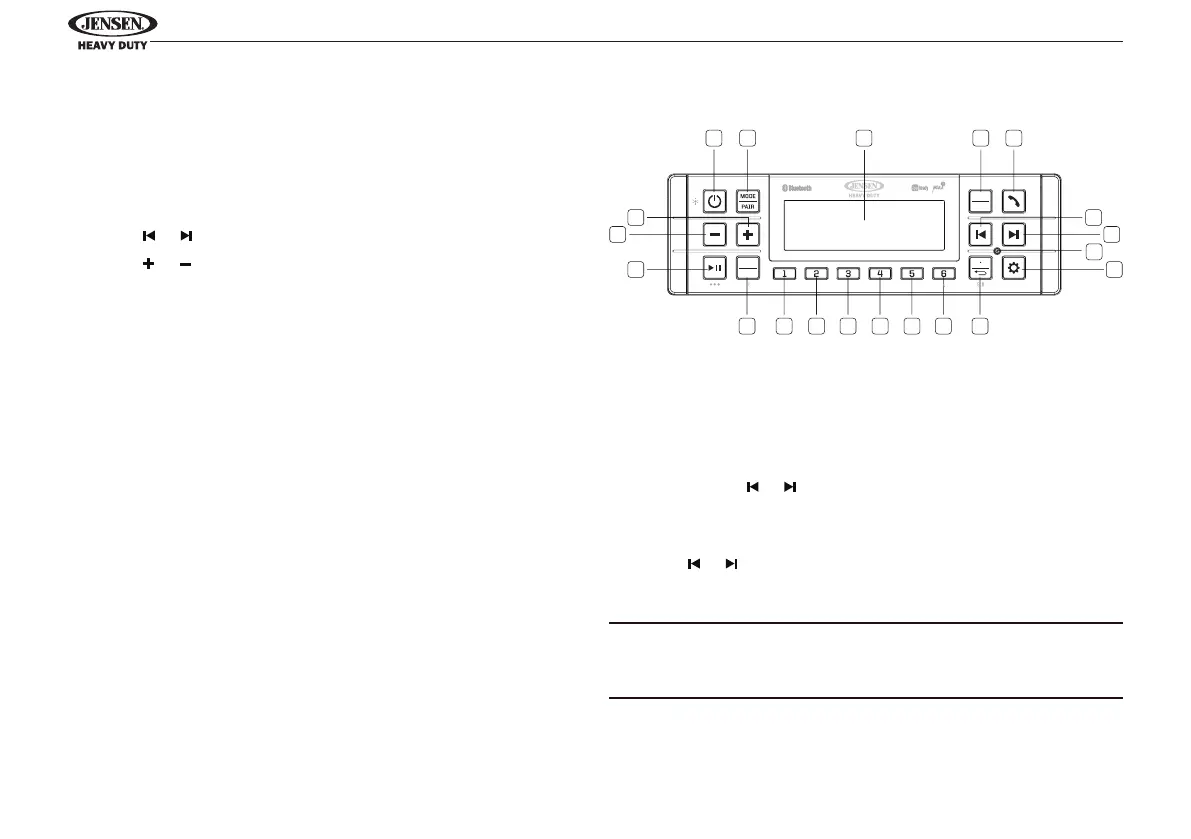
• Press ENTER/TIMER button (4) to enter clock setting
menu.
• Press or to select hours, minutes, or 12/24 hour format.
• Press or to adjust the setting eld.
When no adjustment is made, the time will become set and
normal operation will resume.
Setting Work Timer
To activate the work timer clock and running in the
background,
• Press ENTER/TIMER button (4) to display work timer.
• Press ENTER/TIMER button again to start/stop work timer.
• Press & hold ENTER/TIMER button to reset work timer.
• Press RETURN button (10) to exit work timer display.
If timer is exited while running, “TIMER” ashes every 10
seconds for 2 seconds in place of clock in footer right on the
display.
1
1617 15 14 13 12 11 10
2 3 4 5
6
7
8
9
20
19
18
JHD62
BAND
PTY
PS AS
ENTER
TIMER
TUNER OPERATION
Select a Band
Press the BAND/SCROLL button (17) to change between FM1,
FM2, FM3, AM1 and AM2.
Manual Tuning
Press & hold the or buttons (6, 7) to seek stations up/
down step by step.
Auto Seek Tuning
Press the or buttons (6, 7) to automatically seek the next
or previous strong station.
NOTE: Seek tuning is not available for weatherband channels.
Use the up or down tuning buttons to manually select any of
the seven available weatherband channels.
Preset Stations
Six numbered preset buttons store and recall stations.



 To Next Page