7
BASIC OPERATION
Power On/O
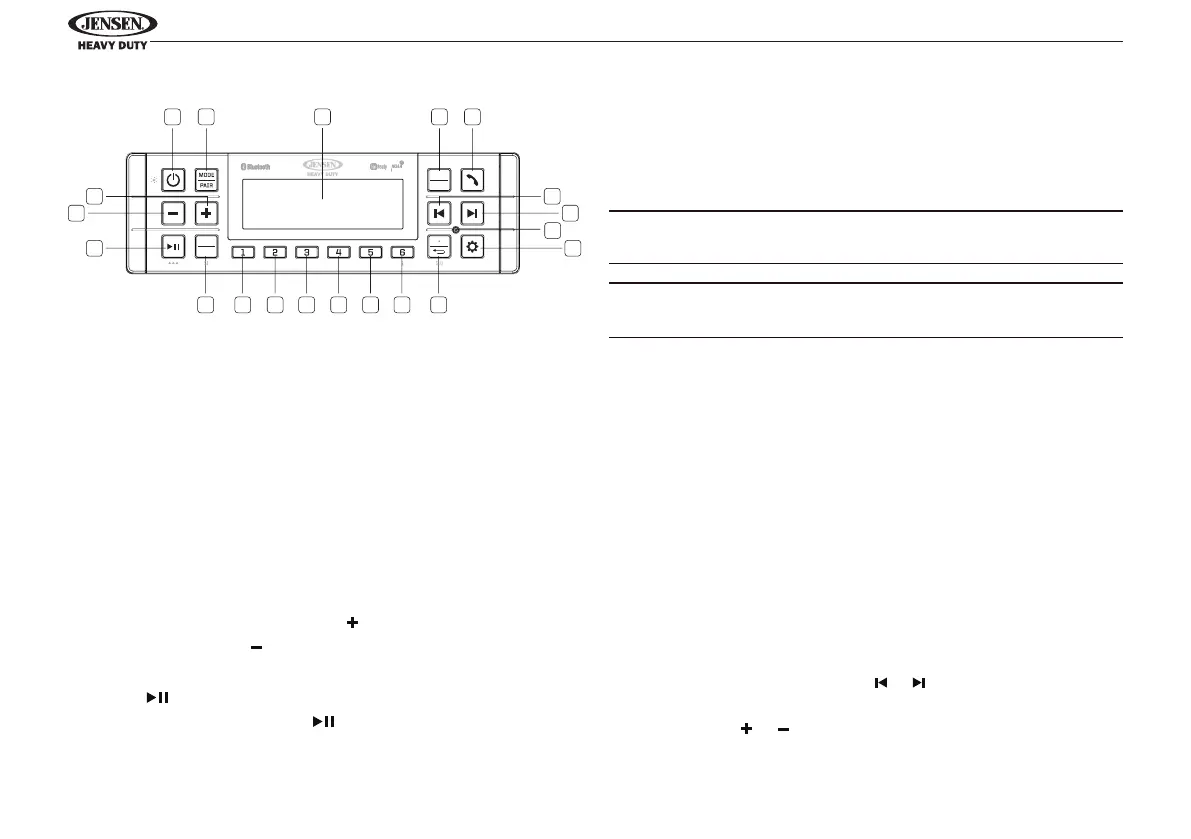
Press the POWER button (1) to turn the unit on. The unit will
resume at the last mode (Tuner, BT, etc.) after turn on. Press
and hold the POWER button (1) to enter standby mode.
Dimmer Control
A short press of the POWER button (1) will switch the
dimmer on/o. While the dimmer is o, the unit will be at
full brightness for daylight viewing. While dimmer is on, the
backlight will dim for night viewing. The dimmer brightness
level can be adjusted in the system settings.
Volume Control
To increase the volume, press the button (20). To decrease
the volume, press the button(19).
Play/Pause/Mute
Press the button (18) on the control panel to pause or
mute the audio output. Press button again to unmute or
restore the audio output to the previous level.
Mode
Press the MODE button (2) to select a dierent mode of
operation, as indicated on the display panel. Available modes
include the following: FM > AM > Weatherband > BT Audio.
FM is the default source mode on initial power up.
NOTE: DAB+ Digital Radio mode will be skipped when the
Region menu option is set to “USA/Russia/Japan.”
NOTE: Weatherband mode will be skipped when the Region
menu option is set to “Europe/Russia/Japan.”
Reset
The RESET button (8) should be activated for the following
reasons:
• Initial installation of the unit when all wiring is completed.
• Function buttons do not operate.
• Error symbol on the display.
Use a ballpoint pen or thin metal object to press the reset
button. This may be necessary should the unit display an error
code.
Audio Menu
Press the SETTINGS button (9) to access the audio menu. You
can navigate through the audio menu items by pressing the
SETTINGS button repeatedly or or buttons (6, 7). Once the
desired menu item appears on the display, adjust that option
by pressing the or buttons (20, 19) within 5 seconds. The
unit will automatically exit the audio menu after ve seconds
1
1617 15 14 13 12 11 10
2 3 4 5
6
7
8
9
20
19
18
JHD62
BAND
PTY
PS AS
ENTER
TIMER



 To Next Page