13
Service List Update
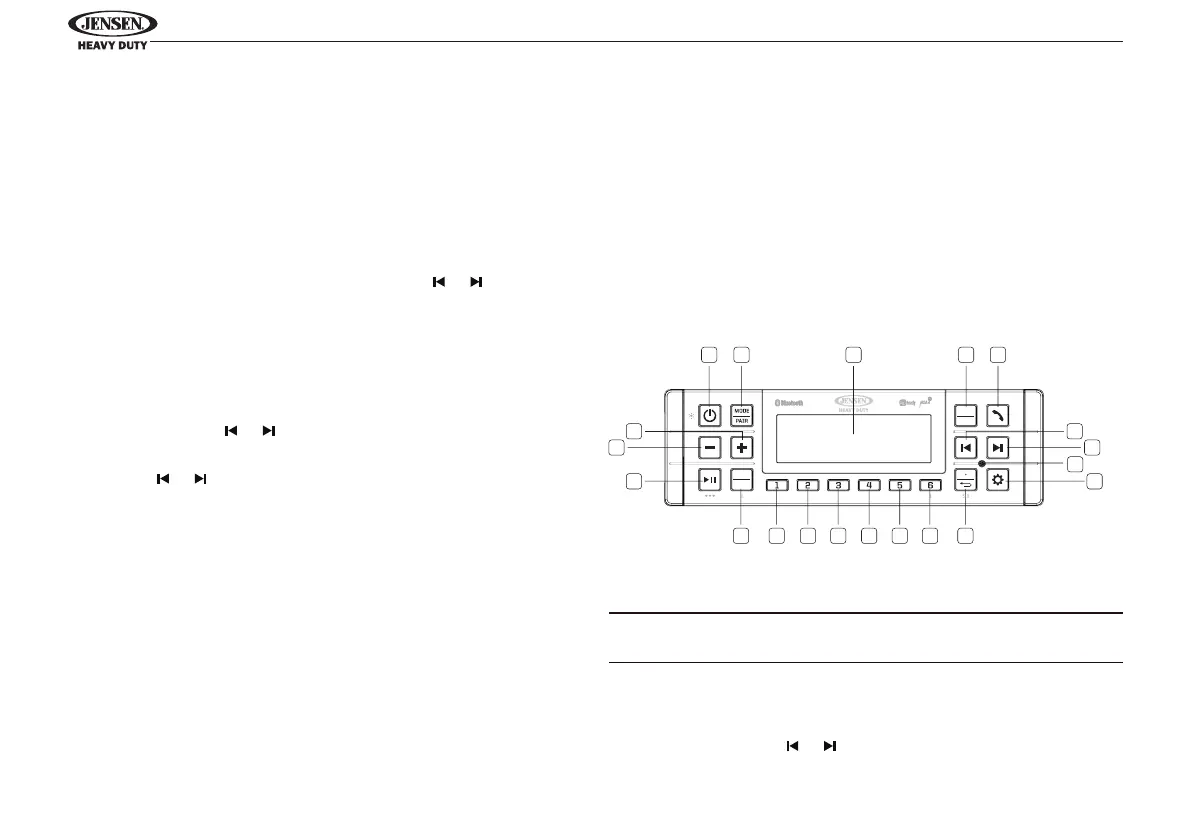
Press and hold the AS•PS/RETURN (SLU) button (10) to start
service list update, The “Service List Updating” will display
and start updating the service list. Press AS•PS/RETURN (SLU)
button to cancel service list update.
Select a Service
Press and hold the BAND/PTY(SL) button (17) to display
Service list menu. While in Service list, press or buttons (6,
7) to navigate down or up service list respectively (list loops).
Press ENTER/TIMER (4) to select desired Service label and
system exits to current selected Service label screen.
Search for An Ensemble
Press and hold the or buttons (6, 7) to automatically
search for an available ensemble, service or component to
play. Press or buttons (6, 7) to manual select an ensemble.
Press ENTER/TIMER (4) to conrm.
Store or Recall Service
Six numbered preset buttons store and recall stations.
Store a Service
Select a station, then press and hold a preset button from 1 –
6 on the number buttons for two seconds. The preset number
will appear on the LCD.
Recall a Store Service
Press a preset button from 1 – 6 on the number buttons to
select the corresponding stored service.
BLUETOOTH OPERATION
The JHD62 includes built-in Bluetooth technology that
allows you to connect this head unit to Bluetooth devices for
streaming audio playback.
About Bluetooth Technology
Bluetooth is a short-range wireless radio connectivity
technology developed as a cable replacement for various
electronic devices. Bluetooth operates in 2.4 GHz frequency
range and transmits voice and data at speeds up to 2.1 Mbit/s
over a range of up to 10 meters.
Bluetooth Menu Options
NOTE: Please note that some BT menu options are only
available while the unit is in Bluetooth Audio mode.
Press and hold the SETTINGS button (9) for more than 2
seconds to enter the system menu. Press the SETTINGS
button repeatedly or or buttons (6, 7) to view the
1
1617 15 14 13 12 11 10
2 3 4 5
6
7
8
9
20
19
18
JHD62
BAND
PTY
PS AS
ENTER
TIMER



 To Next Page