EasyManua.ls Logo

Jensen MS3ABK - User Manual

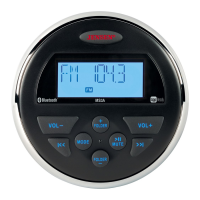
Jensen MS3ABK
16 pages
Print Icon
To Next Page IconTo Next Page
Loading...
MS3A
Owners Manual

Questions and Answers

  • T
    Theodore TateAug 6, 2025
    How to troubleshoot no power on a Jensen MS3ABK Stereo System?
    • G
      George MoyerAug 6, 2025
      If your Jensen Stereo System isn't getting power, try these steps: If the power supply is connected to the vehicle accessory circuits but the engine is not on, switch the ignition key to “ACC”. Also, the fuse may be blown. Replace it with a 10AMP ATO fuse.
  • T
    Teresa ClarkAug 16, 2025
    What to do if there is no sound from my Jensen Stereo System?
    • A
      Amber OlsonAug 17, 2025
      First, verify that your Jensen Stereo System is powered on. If it is on, check the volume level and increase it if needed. Also, ensure the unit is not in pause mode by pressing the play/pause button.
  • N
    Nicole CruzAug 26, 2025
    Why is there no AM/FM reception on my Jensen Stereo System?
    • R
      Robert Snow MDAug 26, 2025
      If you're experiencing no AM/FM reception on your Jensen Stereo System, make sure the antenna cable is firmly inserted.

Summary

Introduction

Product Features

Lists the key features and capabilities of the Jensen MS3A stereo system.

Box Contents

Details all items included in the product packaging.

FCC Compliance Information

Provides regulatory compliance details, including FCC rules and warnings.

Safety Information

Driving Safety Precautions

Ensures awareness of road conditions by maintaining appropriate volume levels while driving.

Environmental Protection Guidelines

Instructions for protecting the unit from water submersion and high temperatures.

General Safety Warnings

Critical warnings regarding power supply, unit modification, installation, and wiring.

Installation Procedure

Mounting the Radio

Step-by-step guide for physically mounting the Jensen MS3A unit in a vehicle.

Audio Connections

Auxiliary Input Setup

How to connect external audio devices using the auxiliary input ports.

Line Output Functionality

Description of the line output for connecting to external amplifiers.

Wiring Diagram

Operation Overview

Basic Functions

Covers power, volume, mute, and mode selection for the unit.

Audio Menu Settings

Accessing and adjusting audio settings like bass, treble, and balance.

Radio Mode Functions

Details tuning, preset storage, and radio mode selection.

USB and Auxiliary Operation

USB Mode Functions

Instructions for playing music from a USB device, including navigation.

Auxiliary Input Mode

How to select and use the auxiliary input for audio playback.

Bluetooth Operation

Bluetooth Technology Basics

Overview of Bluetooth wireless technology and its capabilities.

Bluetooth Menu Options

Navigation and control of Bluetooth settings and paired devices.

Pairing a Bluetooth Device

Step-by-step guide for pairing a mobile device with the Jensen MS3A.

Bluetooth Audio Playback

Managing audio playback, track selection, and pausing via Bluetooth.

App Operation

jControl App Features

Details the functions controlled by the Jensen Specialty Controller app.

Connecting with jControl App

Instructions for connecting your device to the MS3A using the jControl app.

Troubleshooting

Specifications

General Specifications

Overall technical details including frequency bands and power requirements.

FM Tuner Specifications

Technical performance details for the FM radio tuner.

AM Tuner Specifications

Technical performance details for the AM radio tuner.

Amplifier Specifications

Details on the unit's amplifier output power and impedance.

Jensen MS3ABK Specifications

General IconGeneral
BrandJensen
ModelMS3ABK
CategoryStereo System
LanguageEnglish

Related product manuals