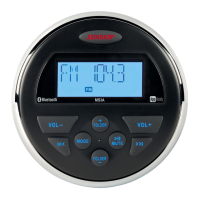
The Jensen MS3A is a marine-grade stereo receiver designed for mobile environments, offering a range of audio playback and connectivity options. Its robust construction is tailored to withstand harsh conditions, featuring waterproof IPx6 rating, as well as UV and corrosion resistance, making it suitable for outdoor and marine applications.
Function Description:
The primary function of the MS3A is to serve as a central audio hub, providing various sources for entertainment. It includes an AM/FM tuner with 12 programmable presets (6 AM, 6 FM), allowing users to easily access their favorite radio stations. For digital audio playback, the unit features a USB port that supports MP3/WMA files, enabling users to connect a USB device and play their music library.
A key feature of the MS3A is its built-in Bluetooth technology, which allows for wireless audio streaming from Bluetooth-enabled devices. This enables users to play music from their smartphones or tablets without the need for physical connections. The unit supports A2DP (Advanced Audio Distribution Profile) and AVRCP (Audio/Video Remote Control Profile), ensuring high-quality audio streaming and remote control capabilities from the connected device.
For wired connections, the MS3A offers a rear auxiliary audio input (AUX IN RIGHT/LEFT) via RCA cables, allowing users to connect portable audio devices. Additionally, it provides a line output (LINE OUT RIGHT/LEFT) for connecting to an external amplifier, offering flexibility for expanding the audio system. The unit delivers amplified audio output through its 4-channel amplifier, designed to power speakers directly.
The MS3A is also "App Ready," meaning it can be controlled wirelessly via the JENSEN Specialty Controller app. This app transforms a smartphone or tablet into a remote control, offering comprehensive control over the stereo's functions, including power on/off, volume and mute, AM/FM tuner operations (station access, recall, presets, song switching), Bluetooth streaming audio control, USB file structure visibility and track selection, auxiliary input control, and audio menu adjustments (bass, treble, balance, fader, and volume settings). The app also provides visual display feedback, showing artist title and album information on the mobile screen.
Usage Features:
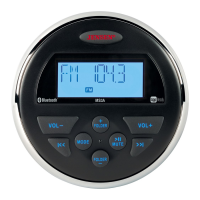
Operating the MS3A is straightforward, with a user-friendly interface consisting of a power button, volume controls (VOL+ and VOL-), mode selection, track navigation (I<< and >>I), folder navigation (FOLDER +/-), and a mute button.
- Power and Volume: The unit is turned on/off by pressing the JENSEN power button. Volume can be adjusted using the VOL+ and VOL- buttons, with a press-and-hold function for rapid changes.
- Mute Function: The MUTE button silences the audio output in tuner, AUX, or USB modes and restores the previous volume level with a second press.
- Mode Selection: The MODE button allows users to cycle through available operation modes: FM, AM, AUX, USB, and Bluetooth.
- Audio Menu: Pressing and holding the MODE button accesses the audio menu, where settings like BASS, TREBLE, BALANCE, and FADER can be adjusted using the VOL+/- buttons.
- Radio Mode: In radio mode, users can fine-tune frequencies using the I<< or >>I buttons or seek strong radio frequencies by pressing and holding these buttons. Favorite channels can be manually stored into six preset channels. The "Auto Store" (AS) function automatically stores the strongest stations, while "Preset Scan" (PS) previews each stored station. The tuning mode can be switched between USA and European frequencies via the system menu.
- USB Mode: When a USB device is connected, playback begins automatically. Users can play/pause tracks with the MUTE button, navigate to the next/previous file using the I<< or >>I buttons, and browse folders with the FOLDER +/- buttons. Fast forward/reverse is available by pressing and holding the I<< or >>I buttons.
- Auxiliary Input Mode: This mode is directly accessible via the MODE button when a portable audio device is connected.
- Bluetooth Operation: The Bluetooth function can be turned on/off, and devices can be paired through the "BT Pair" option in the menu. The unit can store up to five paired devices, with options to lock/unlock, disconnect, or delete devices from the list. During Bluetooth audio playback, users can select tracks, pause/resume playback, and answer calls, with the unit pausing audio during a call. The system automatically searches for a previously paired device if disconnected.
- App Control: The JENSEN Specialty Controller app provides an intuitive way to manage all stereo functions from a mobile device, enhancing convenience, especially in marine environments where direct access to the unit might be limited.
Maintenance Features:
The MS3A incorporates several features and guidelines to ensure its longevity and proper functioning:
- Factory Reset: The unit can be reset to factory default settings, which is useful for troubleshooting or restoring original configurations. This involves a specific sequence of button presses to confirm the reset.
- Fuse Replacement: In case of no power, the manual advises checking and replacing the 10AMP ATO fuse if it is blown, emphasizing the importance of using the correct ampere rating.
- Wiring and Installation: The manual provides detailed instructions for proper installation, including mounting the radio, making wiring connections, and testing the system before final installation. It highlights the importance of routing cables away from moving parts or sharp edges and using rubber grommets when passing wires through metal holes to prevent damage. Sealing caulk is recommended for openings that might allow water entry.
- Safety Information: The manual includes crucial safety information, such as not submerging the unit, protecting it from high temperatures, and ensuring proper power supply (12-volt DC negative ground battery system). It also warns against opening, disassembling, or altering the unit, as this could lead to damage or electric shock.
- Troubleshooting Guide: A dedicated troubleshooting section helps users diagnose common issues like no power, no AM/FM reception, or no sound, providing simple solutions such as checking connections, volume levels, and device status.
- FCC Compliance: The device is designed to comply with FCC rules, and users are advised against unauthorized modifications that could void their authority to operate the equipment. Proper connections are necessary to meet FCC emission limits.
Overall, the Jensen MS3A is a durable and versatile marine stereo receiver, offering a blend of traditional radio, modern digital playback, and smart control options, all within a rugged design built for demanding environments.


 To Next Page
 General