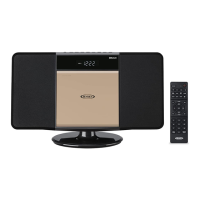
The JENSEN JBS-300 is a versatile wall-mountable Bluetooth music system with a CD player, designed to provide a comprehensive audio experience. This system integrates multiple playback options, including CD, USB, Bluetooth, and AM/FM radio, making it suitable for various audio sources. It also features an alarm clock with different wake-up options and a sleep timer for added convenience.
Function Description
The JBS-300 serves as a central audio hub, offering a range of functionalities:
- CD/MP3 CD Playback: The unit features a front-loading CD door for playing standard audio CDs and MP3 CDs. It supports various playback modes, including Repeat 1 (single track repeat), Repeat All (all tracks repeat), Random (random track order), and Normal playback. For MP3 CDs, it also includes a "Repeat Folder" option. Users can program up to 32 tracks for customized playback sequences. Direct track access buttons on the remote control allow for quick selection of specific tracks.
- USB Playback: A USB port is included for playing MP3 songs from a USB thumb drive. The unit supports FAT32 format and thumb drives up to 128GB. Playback features such as Play/Pause, Repeat, Random, and Program tracks are available, similar to CD playback.
- Bluetooth Connectivity: The system is equipped with Bluetooth 5.0, allowing wireless streaming of music from Bluetooth-enabled devices like smartphones, tablets, and computers. The pairing process is straightforward, with visual indicators on the LCD display to confirm connection status. It supports the A2DP profile for audio streaming.
- AM/FM Radio: The JBS-300 includes an AM/FM tuner for listening to radio broadcasts. It supports both manual and automatic tuning methods to find stations. For FM, it offers an FM Stereo/Mono mode, with an "ST" indicator for stereo reception. Users can preset up to 20 FM and 20 AM stations for quick access.
- Auxiliary Input: An auxiliary audio input jack (3.5mm stereo) allows users to connect external audio devices such as MP3 players or digital audio devices, playing their content through the system's speakers.
- Alarm Clock: The unit features an alarm clock with multiple wake-up sources: a beeping alarm, CD, USB, or radio. Users can set a specific alarm time and volume level (not available for beeping alarm). The alarm can be activated or deactivated with a single button press.
- Sleep Timer: A sleep timer function allows users to set the unit to automatically turn off after a predetermined period (10, 20, 30, 40, 50, 60, 70, 80, or 90 minutes), useful for falling asleep to music.
- Snooze Function: When the alarm sounds, a snooze button provides a 9-minute delay before the alarm sounds again.
- Headphone Jack: A headphone jack is available for private listening.
- Wall Mountable Design: The system is designed to be wall-mountable, offering flexible placement options. A detachable stand is also included for tabletop use.
Usage Features
The JBS-300 is designed for user-friendly operation, with controls on both the main unit and a remote control.
- Power On/Off: The unit can be turned on or off (into standby mode) using the POWER/STANDBY button on the main unit or remote control. In standby mode, the LCD display shows the current time.
- Mode Selection: A FUNCTION button on the main unit and dedicated function buttons on the remote control allow users to switch between CD, USB, Bluetooth, AM/FM radio, and AUX IN modes.
- Volume Control: Volume can be adjusted using VOLUME+/- buttons on both the main unit and remote control.
- Mute Function: A MUTE button on the remote control temporarily silences the audio output, with a "MUTE" icon appearing on the display.
- Equalizer (EQ) Presets: The remote control includes an EQ button to cycle through four preset equalizer modes: Rock, Classic, Pops, and Jazz, to enhance the listening experience.
- X-BASS Function: An X-BASS button on the remote control allows users to enhance the bass output, with an "X-BASS" icon indicating activation.
- Clock Setting: The clock can be set to either 12-hour or 24-hour format. The time setting process involves using the PROG./TIME SET button and the skip/tune buttons to adjust hours and minutes.
- Alarm Setting: Setting the alarm involves selecting the wake-up source (CD, USB, Radio, or Beep), setting the alarm time, and adjusting the alarm volume.
- Radio Tuning and Presets: Radio stations can be tuned manually or automatically. Presets can be stored and recalled using the PRESET buttons on the remote control.
- CD/USB Playback Controls: Standard playback controls such as Play/Pause, Stop, Skip Previous/Next, and Search (fast forward/reverse) are available for CD and USB modes.
- Folder Selection (MP3 CD/USB): For MP3 CDs and USB playback, FOLDER buttons on the remote control allow navigation through different folders containing songs.
- Remote Control: A full-function remote control provides convenient access to all features from a distance. It requires two "AAA" batteries (not included).
Maintenance Features
Proper care and maintenance are essential to ensure the longevity and optimal performance of the JBS-300.
- Cleaning: The unit should be cleaned with a dry, soft cloth. Solvents or detergents should not be used. For dusty cabinets, a soft dry dust cloth is recommended. For fingerprints on the front panel, a soft cloth slightly dampened with a mild soap and water solution can be used, avoiding abrasive cloths or polishes.
- Disc Care: If CD playback issues occur (drop-outs, interruptions, or failure to play), the bottom surface of the disc may need cleaning. Discs should be wiped from the center outwards with a good soft cleaning cloth.
- Placement: The unit should be kept away from excessive force, shock, dust, extreme temperatures, direct sunlight, hot, humid, or dusty places. It should also be kept away from heating appliances and sources of electrical noise like fluorescent lamps or motors.
- Non-Magnetically Shielded Speakers: Users should be aware that the unit's speakers are not magnetically shielded, and placing the unit too close to some TVs or video monitors may cause color distortion. Moving the unit further away can resolve this.
- Power Adapter Care: The power adapter should be protected from being walked on or pinched. Only the supplied mains power adapter should be used, and it should only be used in dry rooms.
- Condensation: If the unit is moved from a cold to a warm, damp room, condensation may form inside the CD player, potentially affecting its function. In such cases, the unit should be allowed to stand for 1-2 hours before turning it on, or the room should be gradually heated to dry the unit.
- Battery Replacement: Remote control batteries should be replaced by an adult. Old and new batteries, or different types of batteries (alkaline, standard, rechargeable), should not be mixed. Exhausted batteries should be removed, and batteries should be inserted with the correct polarity. Battery contacts should be cleaned prior to installation.
- Furniture Protection: The unit is equipped with non-skid rubber feet. To prevent potential marks or residue on fine wooden furniture from certain oil-based polishes or cleaning sprays, it is recommended to apply small self-adhesive felt pads to the bottom of the rubber feet.
- Resetting: In case of erratic operation or unresponsiveness, the unit may have experienced an electrostatic discharge or power surge. Unplugging the AC cord for 60 seconds and then plugging it back in will reset the unit, requiring the clock and alarm to be re-setup.


 To Next Page
 General