58
VM9215BT
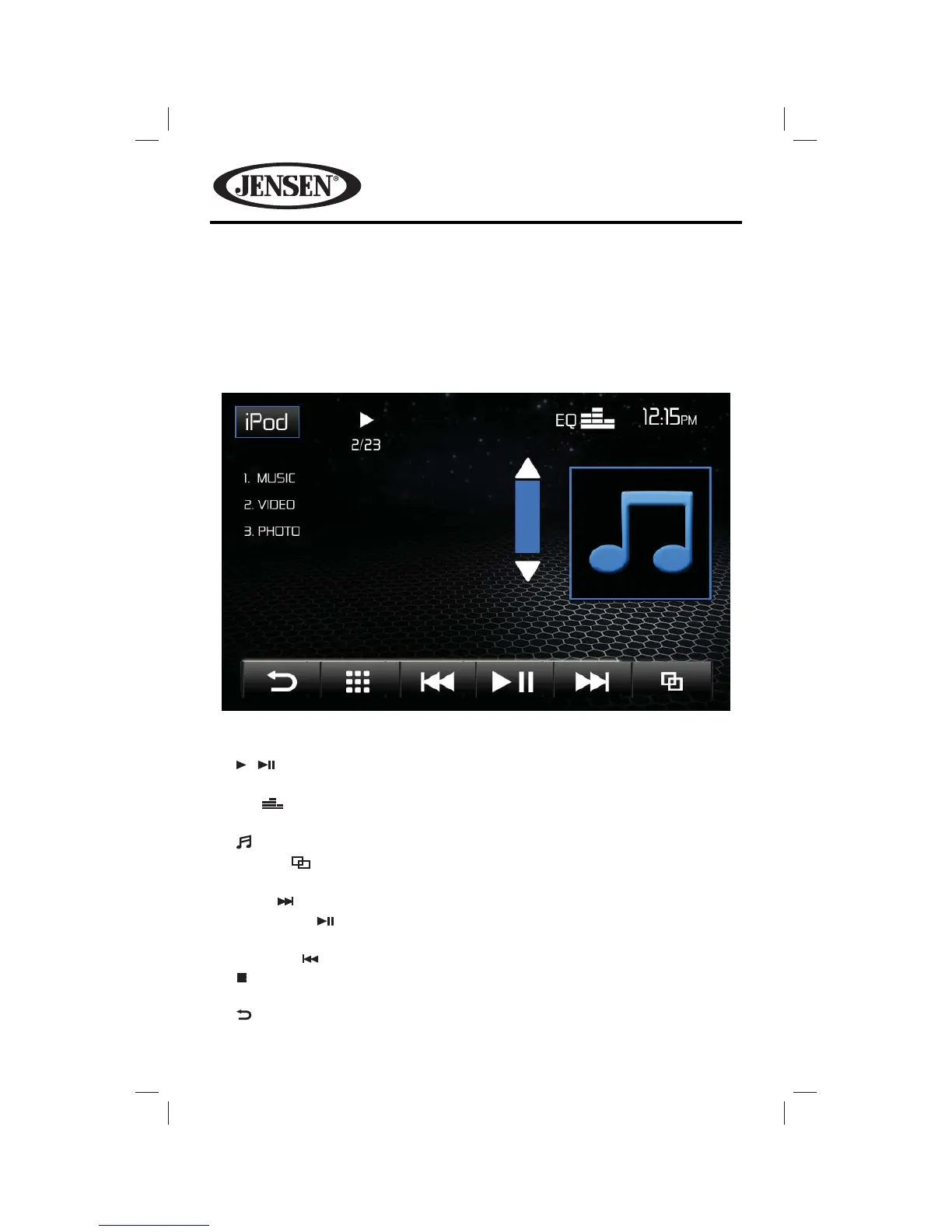
Search Screen
The Search Screen allows you to search for music or video les stored in your iPod®/
iPhone®. Touch the Music list box to search for music grouped by playlists, artists,
albums, songs, genres, composer or podcast. Touch the Video list box to search
for videos grouped by movie, music videos, TV shows, video podcasts, rentals, and
video playlists. Photos are displayed by using the iPod®/iPhone® to control and
select photos.
1. iPod icon: Touch to view the SOURCE MENU and select a new playback
source.
2. / indicator: Indicates whether media is playing or paused.
3. 2/23 indicator: File number and total number of les on the disc.
4. EQ icon: Touch for quick access to Equalizer level settings menu.
5. Clock: Displays the time as entered by the user in the settings menu.
6. Preview Window: Displays album art, if available.
7. Toggle ( ) icon: Touch to toggle between menu page 1 and menu
page 2.
8. Next (
) icon: Touch to play the next track.
9. Pause/Play (
) icon: Touch to pause playback. Touch again to resume
playback.
10. Previous ( ) icon: Touch to play the previous track.
11. icon: Touch to select a chapter/track directly using the on-screen display
direct entry menu display.
12. icon: Touch to return to a previous menu.















 To Next Page