48
VM9226BT
Indicators/Controls
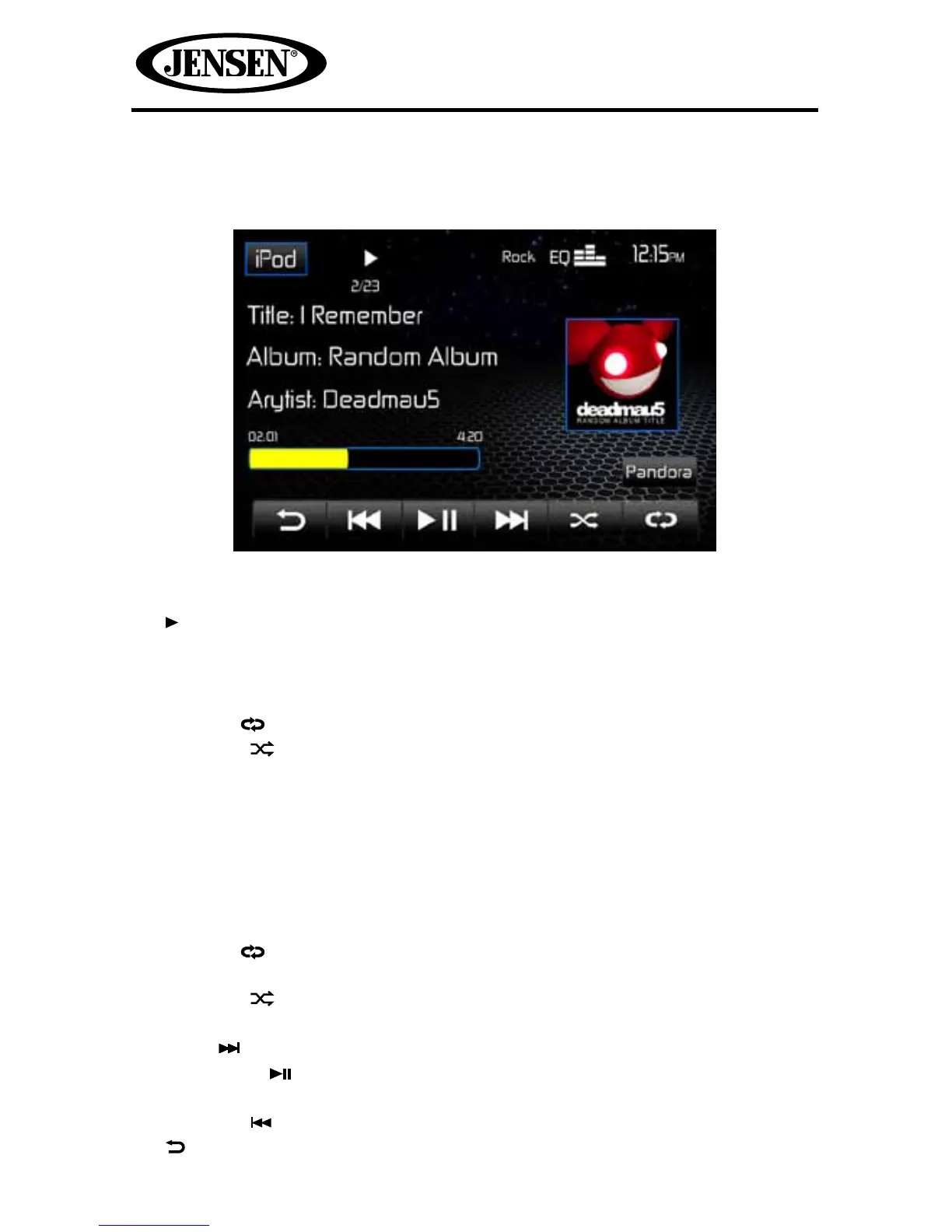
The on-screen indicators and touch key areas for iPod® playback are outlined
below.
1. iPod: Touch to view the SOURCE MENU and select a new playback source.
2. ll Indicates whether media is playing or paused.
3. Rock: Indicates the current equalizer setting.
4. EQ: Touch for quick access to Equalizer level settings.
5. Clock
6. Repeat ( ) icon: Indicates the repeat function is enabled.
7. Random ( ) icon: Indicates the random function is enabled.
8. 2/23: File number and total number of les on the disc.
9. Song title , album, and performing artist.
10. 02:01: Elapsed playing time and playback progress bar for current le.
11. 4:20 Total playing time for current le.
12. Preview Window: Displays album art, if available.
13. Pandora icon: Touch to play Pandora Radio. The Pandora app on your iPod®
must be launched.
14. Repeat ( ) icon: Touch to alter repeat mode as follows: Repeat Single >
Repeat Folder > Repeat All > Repeat O.
15. Random ( ) icon: Touch to alter random mode as follows: Random On >
Random O.
16. Next ( ) icon: Touch to play the next track.
17. Pause/Play ( ) icon: Touch to pause playback. Touch again to resume
playback.
18. Previous ( ) icon: Touch to play the previous track.
19. Touch to return to a previous menu.



 To Next Page