VX3010
Video
Files
1.
Touch Video icon
[~]to
display all available video
folders.
2.
Touch a
folder,
then touch the desired
file.
3.
Touch the
file
again
to
start
play.
Picture
Files
1.
Touch Picture icon
[~]to
display all available
picture
folders
2.
Touch a
folder,
then touch the desired
file.
3.
Touch the
file
again
to
start
play.
Repeat
playback
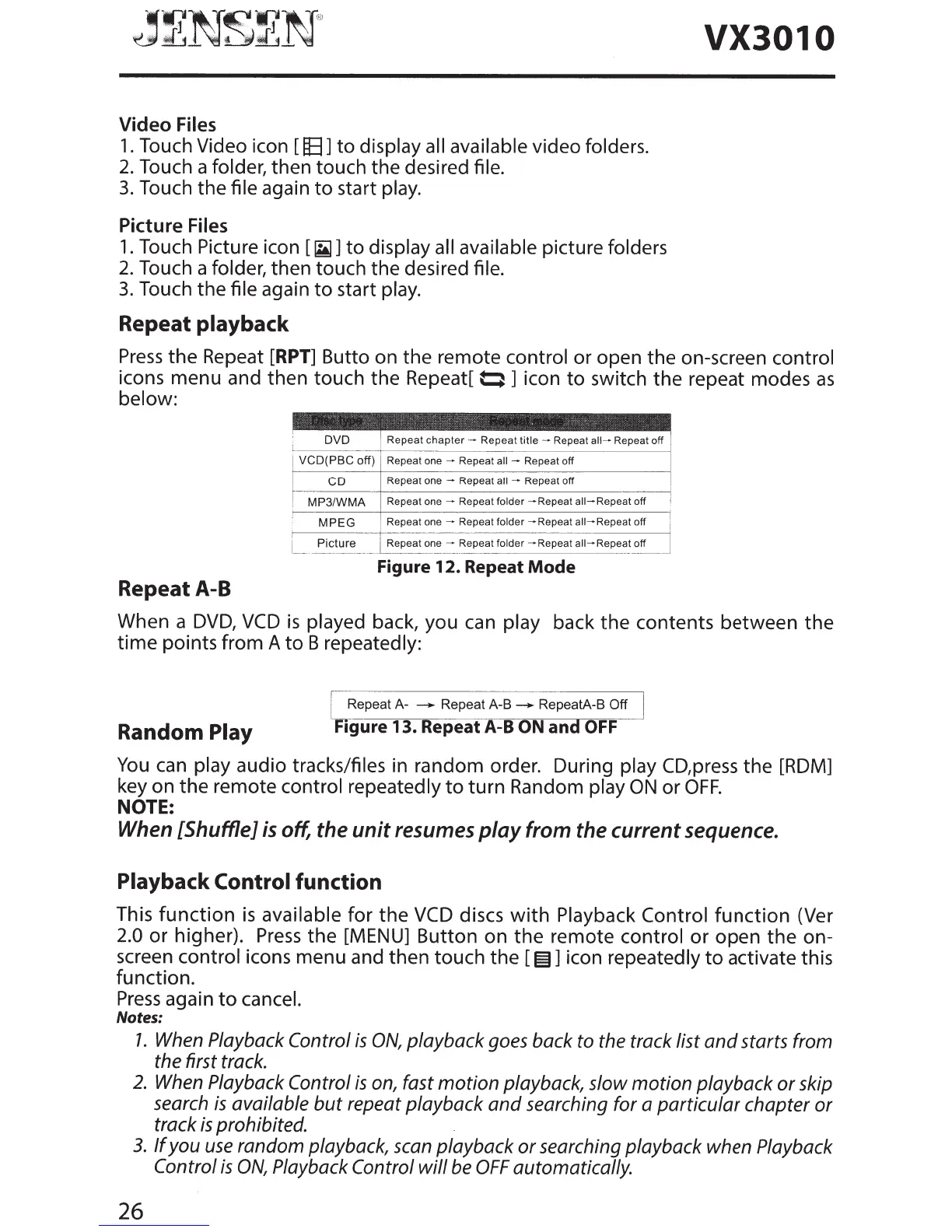
Press
the Repeat
[RPT]
Butta on the remote
control
or open the on-screen
control
icons menu and then touch the Repeat[
~
] icon
to
switch the repeat modes
as
below:
Figure
12.
Repeat
Mode
Repeat A-8
When a
DVD,
VCD
is
played
back, you can
play
back the contents between
the
time
points from A
to
B
repeatedly:
Random
Play
Repeat A-
___.
Repeat A-B
___.
RepeatA-B
Off
F1gure
13.
Repeat A-8
ON
an
OFF
You
can
play
audio
tracks/files
in random order. During
play
CD,press the [RDM]
key on the remote
control repeatedly
to
turn
Random play
ON
or
OFF.
NOTE:
When [Shuffle]
is
off, the
unit
resumes
play
from the current sequence.
Playback Control
function
This
function
is
available
for
the
VCD
discs
with
Playback Control
function
(Ver
2.0
or
higher).
Press
the [MENU] Button on
the
remote control
or
open
the
on-
screen
control
icons menu and then touch the [
~]
icon
repeatedly
to
activate this
function.
Press
again
to
cancel.
Notes:
7.
When Playback
Control
is
ON,
playback goes back to the track list
and
starts from
the first track.
2.
When Playback
Control
is
on, fast
motion
playback, slow
motion
playback
or
skip
search
is
available
but
repeat playback
and
searching for a
particular
chapter
or
track
is
prohibited.
3.
If
you
use
random playback, scan playback
or
searching playback when Playback
Control
is
ON,
Playback
Control
will
be
OFF
automatically.
26



 To Next Page