EasyManua.ls Logo

Jensen VX3010 - Media Playback Options and Information; Audio, Subtitle, and Angle Selection; Video Setup Adjustments; DVD Playback Information Display

Jensen VX3010
54 pages
Print Icon
To Next Page IconTo Next Page
To Previous Page IconTo Previous Page
Loading...
Select
Audio
Mode
When
playing
VCDs,
the user
can
select
an
audio mode (R/L/Stereo).
1.
During
playback,
touch
the
bottom
half
of
the
screen
to
display
menu on
the
screen.
2.
Touch the Next icon [
>]
to
display
the
2nd menu.
3.
Touch
the
Audio icon [
..
_.]
repeatedly until
the
audio mode
is
selected.
Select Subtitle
Language
For
DVD
discs
that
contain
two
or more
subtitle languages.
1.
During
play,
touch the screen
to
display
menu on
the
screen.
2.
Touch the Next
icon[>]
to
di2.2!ay
the
2nd menu.
3.
Touch
the
Language icon [
~
]
repeatedly
to
select
a
language.
The
selected
language
is
displayed.
Change
Viewing Angle
Some DVDs
contain
alternate
scenes, such
as
scenes recorded
from
different
camera angles.
For
such
DVDs,
you
can
select
from the
available alternate
scenes.
1.
During
playback,
touch
the
screen
to
display
menu on the screen.
2.
Press
the
Angle
icon [
t:f]
repeatedly
on the remote
control.
The viewing
angle
is
changed.
Video Setup
Touch
the
Settings icon [
-:+:-]
to
access
video
setup mode,
touch
Left
or
Right
direction icons
[11m]/[
1011]
to
set the desired effect.
You
may set the brightness,
contrast, and saturation
of
the video
output
from 1
to
20.
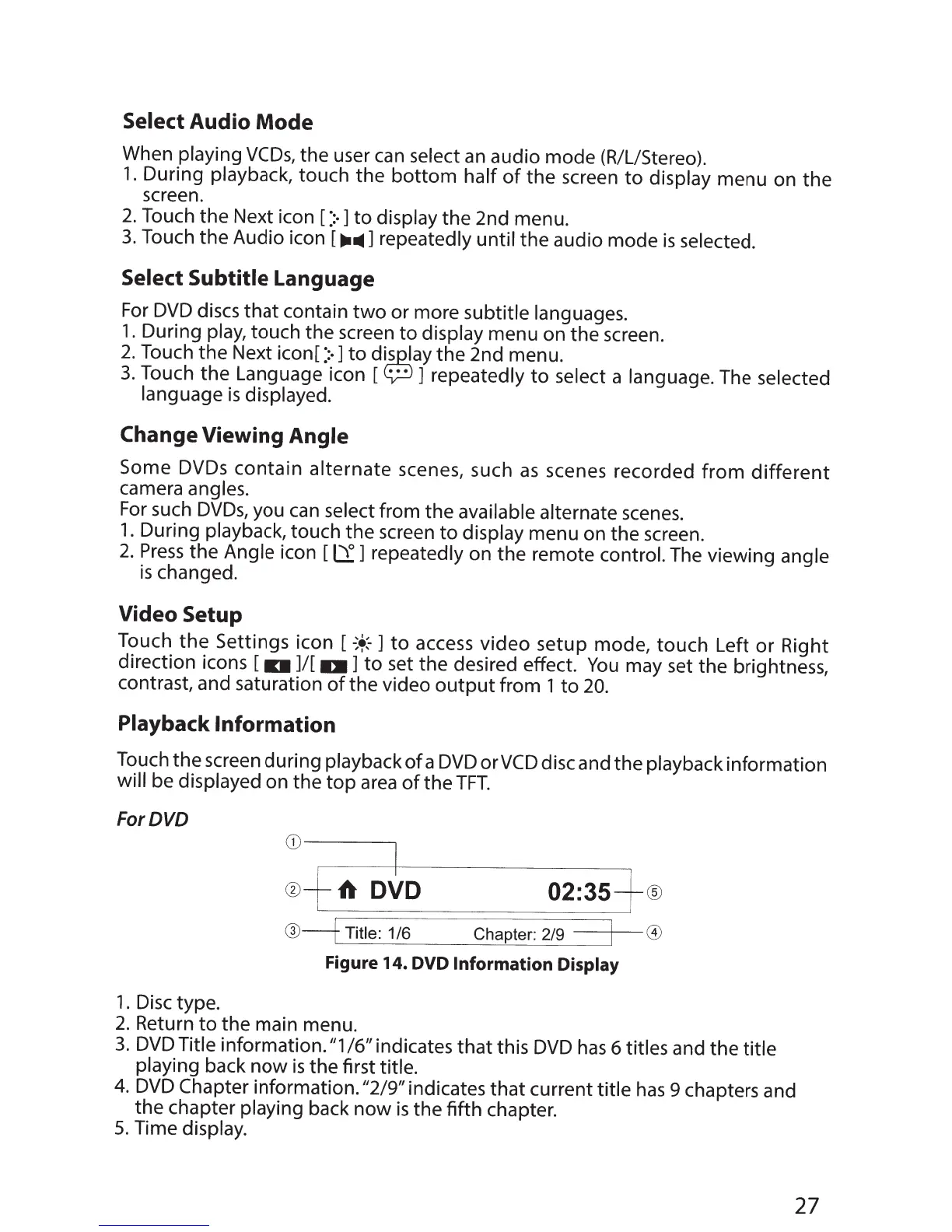
Playback
Information
Touch
the
screen during
playback
of
a
DVD
orVCD disc and the
playback
information
will
be
displayed
on
the
top
area
of
the
TFT.
ForDVD
CD--I
®fA
DVD
@--f
Title: 1/6
02:35+®
Chapter: 2/9
I
0
Figure 14.
DVD
Information
Display
1 . Disc type.
2.
Return
to
the
main menu.
3.
DVD
Title
information."1
/6"
indicates
that
this
DVD
has
6 titles
and the
title
playing back
now
is
the first title.
4.
DVD
Chapter information. "2/9"
indicates
that
current
title
has
9 chapters and
the
chapter
playing
back
now
is
the fifth chapter.
5.
Time
display.
27

Other manuals for Jensen VX3010

Related product manuals