EasyManua.ls Logo

Jensen VX3020 - Audio Settings

Jensen VX3020
55 pages
Print Icon
To Next Page IconTo Next Page
To Previous Page IconTo Previous Page
Loading...
VX3020
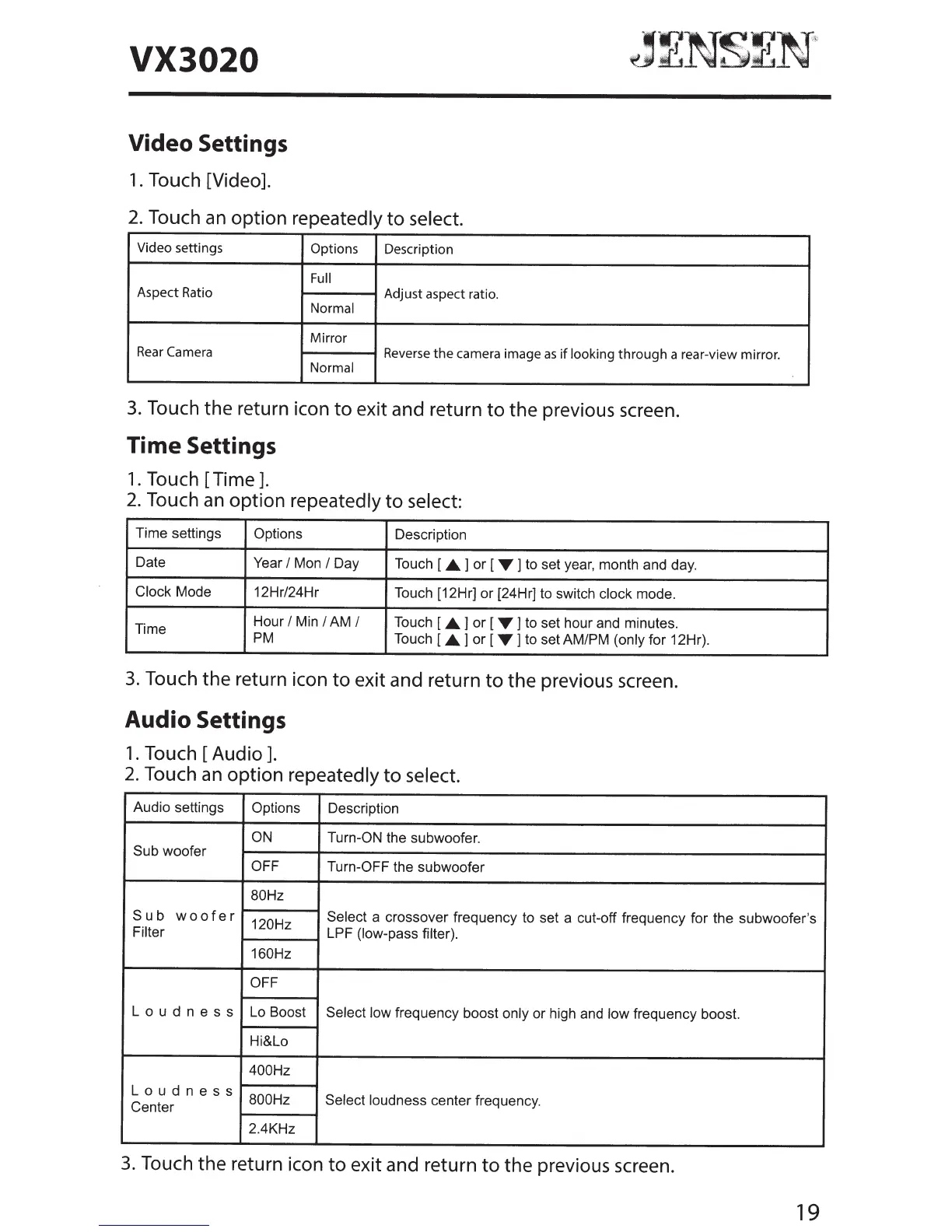
Video Settings
1.
Touch [Video].
2.
Touch an option
repeatedly
to
select.
Video settings
Options
Description
Full
Aspect Ratio
Adjust aspect ratio.
Normal
Mirror
Rear
Camera
Reverse
the
camera image
as
if
looking
through
a rear-view mirror.
Normal
3.
Touch
the
return icon
to
exit and return
to
the previous screen.
Time Settings
1.
Touch
[Time].
2.
Touch
an
option
repeatedly
to
select:
Time settings
Options
Description
Date
Year
I
Mon
I
Day Touch [
.._
] or [
T
]
to set year, month and day.
Clock
Mode
12Hri24Hr
Touch [12Hr] or [24Hr] to switch clock
mode.
Time
Hour
I
Min
I
AM
I
Touch [
.._]
or [
T]
to set hour and minutes.
PM
Touch
[.._]or
[
T]
to setAMIPM
(only
for 12Hr).
3.
Touch the return icon
to
exit and return
to
the previous screen.
Audio Settings
1.
Touch
[Audio].
2.
Touch
an
option
repeatedly
to
select.
Audio settings
Options
Description
ON
Turn-ON
the subwoofer.
Sub woofer
OFF
Turn-OFF the subwoofer
80Hz
Sub
woofer
120Hz
Select
a crossover frequency to set a cut-off frequency for the subwoofer's
Filter
LPF
(low-pass filter).
160Hz
OFF
L
o u d n e s s
Lo Boost
Select low
frequency boost only
or high and
low frequency boost.
Hi&Lo
400Hz
L
o u d n e s s
800Hz
Select loudness
center frequency.
Center
2.4KHz
3.
Touch the return icon
to
exit and return
to
the previous screen.
19

Other manuals for Jensen VX3020

Related product manuals