VX3020
Receiving a Call
By
default, all incoming calls are received automaticaly.
1.
If
there is an incoming call, the screen will display "Incoming call.
..
".
2. Touch the screen to select [ hang up ] or
[Answer].
Speak into the Bluetooth microphone.
Tip
•
You
can select to receive calls manually by setting [Auto answer] to [OFF]
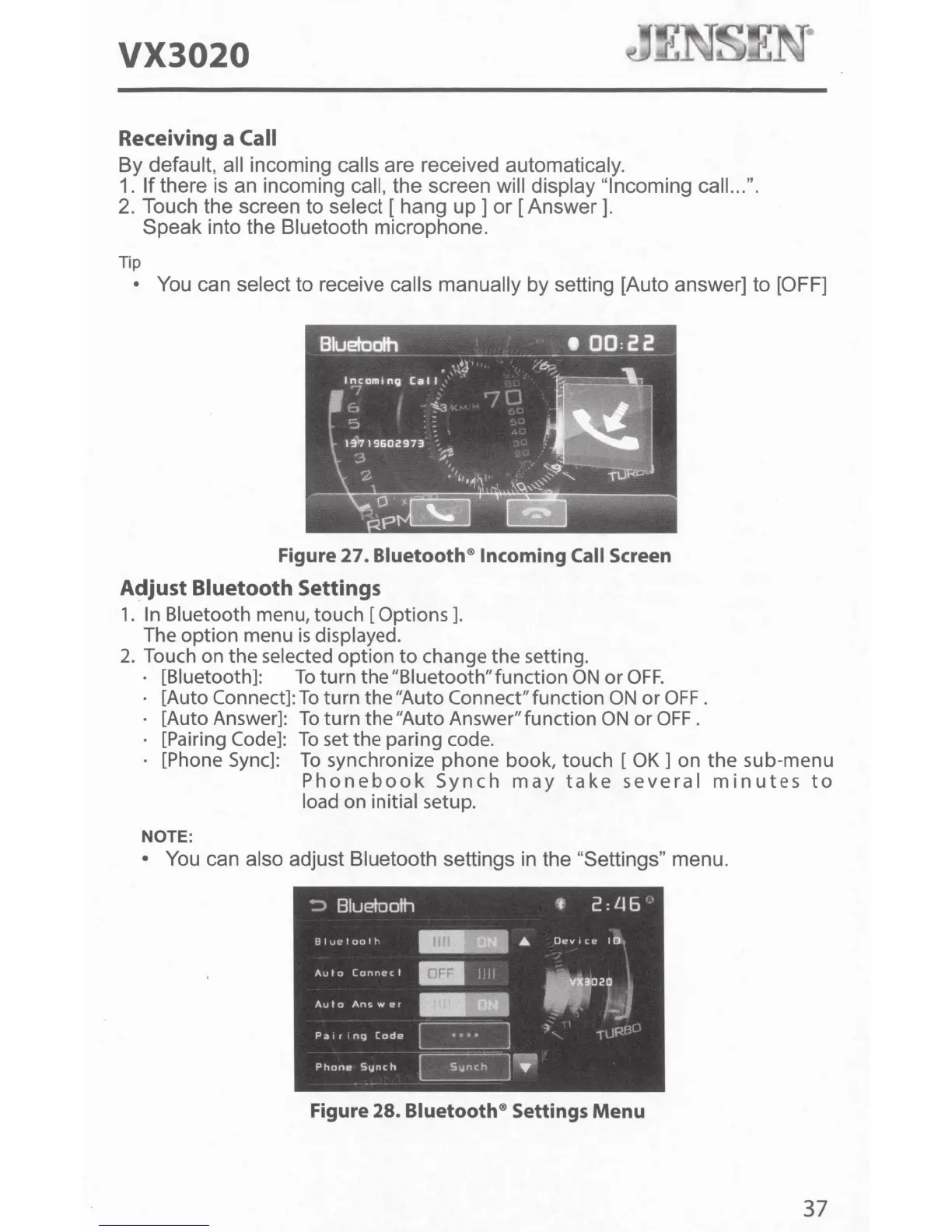
Figure
27.
Bluetooth® Incoming Call Screen
Adjust Bluetooth Settings
1. In Bluetooth menu, touch [Options].
The
option menu
is
displayed.
2. Touch on the selected option
to
change the setting.
[Biuetooth]:
To
turn the "Biuetooth" function
ON
or
OFF.
[Auto Connect]:
To
turn the "Auto Connect" function
ON
or OFF.
[Auto Answer]:
To
turn the "Auto Answer" function
ON
or
OFF
.
[Pairing
Code]:
To
set
the paring code.
[Phone
Sync]:
To
synchronize phone book, touch [
OK]
on the sub-menu
Phonebook
Synch
may
take
several
minutes
to
load on initial setup.
NOTE:
• You can also adjust Bluetooth settings in the "Settings" menu.
Figure
28.
Bluetooth® Settings
Menu
37



 To Next Page