EasyManua.ls Logo

Jensen VX3020 - Disc Playback and Compatibility Troubleshooting; Error Message Troubleshooting for Discs

Jensen VX3020
55 pages
Print Icon
To Next Page IconTo Next Page
To Previous Page IconTo Previous Page
Loading...
VX3020
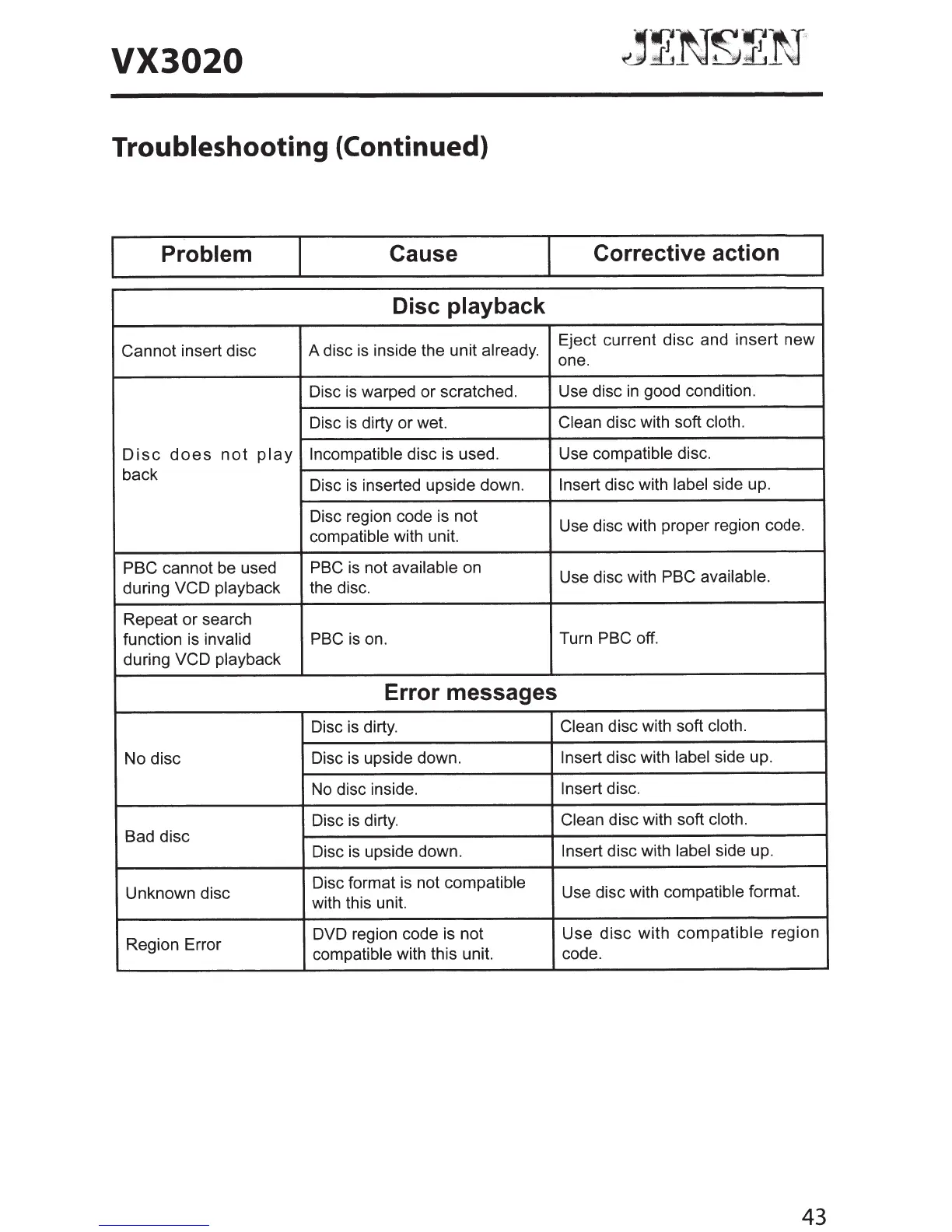
Troubleshooting
{Continued)
Problem
Cause
Corrective action
Disc playback
Cannot insert disc A disc
is
inside the unit already.
Eject current disc and insert new
one.
Disc
is
warped or scratched.
Use disc
in
good condition.
Disc
is
dirty or wet.
Clean
disc with soft
cloth.
Disc
does
not
play
Incompatible
disc is used.
Use compatible disc.
back
Disc
is
inserted upside down.
Insert
disc with label side up.
Disc region code is not
Use disc with proper region code.
compatible with unit.
PBC
cannot be used PBC
is
not available on
Use disc with
PBC
available.
during
VCD
playback the disc.
Repeat or search
function is invalid
PBC
is
on.
Turn
PBC
off.
during
VCD
playback
Error messages
Disc
is
dirty.
Clean
disc with soft cloth.
No disc Disc
is
upside down.
Insert
disc with
label
side up.
No
disc inside.
Insert
disc.
Disc
is
dirty.
Clean
disc with soft
cloth.
Bad disc
Disc
is
upside down.
Insert
disc with label side up.
Unknown disc
Disc format is not compatible
Use disc with compatible format.
with this unit.
Region Error
DVD region code is not
Use
disc
with
compatible
region
compatible with this unit. code.
43

Other manuals for Jensen VX3020

Related product manuals