Optional Equipment
• Steering Wheel Control
(SWC)-
The VX3020
is
SWC
ready for vehicles equipped with the option.
See
wiring diagram for
installation details.
For
SWC
programming details, please
see
the operation manual.
•
Rear
Camera- The VX3020
is
Rear
Camera ready for vehicles equipped with
the
option.
See
wiring diagram for installation
details.
Disconnect
the
Battery
•
To
prevent a short circuit, be sure
to
turn
off
the ignition and remove
the
negative(-) battery cable prior
to
installation.
NOTE:
If
the
VX3020
is
to
be
installed
in
a car equipped with
an
on-board
drive
or
navigation
computer, do
not
disconnect
the
battery
cable.
If
the
cable
is
disconnected, the computer
memory
may
be lost. Under these conditions, use
extra
caution
during installation to
avoid
causing a short circuit.
Replacing the
Fuse
• When replacing
the
vehicles Radio fuse always
use
the
proper rated replacement fuse. Using a fuse
with
an
improper rating
could damage
the
unit
and cause a fire.
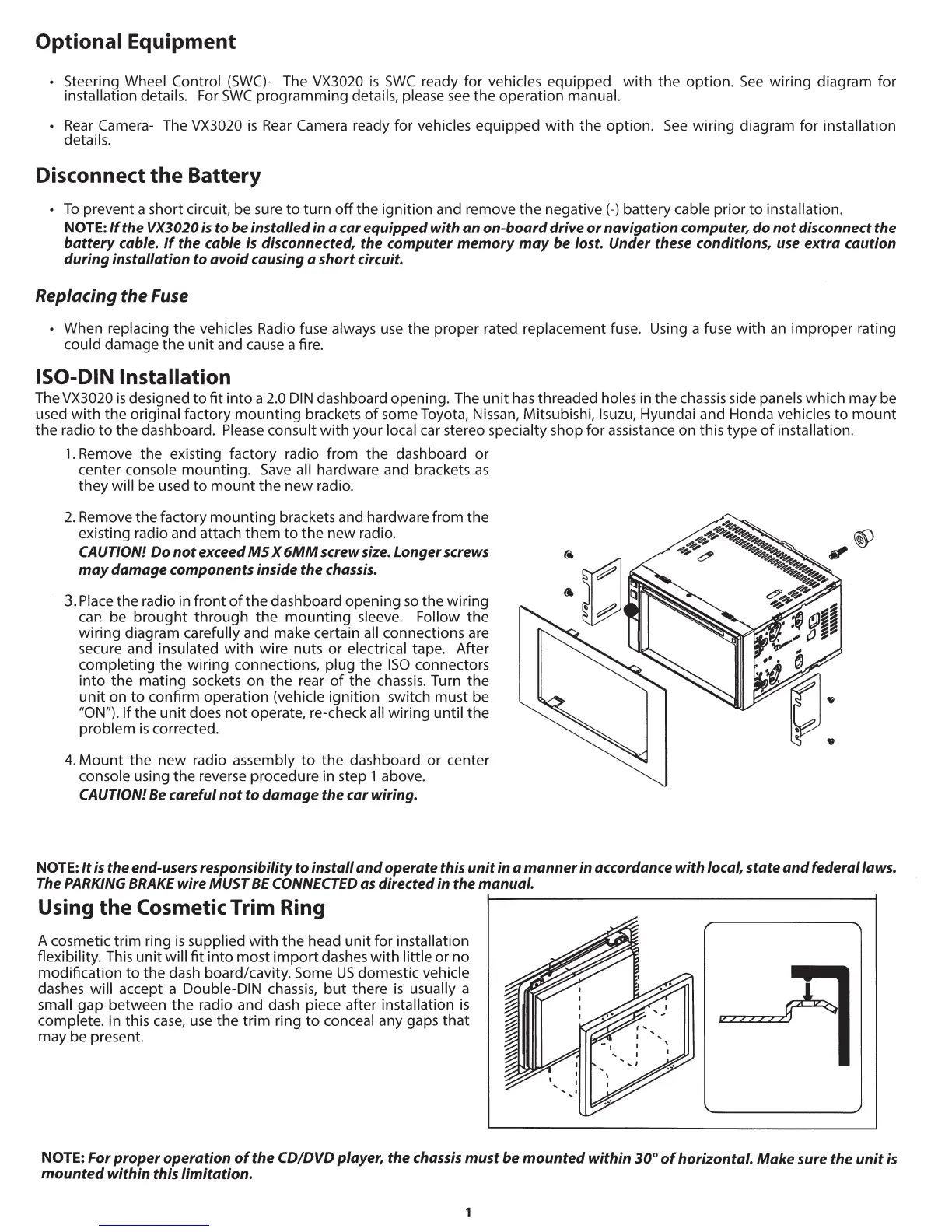
ISO-DIN Installation
The VX3020
is
designed
to
fit
into a
2.0
DIN
dashboard opening. The
unit
has
threaded holes in
the
chassis side panels which may be
used
with
the original factory
mounting
brackets
of
some Toyota, Nissan, Mitsubishi, lsuzu, Hyundai and Honda vehicles
to
mount
the
radio
to
the dashboard.
Pl
e
ase
consult
with
your local car stereo specialty shop for assistance on this type
of
installation.
1.
Remove the existing factory radio from the dashboard
or
center console mounting.
Save
all hardware and brackets
as
they will be used
to
mount the new radio.
2. Remove the factory mounting brackets and hardware from the
existing radio and attach
them
to
the
new radio.
CAUTION!
Do
not
exceed
MS
X
6MM
screw size. Longer screws
may
damage
components inside
the
chassis.
3.
Place
the
radio in front
of
the
dashboard opening
so
the wiring
car.
be
brought through
the
mounting sleeve. Follow the
wiring diagram carefully and make certain all connections are
secure and insulated
with
wire nuts or electrical tape. After
completing
the
wiring connections, plug
the
ISO
connectors
into
the mating sockets on the rear
of
th
e
chassis
. Turn
the
unit
on
to
confirm operation (vehicle ignition switch must be
"ON"). If the
unit
does
not
operate, re-check all wiring until
the
problem
is
corrected.
4. Mount the
new
radio assembly
to
the
dashboard or center
console using
the
reverse procedure in step 1 above.
CAUTION! Be careful
not
to
damage
the car wiring.
NOTE:
It
is
the end-users responsibility
to
install
and
operate
this
unit
in a
manner
in
accordance with local,
state
and
federal laws.
The PARKING
BRAKE
wire MUST
BE
CONNECTED as directed in
the
manual.
Using the Cosmetic Trim Ring
A cosmetic
tr
im ring
is
supplied
with
the
head unit for installation
flexibility. This unit will
fit
into
mo
st
import
dashes
with
little or no
modification
to
the dash board/cavity. Some
US
domestic vehicle
dashes will accept a Double-DIN chassis,
but
there
is
usually a
small gap between
the
radio and dash piece after installation
is
complete.
In
this
case
,
use
the
trim
ring
to
conceal any gaps
that
may be present.
NOTE: For
proper
operation
of
the
CD!DVD
player,
the
chassis
must
be
mounted
within
30°
of
horizontal.
Make
sure the
unit
is
mounted
within this limitation.



 To Next Page