3
VX3518 INSTALLATION
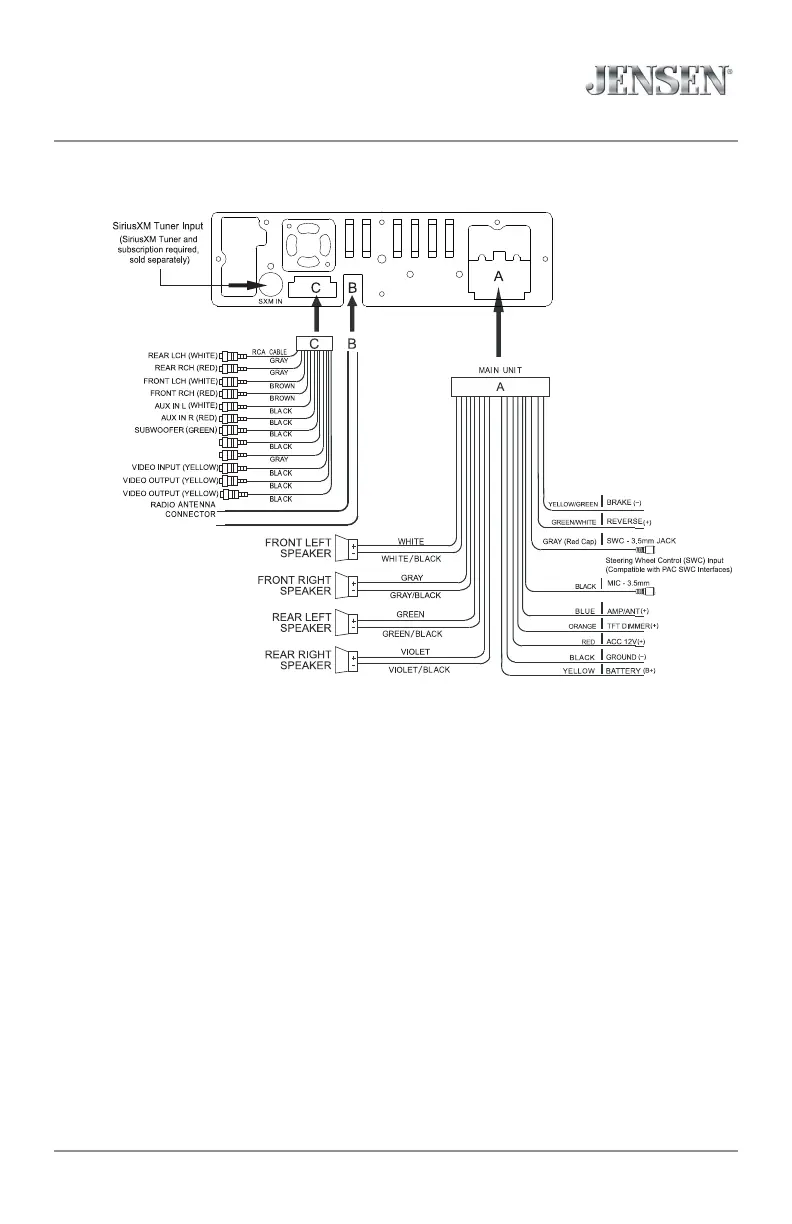
Wiring Diagram
Note:
When replacing a fuse, make sure to use the correct type and amperage. Using an incorrect fuse could cause
damage. The unit uses (1) 10 amp blade-type fuse located on the back of the unit.
Wiring Notes:
Rear camera input
A rear view camera (not included) can be used with the Camera input.
SiriusXM
For more information on how to install the SiriusXM Connect Vehicle tuner, consult the installation guide included
with the tuner (SiriusXM connect tuner and subscription sold separately).
REAR USB CABLE
(CHARGING ONLY)
REAR VIEW CAMERA AUDIO INPUT (BLACK)
REAR VIEW CAMERA INPUT (YELLOW)



 To Next Page