EasyManua.ls Logo

Jet 16-32 Plus - User Manual

Jet 16-32 Plus
36 pages
Print Icon
To Next Page IconTo Next Page
Loading...
Operating Instructions and Parts Manual
Drum Sander
Model 16-32 Plus
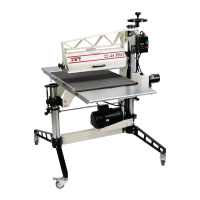
shown with optional casters (98-0130) and infeed/outfeed tables (98-1601)
WMH TOOL GROUP
2420 Vantage Drive
Elgin, Illinois 60123 Part No. M-629004
Ph.: 800-274-6848 Revision A 3/06
www.wmhtoolgroup.com Copyright © WMH Tool Group

Other manuals for Jet 16-32 Plus

Questions and Answers

  • M
    Melinda MoralesAug 20, 2025
    Why does my Jet 16-32 Plus burn wood?
    • S
      stephaniesweeneyAug 20, 2025
      The Jet Sander may burn wood because the abrasive strip is overlapped, loaded, or worn. It may also be that the depth of cut is excessive for the grit being used, or the feed rate is too slow. To resolve this, re-wrap or clean the abrasive strip, use a coarser grit, reduce the depth of cut, increase the feed rate, or replace the abrasive.
  • R
    Rhonda JonesAug 22, 2025
    What to do if my Jet Sander will not start?
    • C
      Charles CooperAug 22, 2025
      If your Jet Sander won't start, the issue might be due to no incoming power or a malfunctioning switch. Check the plug connection and ensure the fuse isn't blown or the circuit breaker isn't tripped. You can also push the circuit breaker button on the sander motor to reset it. If the switch is faulty, consider replacing it.
  • B
    Brian MendezAug 25, 2025
    Why does the abrasive load up prematurely on my Jet Sander?
    • J
      Jeremy RobinsonAug 25, 2025
      Premature loading of the abrasive on your Jet Sander can occur due to excessive depth of cut or feed rate, inadequate dust collection, or using an inadequate abrasive. Try reducing the depth of cut and feed rate, increasing airflow at the dust port, or switching to an open-coat abrasive.
  • M
    Maria RodriguezAug 26, 2025
    What causes snipe marks on my Jet 16-32 Plus?
    • G
      garydennisAug 26, 2025
      Snipe marks on your Jet Sander are caused by improper tension on the rollers. Re-tension the rollers to resolve this issue.
  • W
    William OwensAug 28, 2025
    What to do if board slips on conveyor belt of Jet 16-32 Plus?
    • M
      morganelizabethAug 28, 2025
      If the board slips on the conveyor belt of your Jet Sander, it could be due to tension rollers being too high, an excessive feed rate, or a dirty or worn conveyor belt. Try lowering the tension rollers, reducing the feed rate, or replacing the conveyor belt.
  • C
    Chad StevensonAug 30, 2025
    Why does my Jet 16-32 Plus motor slows or stalls?
    • E
      emilysmithAug 30, 2025
      The Jet Sander motor might slow down or stall due to improper conveyor belt tension, or excessive depth of cut and/or excessive feed rate. Adjust the belt tension and, if necessary, reduce the depth of cut or feed rate.
  • T
    Tamara Davidson DDSSep 1, 2025
    What causes a line or groove in stock sanded by Jet 16-32 Plus?
    • K
      Kyle GomezSep 1, 2025
      A line or groove in the stock sanded by your Jet Sander is caused by an inconsistent feed rate. To prevent this, do not stop or change the feed rate while feeding stock.
  • R
    Rachel McguireSep 3, 2025
    Why does the conveyor belt slip on drive roller of Jet 16-32 Plus Sander?
    • F
      Frank PriceSep 3, 2025
      The conveyor belt may slip on the drive roller of your Jet Sander due to improper conveyor belt tension or excessive depth of cut and/or feed rate. Try adjusting the belt tension and/or reducing the depth of cut and feed rate.
  • D
    Dr. Sandra PatelSep 5, 2025
    Why does the conveyor motor stalls on my Jet 16-32 Plus Sander?
    • L
      Lindsay MoodySep 5, 2025
      The conveyor motor on your Jet Sander stalls because of an excessive depth of cut. Reduce the depth of cut; use coarser grit; reduce feed rate.
  • C
    Crystal JacksonSep 7, 2025
    How to fix ripples in sanded surface with Jet 16-32 Plus?
    • K
      Kristen MillerSep 7, 2025
      Ripples in the sanded surface when using the Jet Sander can be caused by a few things. Non-uniformly spaced ripples are usually due to an uneven feed rate, a slipping conveyor belt, a board slipping on the conveyor belt, or a stalled conveyor motor. Uniformly spaced ripples may be due to conveyor bed flexing or vibration. To address these issues, reduce the depth of cut and/or feed rate, and check for loose bolts, loose shaft coupling set screws, or an out-of-balance drum.

Summary

WARRANTY AND SERVICE

Warranty Details

Covers warranty scope, coverage period, and exclusions.

How to Get Service

Procedure for obtaining service and required documentation.

Warranty Limitations

Explains warranty limitations and state law applicability.

Safety Precautions

General Operating Safety

Essential safety rules before assembly or operation.

Specific Safety Guidelines

Workshop Safety Practices

Rules for safe operation, maintenance, and workshop environment.

Safety Notice Definitions

Explains the meaning of CAUTION and WARNING notices.

Introduction

Specifications

Features and Terminology

Component Identification

Labeled diagram of the drum sander's main parts.

Unpacking and Contents

Box Contents Check

Lists parts included in Box #1 and Box #2.

Stand Assembly

Optional Caster Installation

Instructions for attaching optional locking casters.

Sander Assembly

Installing Drum Head

Steps to mount the drum head assembly to the stand.

Installing Conveyor

Procedure to attach the conveyor bed and motor.

Optional Infeed;Outfeed Tables

Dust Collection System

Abrasive Strip Installation

Tapering and Securing Abrasive

How to prepare and attach abrasive strips to the drum.

Abrasive Strip Installation (Continued)

Using the TUFTool

Guide on using the TUFTool for abrasive tensioning.

Grounding Instructions

Extension Cords

Machine Adjustments

Drum Height Control

How to adjust the drum height and depth of cut.

Switch Lock

Procedure for preventing unauthorized machine start-up.

Depth Gauge Setup

How to calibrate the depth gauge indicator.

Dust Cover Latch

Conveyor Belt Maintenance

Belt Tension and Tracking

Adjusting conveyor belt tension and tracking.

Belt Replacement Procedure

Steps for replacing a worn conveyor belt.

Sanding Drum Alignment

Fine-Tuning Drum Alignment

Drum Height Control Adjustment

Tension Roller Alignment

Tension Roller Pressure Adjustment

Operation

Operational Setup and Procedures

Covers circuit breaker, basic procedures, depth of cut, and drum height.

Performance and Dust Collection

Tips for maximum performance and operational dust collection.

Sanding Techniques

Sanding Methods and Best Practices

Covers multiple pieces, edges, imperfect stock, feeding angle, and cleaning.

Tracker Kit Installation

Maintenance

Troubleshooting Guide

Power and Conveyor Issues

Addresses sander not starting and conveyor problems.

Abrasive and Sanding Quality Issues

Solutions for abrasive strip problems and sanding quality defects.

Troubleshooting (Continued)

Sander Performance Issues

Addresses wood burning and surface imperfections.

Operational and Electrical Issues

Fixes for height adjustment, overload, and wiring problems.

Abrasives Selection and Use

Abrasive Selection and Maintenance

Guidance on choosing, cleaning, and maintaining abrasives.

Optional Accessories

Parts List: Stand Assembly

Conveyor and Motor Assembly Diagram

Parts List: Conveyor and Motor Assembly

Drum Head Assembly Diagram

Parts List: Drum Head Assembly

Parts List: Infeed;Outfeed Tables

Electrical Connections

Jet 16-32 Plus Specifications

General IconGeneral
Maximum Board Width32"
Dust Port Diameter4"
Feed Rate0-10 FPM
Voltage115V
Sanding Capacity (Thickness)3 inches
Abrasive Width16 inches
Drum Speed1725 RPM

Related product manuals