EasyManua.ls Logo

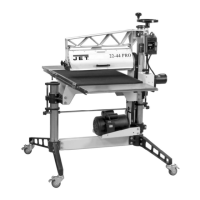
Jet 22-44 Pro-3 - User Manual

Jet 22-44 Pro-3
40 pages
Print Icon
To Next Page IconTo Next Page
Loading...
Operating Instructions and Parts Manual
Drum Sander
Model 22-44 Pro-3
JET
427 New Sanford Road Part No. M-649600
LaVergne, Tennessee 37086 Revision B
03/2016
P
h.: 800-274-6848 ECR 16020409184
www.jettools.com Copyright © 2014 JET
This .pdf document is bookmarked

Other manuals for Jet 22-44 Pro-3

Questions and Answers

  • J
    Johnny HunterSep 8, 2025
    Why does the conveyor motor oscillate on my Jet 22-44 Pro-3 Sander?
    • L
      Lauren BriggsSep 8, 2025
      If the conveyor motor on your Jet Sander oscillates, loosen the housing bolts, run the motor, and then retighten the bolts to properly align the motor. If the transfer rod collar is worn, replace it. If the drive roller is bent, replace it as well.
  • V
    Vickie WilkinsonAug 23, 2025
    How to troubleshoot a Jet 22-44 Pro-3 that will not start?
    • M
      morrisonsandraAug 23, 2025
      If your Jet Sander will not start, check the plug connections to ensure the main cord is connected to a power source and the motor cord is properly inserted into the control box receptacle. Also, check if a circuit fuse has blown or a breaker has tripped, and replace the fuse or reset the breaker if necessary. A malfunctioning switch could also be the culprit, in which case you should replace it.
  • P
    pcarterAug 25, 2025
    How to prevent burning of wood with my Jet 22-44 Pro-3?
    • S
      Seth HallAug 25, 2025
      If you're experiencing burning of wood with your Jet Sander, try increasing the feed rate. Additionally, reduce the depth of cut, use abrasive of coarser grit, clean or replace strips, and angle stock when feeding. Check if abrasive strips are overlapped and rewrap strip without overlap. Ensure the drum is properly aligned.
  • A
    Andrew HallAug 26, 2025
    How to stop the abrasive from loading up prematurely on my Jet 22-44 Pro-3?
    • C
      Christina ButlerAug 26, 2025
      If the abrasive on your Jet Sander loads up prematurely, reduce the depth of cut and feed rate. Also, increase airflow at the dust port to improve dust collection, and consider using an open-coat abrasive. If possible, angle the stock at 60° to avoid resin line buildup.
  • F
    fkellerAug 27, 2025
    What causes the conveyor belt to slip on the drive roller of my Jet 22-44 Pro-3?
    • S
      Seth MarshAug 28, 2025
      If the conveyor belt on your Jet Sander slips on the drive roller, adjust the belt tension. Also, reduce the depth of cut and feed rate.
  • M
    Mary LoveSep 22, 2025
    Why is my Jet Sander leaving a line or groove in the stock?
    • C
      Cheryl BakerSep 22, 2025
      If you notice a line or groove in the stock when using your Jet Sander, avoid stopping or changing the feed rate while feeding stock to maintain a consistent feed rate.
  • J
    Jay JohnsonSep 16, 2025
    How to adjust the table height control on my Jet Sander?
    • G
      Gloria SnyderSep 16, 2025
      If the table height adjustment on your Jet Sander works improperly, readjust the height control.
  • N
    nmillerSep 18, 2025
    What causes the drum drive v-belt to slip on my Jet 22-44 Pro-3?
    • M
      Melissa GardnerSep 18, 2025
      If the drum drive v-belt slips on your Jet Sander, increase the tension.
  • M
    manueladamsSep 7, 2025
    What causes gouging of wood when using my Jet 22-44 Pro-3 Sander?
    • A
      Aaron HeathSep 7, 2025
      If you're experiencing gouging of wood with your Jet Sander, adjust the conveyor belt tension. Reduce the depth of cut. Use an alternate feeding procedure if wood is slipping on the conveyor due to lack of contact. Replace with coarser grit.
  • M
    Mr. Dale VanceSep 4, 2025
    Why is my Jet 22-44 Pro-3 making a knocking sound?
    • R
      Rebecca JacobsSep 4, 2025
      If you hear a knocking sound while your Jet Sander is running, realign the bearings. Replace the v-belt if it's worn. Remove any material inside the drum. Replace the pulley if it's wobbling or out of round. Retighten any loose set-screws in the pulley or bearing. Insert an abrasive strip or replace the fastener if the abrasive fastener on the drum is loose. Replace the drum bearings if they are worn.

Summary

Safety Warnings and Precautions

General Operational Safety Guidelines

Essential safety instructions to prevent injury during operation and assembly.

Specific Hazard and Symbol Definitions

Warnings for specific actions and definitions of CAUTION/WARNING symbols.

Unpacking and Assembly

Assembly Procedures

Step-by-step instructions for assembling stand legs, tables, and handwheel.

Abrasive Installation

Installing Abrasive Strips

Guide to properly wrapping and securing abrasive strips on the drum.

Machine Adjustments

Alignment Procedures

Drum and Belt Alignment

Procedures for initial and fine-tuning drum alignment.

Conveyor Belt Tension and Tracking

Adjusting conveyor belt tension and tracking for optimal performance.

Maintenance and Troubleshooting

Troubleshooting Common Problems

Solutions for common motor, mechanical, and operational problems.

Operation and Performance

Jet 22-44 Pro-3 Specifications

General IconGeneral
TypeDrum Sander
Drum Length44 inches
Voltage230V
Max Sanding Width44 in (2 passes)
Dust Port Diameter4 inches

Related product manuals