EasyManua.ls Logo

Jet JSG-6DC - User Manual

Jet JSG-6DC
28 pages
Print Icon
To Next Page IconTo Next Page
Loading...
Operating Instructions and Parts Manual
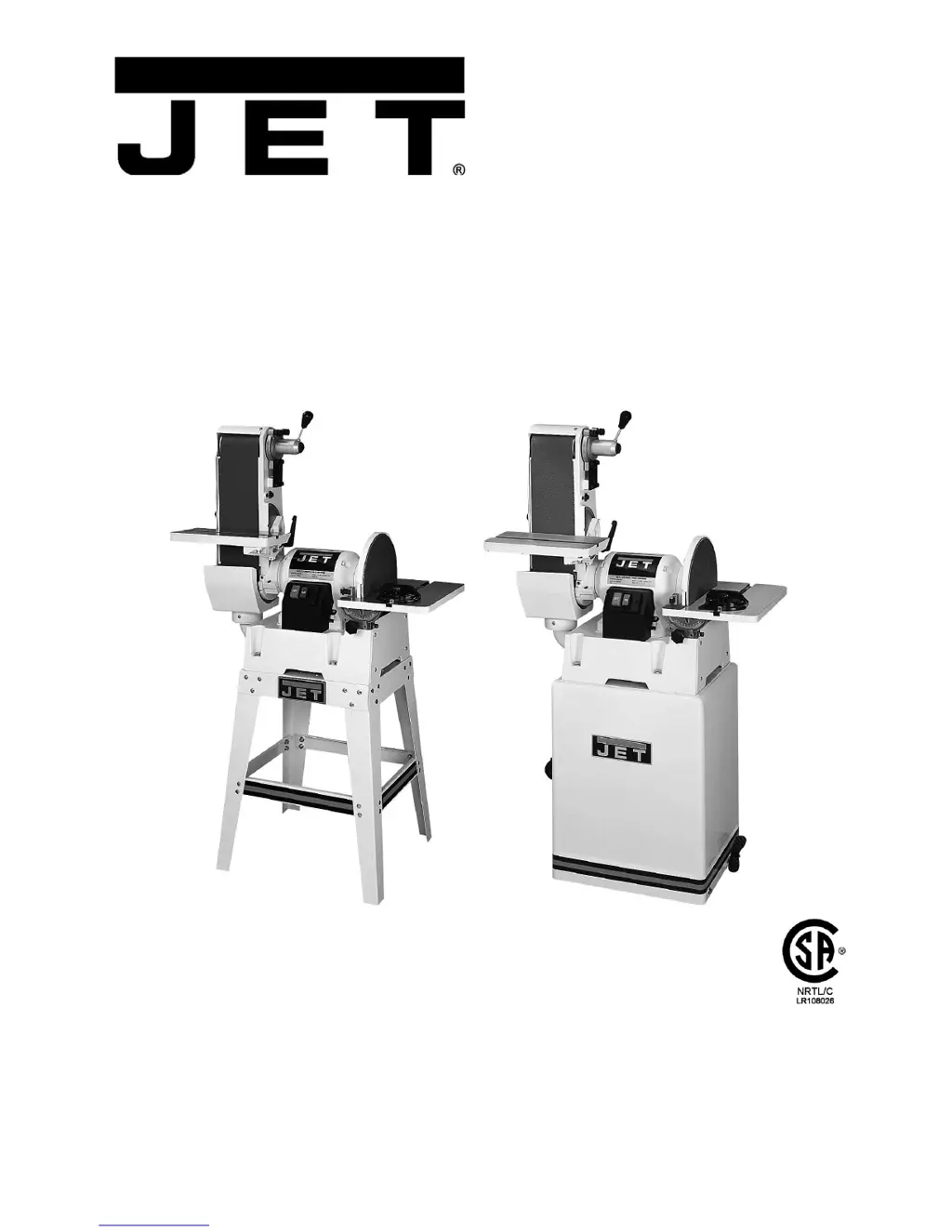
Combination Belt/Disc Sander
Model JSG-6DC
with optional open stand with optional closed stand
WALTER MEIER (Manufacturing) Inc.
427 New Sanford Road
LaVergne, Tennessee 37086 Part No. M-708598
Ph.: 800-274-6848 Revision G 03/2010
www.waltermeier.com Copyright © 2010 Walter Meier (Manufacturing) Inc.

Questions and Answers

  • T
    tmarshJul 26, 2025
    Why sanding belt on my Jet JSG-6DC does not come up to speed?
    • W
      Wendy FreemanJul 26, 2025
      If the sanding belt on your Jet Sander is not reaching the correct speed, it might be due to an extension cord that is too light or too long; replace it with a cord of adequate size and length. Low current could also be the cause; in this case, contact a qualified electrician.
  • L
    Lisa ElliottAug 1, 2025
    Why won't my Jet JSG-6DC start?
    • D
      David BarrettAug 1, 2025
      The Jet Sander might not start due to several reasons. First, check all plug connections to ensure the sander is properly plugged into the wall and the motor. It's also possible that a fuse has blown or a circuit breaker has tripped; in this case, replace the fuse or reset the circuit breaker, making sure the supply circuit is appropriate for the amperage rating on the motor plate. A damaged cord or a bad starting capacitor could also be the cause; if that's the case, replace the cord or the starting capacitor accordingly.
  • M
    Marilyn HughesAug 7, 2025
    What to do if my Jet JSG-6DC Sander leaves sanding marks on wood?
    • K
      Kathryn ShieldsAug 7, 2025
      If your Jet Sander is leaving sanding marks on the wood, several factors could be the cause. Make sure to keep the workpiece moving to avoid sanding marks. Additionally, ensure you are using the correct grit sanding belt; use a coarser grit for stock removal and a fine grit for finish sanding. Avoid applying too much feed pressure by never forcing the work into the sanding platen. Lastly, make sure you are sanding with the grain.
  • S
    Stephanie GreenAug 13, 2025
    Why does my Jet JSG-6DC Sander vibrate excessively?
    • K
      Kimberly ChenAug 13, 2025
      Excessive vibration in your Jet Sander can stem from a few issues. Ensure the stand is resting evenly on the floor; adjust it if necessary. Bearing fatigue or a motor problem could also be the cause. In these cases, it is best to have the bearings replaced or the motor inspected by a qualified service technician.
  • C
    Courtney JonesAug 18, 2025
    How to fix a sanded edge that is not square using Jet JSG-6DC?
    • J
      Joshua MitchellAug 19, 2025
      If the sanded edge is not square when using your Jet Sander, it could be due to the table not being square to the abrasive belt, or the miter slot not being parallel to the abrasive belt. Use a square to adjust the table and/or the table’s miter slot to ensure they are aligned correctly with the abrasive belt.

Summary

Warranty and Service Information

Warranty Coverage and Claims

Details on what is covered, who is covered, warranty period, and exclusions.

Service and Legal Information

Information on obtaining service, legal rights, and warranty limitations.

Machine Safety Warnings

General Operational Safety Rules

Comprehensive safety precautions for sander operation, including pre-operation checks.

Personal and Environmental Safety

Safety guidelines related to operator conduct, work area, and environmental hazards.

Product Specifications and Introduction

Detailed Machine Specifications

Technical details including model, dimensions, motor, and component sizes.

Electrical Setup and Operation

Grounding and Voltage Requirements

Instructions for proper grounding and connecting for 115V or 230V operation.

Extension Cord Usage

Guidelines for selecting appropriate extension cords based on amperage and length.

Unpacking and Parts Inventory

Main Unit Components

List and illustration of parts included in the main sander carton.

Optional Stand Components

List of parts for optional closed and open stands.

Assembly and Installation

Sander Main Assembly

Steps for assembling the main sander unit and securing it to a stand.

Table and Workstop Installation

Instructions for attaching the disc table, belt table, and workstop assembly.

Abrasives and Dust Collection

Procedures for installing abrasive discs/belts and connecting a dust collection system.

Machine Adjustments and Calibration

Belt Table Adjustments

Aligning the belt table for 90° and 45° stops and ensuring parallelism.

Belt Tracking and Arm Orientation

Adjusting belt tracking and setting the belt arm position.

Disc Table Adjustments

Aligning the disc table, setting 90°, 45°, and rear stops.

Miter Gauge and Stops Setup

Calibrating the miter gauge and ensuring correct angle stop settings.

Operation, Maintenance, and Repair

Belt Tracking and Replacement

Steps for adjusting belt tracking and replacing worn belts.

Disc Replacement and Maintenance

Procedures for replacing abrasive discs and general machine upkeep.

Troubleshooting and Parts Ordering

Problem Resolution Guide

Common sander issues, their probable causes, and recommended remedies.

Parts and Accessories Information

Information on optional accessories and how to order replacement parts.

Assembly Diagrams and Parts Lists

JSG-6 DC Sander Parts Breakdown

Comprehensive list of all parts for the JSG-6DC Belt/Disc Sander.

Optional Stand Assembly

Closed Stand Assembly Details

Instructions and parts list for assembling the optional closed stand.

Open Stand Assembly Details

Instructions and parts list for assembling the optional open stand.

Electrical Connection Diagrams

Jet JSG-6DC Specifications

General IconGeneral
BrandJet
ModelJSG-6DC
CategorySander
LanguageEnglish

Related product manuals