EasyManua.ls Logo

Jet J-3130 - User Manual

Jet J-3130
32 pages
Print Icon
To Next Page IconTo Next Page
Loading...
Operating Instructions and Parts Manual
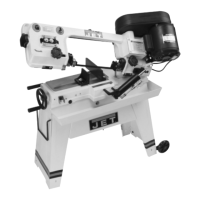
5-inch x 8-inch Horizontal Band Saw
Models: J-3130, J-3230
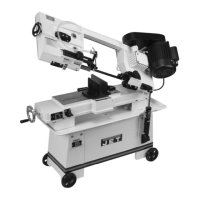
Model J-3130 shown
WALTER MEIER (Manufacturing) Inc.
427 New Sanford Road
LaVergne, Tennessee 37086 Part No. M-414453
Ph.: 800-274-6848 Revision D1 10/2013
www.waltermeier.com Copyright © 2013 Walter Meier (Manufacturing) Inc.

Questions and Answers

  • J
    Jacqueline FischerAug 20, 2025
    Why is my Jet J-3130 breaking teeth?
    • A
      Amber JonesAug 20, 2025
      Breaking teeth on your Jet Saw can be caused by several factors. If the teeth are too coarse for the material, switch to a blade with a finer pitch. If the feed is too heavy, decrease the feed rate and observe chip formation to ensure efficient cutting. If the speed is too slow, increase the blade speed, referring to technical literature or supplier recommendations. Ensure the workpiece isn't vibrating by tightening the vise and supporting slender or long workpieces. If stacking pieces, ensure all are securely captured by the vise. If tooth gullets are loading, use a coarser blade or one with appropriate tooth geometry. Always allow the motor to reach full speed before starting the cut.
  • T
    Tanya HowellAug 25, 2025
    How to fix crooked cuts with my Jet J-3130?
    • A
      Angelica GregoryAug 25, 2025
      Crooked cuts with your Jet Saw can result from a few issues. Ensure the workpiece is square by adjusting the right vise jaw to be at right angles to the blade, and clamp the work tightly. Check the blade for vertical alignment and adjust if needed. Position the guide bearings as close as possible to the work while still completing the cut. Also, inspect the guide bearings, seats, and brackets for any looseness or wear.
  • S
    Sarah PorterAug 28, 2025
    What causes blade twisting on my Jet J-3130 Saw?
    • K
      Kevin SalazarAug 28, 2025
      Blade twisting on your Jet Saw can occur if the cut is binding the blade; ensure the workpiece is flat on the saw base and decrease feed pressure. If blade tension is too high, reduce it to just above the point where the blade slips. Check the eccentric jam nuts for tightness and inspect guide bearings for wear, replacing them if necessary. Ensure correct guide bearing adjustment. Tighten the bracket on the saw arm if it's loose, and also tighten the bearing seat attachment screw, adjusting bearing clearance.
  • R
    Ryan CamposAug 31, 2025
    What causes rough cuts on my Jet J-3130?
    • D
      Dominique FrazierSep 1, 2025
      Rough cuts with your Jet Saw can be due to excessive feed or speed; try reducing the speed and observing chip formation for efficient cutting. If the blade is too coarse, switch to a finer blade, consulting suppliers for recommendations based on the material you're cutting. Ensure you are using the correct blade for the material. Consult blade suppliers for recommendations for exotic or unusual materials.
  • A
    Amanda BergSep 5, 2025
    Why is there unusual wear on the side or back of my Jet Saw blade?
    • K
      Kristin LopezSep 5, 2025
      Unusual wear on the side or back of your Jet Saw blade can be caused by worn blade guides, which should be replaced. Also, ensure the blade guide bearings are properly adjusted for correct clearance. If the blade guide bearing bracket is loose, tighten it to the saw arm. If the blade is running on the wheel flange, adjust blade tracking using the paper cutting method.
  • K
    Karen SandersSep 8, 2025
    Why is the motor running too hot on my Jet J-3130?
    • S
      Susan SantiagoSep 8, 2025
      A Jet Saw motor running too hot can be caused by excessive blade tension; decrease the blade tension to just above the slip point. Worn transmission and worm gears can also cause overheating, requiring replacement of the gears in the transmission gearbox. Additionally, check the gearbox and add oil as needed to ensure proper lubrication.
  • D
    Deborah TorresNov 12, 2025
    Why is there excessive blade breakage on my Jet J-3130 Saw?
    • J
      John PerryNov 12, 2025
      Excessive blade breakage in your Jet Saw can occur for several reasons. First, ensure the material is tightly secured in the vise by applying more pressure and checking the right jaw pivot and lock bolts, as well as the left jaw pivot bolt, for tightness. If stacking material, make sure all pieces are captured by the vise pressure. Also, verify that the feed and speed settings are correct for the material and blade. Adjust the blade tension to prevent slippage on the wheel. Make sure the saw motor reaches full speed before cutting, and that the blade isn't resting on the workpiece before the motor is at full speed. Adjust blade tracking if the blade rubs on the wheel flange. Misadjusted blade guides can also cause breakage, so ensure they are properly adjusted. If the blade is too thick fo...
  • W
    William HahnNov 16, 2025
    What to do if the blade is dulling prematurely on my Jet J-3130?
    • M
      Mark MeyerNov 16, 2025
      Premature blade dulling on your Jet Saw can happen due to several factors. Using a blade with teeth that are too coarse can cause this, so switch to a finer tooth blade. Excessive blade speed can also be a culprit; try a lower speed or consult technical documentation for speed recommendations. Inadequate feed pressure can lead to dulling, so increase the pressure while monitoring chip formation. If you encounter hard spots or scale on the material, reduce the blade speed and increase feed pressure. For materials prone to work hardening, like stainless steel, ensure a heavy, continuous cut and use a sharp blade, potentially releasing some counterbalance spring pressure. Ensure the blade is installed correctly with teeth pointing towards the right end of the saw. Also, verify you are using t...

Jet J-3130 Specifications

General IconGeneral
BrandJet
ModelJ-3130
CategorySaw
LanguageEnglish

Related product manuals