EasyManua.ls Logo

Jet J-8203K - User Manual

Jet J-8203K
36 pages
Print Icon
To Next Page IconTo Next Page
Loading...
Operating Instructions and Parts Manual
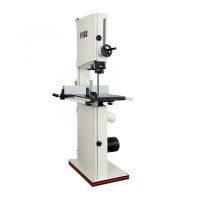
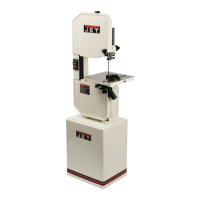
14-inch Vertical Band Saws
Models: J-8201, J-8203, J-8201VS, J-8203VS
JET
427 New Sanford Road
LaVergne, Tennessee 37086 Part No. M-414500
Ph.: 800-274-6848 Revision D 01/2016
www.jettools.com Copyright © 2014 JET
This .pdf document is bookmarked

Table of Contents

Questions and Answers

  • P
    Pamela CabreraSep 23, 2025
    How to fix rough cuts with my Jet Saw?
    • F
      fhubbardSep 23, 2025
      Rough cuts from your Jet Saw can be attributed to a blade speed that's too high for the feed pressure, or a blade that is too coarse. To fix this, reduce blade speed and feed pressure or replace with finer blade.
  • C
    Courtney SampsonAug 23, 2025
    Why does the blade on my Jet J-8203K Saw dull prematurely?
    • N
      Nicole JohnsonAug 23, 2025
      Premature blade dulling on your Jet Saw can be attributed to several factors. Ensure you are not using a blade with teeth that are too coarse; switch to a finer tooth blade. The blade speed might be too high, so try lowering it. If you encounter hard spots or scale on the workpiece, increase feed pressure and reduce speed. For materials prone to work hardening, like stainless steel, increase feed pressure by reducing spring tension. Also, ensure the blade tension is at the proper level and avoid running the blade at idle on the material.
  • S
    Susan GarzaAug 25, 2025
    How to fix bad (out-of-square) cuts with my Jet J-8203K Saw?
    • E
      Erin GomezAug 26, 2025
      Out-of-square cuts with your Jet Saw can occur for several reasons. Check that the feed pressure isn't too fast and decrease it if necessary. Ensure that the guide bearings are properly adjusted to a clearance of 0.001 inch (0.002 inch maximum). Gradually increase blade tension if it's inadequate. Replace the blade if it is dull. Verify the blade speed. Tighten the blade guide assembly and the blade guide bearing assembly if they are loose. Adjust blade tracking if the blade track is too far from the wheel flanges. Replace the guide bearing if it is worn.
  • Z
    Zachary MoranAug 27, 2025
    Why is the motor of my Jet J-8203K Saw running too hot?
    • B
      Billy MatthewsAug 27, 2025
      If the motor of your Jet Saw is running too hot, there are several potential causes. The blade tension might be too high; reduce it. Similarly, the drive belt tension could be too high, so reduce that as well. Ensure that the blade is appropriate for the workpiece; use a blade with a fine tooth pitch if the current one is too coarse, or a blade with a coarse tooth pitch if the current one is too fine. Finally, check the speed reducer to ensure it has sufficient lubrication.
  • T
    tsnyderAug 27, 2025
    What to do if teeth are missing or ripped from my Jet J-8203K blade?
    • Q
      qhollandAug 28, 2025
      Missing or ripped teeth on your Jet Saw blade can occur due to several reasons. If the blade tooth pitch is too coarse for the workpiece, use a blade with a finer tooth pitch. If the feed is too slow or too fast, try increasing feed pressure and/or blade speed. Securely clamp the workpiece to prevent vibration. If the gullets are loading up with chips, use a blade with a coarse tooth pitch and reduce feed pressure, and brush the blade to remove chips.
  • S
    susanswansonSep 16, 2025
    What to do if Jet J-8203K is making out-of-square cuts?
    • M
      Maureen ReedSep 16, 2025
      Bad or out-of-square cuts with your Jet Saw can occur due to several factors. These include feed pressure being too fast, guide bearings not adjusted properly, inadequate blade tension, a dull blade, incorrect blade speed, a loose blade guide assembly or bearing assembly, the blade track being too far from the wheel flanges, or a worn guide bearing. Decrease pressure, adjust guide bearing clearance to 0.001 inch (0.002 inch maximum), gradually increase blade tension, replace the blade, check blade speed, tighten the blade guide assembly and bearing assembly, adjust blade tracking and replace worn bearing.
  • T
    Theresa SchroederSep 13, 2025
    Why is the blade breaking so much on my Jet J-8203K Saw?
    • M
      Meagan MarquezSep 13, 2025
      Excessive blade breakage in your Jet Saw can stem from several issues. Ensure the material is securely clamped. Incorrect speed or feed settings can cause breakage; consult a Machinist’s Handbook for appropriate settings. Using teeth that are too coarse for the material, incorrect blade tension, saw blade contact with the workpiece before starting, blade rubbing on the wheel flange, misaligned guides, or cracking at the weld can also contribute to this problem. Adjust blade tension, tracking and guides. For cracking at the weld a longer annealing cycle is recommended.
  • E
    Eric ThompsonSep 14, 2025
    Why is the blade on my Jet J-8203K Saw dulling so quickly?
    • M
      michael54Sep 15, 2025
      Premature blade dulling in your Jet Saw could be due to several reasons. Using a blade with teeth that are too coarse or running the blade speed too high can cause this. Hard spots or scale on the workpiece, work hardening of the material, insufficient blade tension, or operating the saw without pressure on the workpiece can also lead to premature dulling. To address this, use a finer tooth blade, lower the blade speed, increase feed pressure, increase blade tension to the proper level and do not run the blade at idle in/on the material.
  • D
    danny98Sep 5, 2025
    What to do if the motor on my Jet J-8203K Saw is running too hot?
    • A
      Adam GriffinSep 5, 2025
      If the motor of your Jet Saw is running too hot, consider the following: reduce tension on the blade if it's too high, also reduce tension on the drive belt if it is too high. If the blade is too coarse or too fine for the workpiece, use a blade with a fine or coarse tooth pitch, respectively. Check the speed reducer to ensure it has enough lubrication.
  • J
    johnjohnsonSep 3, 2025
    How to fix bad (out-of-square) cuts on my Jet J-8203K Saw?
    • J
      James DavisSep 3, 2025
      Bad cuts (out-of-square) with your Jet Saw can stem from several factors. Start by decreasing the feed pressure if it's too fast. Ensure the guide bearings are properly adjusted to a clearance of 0.001 inch (0.002 inch maximum). Gradually increase blade tension if it's inadequate. Replace the blade if it's dull. Check and correct the blade speed. Also, ensure that the blade guide assembly and blade guide bearing assembly are tightened. Adjust blade tracking if the blade track is too far away from wheel flanges, and replace the guide bearing if worn.

Jet J-8203K Specifications

General IconGeneral
BrandJet
ModelJ-8203K
CategorySaw
LanguageEnglish

Related product manuals