19
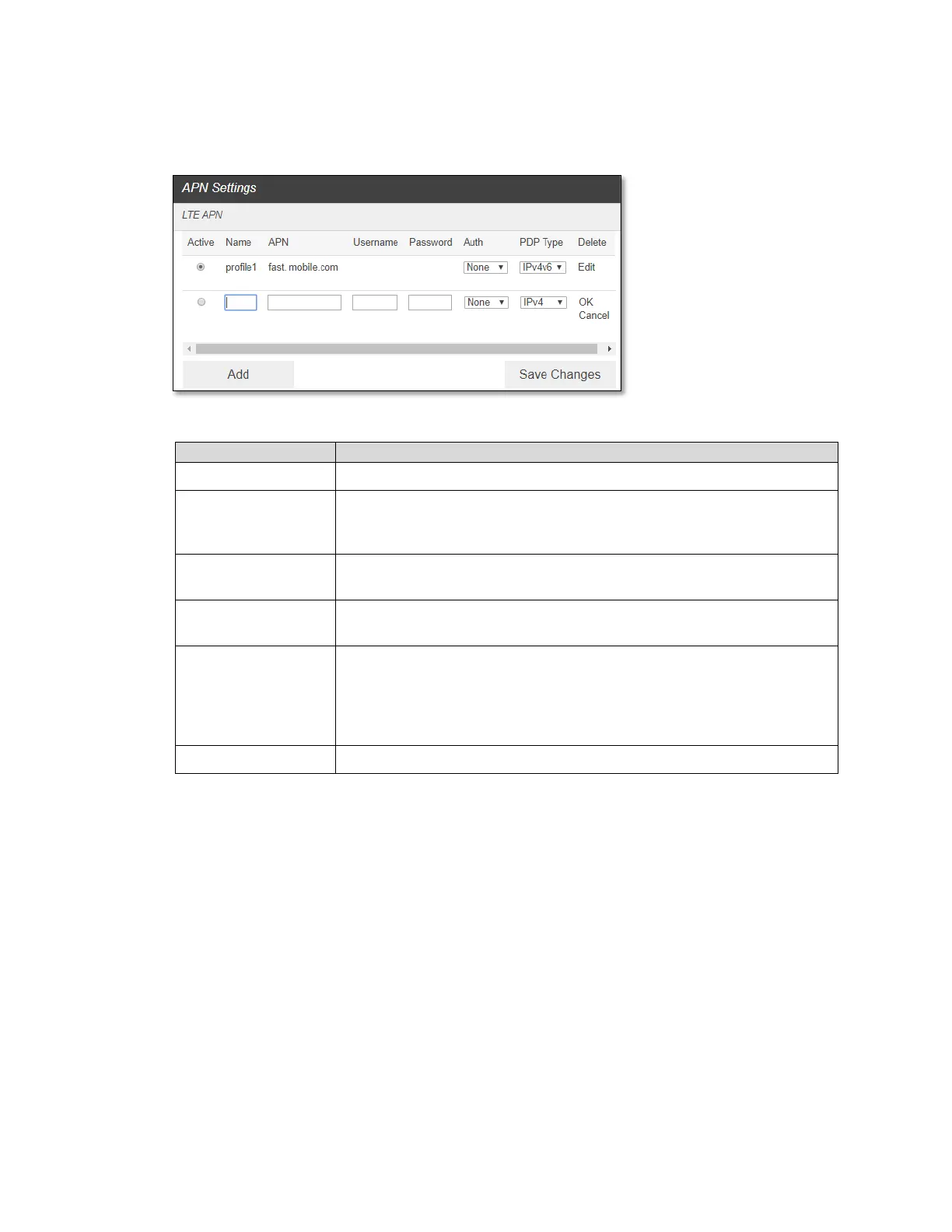
To add a new APN, follow the steps below:
1. Click Add to access the following page.
2. Enter the related parameters as described in the following table.
The Access Point Name (APN) is the name to set up a connection to
the gateway between your service provider’s cellular network and the
public Internet.
Username is used to obtain authentication from the ISP when the
connection is established.
Password is used to obtain authentication from the ISP when the
connection is established.
Password Authentication Protocol (PAP) provides a simple method
without encryption for the peer to establish its identity using a 2-way
handshake. Challenge-Handshake Authentication Protocol (CHAP) is
used to periodically verify the identity of the peer using a 3-way
handshake.
PDP Type must be selected. IPv4, IPv6, IPv4v6.
3. Click Save Changes to add the new APN.
Additional APN Options
- To select APN to use, click Active circle, then click Save Changes.
- To edit APN info, click Edit, change the settings, and then click OK.
- To delete APN, click Delete.
CAUTION! Changing APN information could result in connection failure. Please contact
your service provider before changing APN only when needed.
- SIM
- SIM Pin Lock
The SIM PIN Lock allows you to lock the SIM (Subscriber Identity Module) card in your
device for additional security. If locked, the PIN code must be entered before the device can
connect to the Internet whenever you power on your router.



 To Next Page