6
Accessing the Network
Work effectively at your home or office with reliable broadband speed that the 5G and LTE
service provides. You can connect to the internet at speeds fast enough to keep up to date on
all your email correspondence, download attachments, and access your corporate intranet.
Using Your CG890 for the First Time
System Requirements
Your computer, tablet, or other wireless devices need Wi-Fi capability and Internet browser
software only. Your CG890 is compatible with most major operating systems and the latest
versions of browsers.
Installing the SIM Card
Your SIM (Subscriber Identity Module) card is a small rectangular plastic card that stores
important information about your wireless service and activation plan.
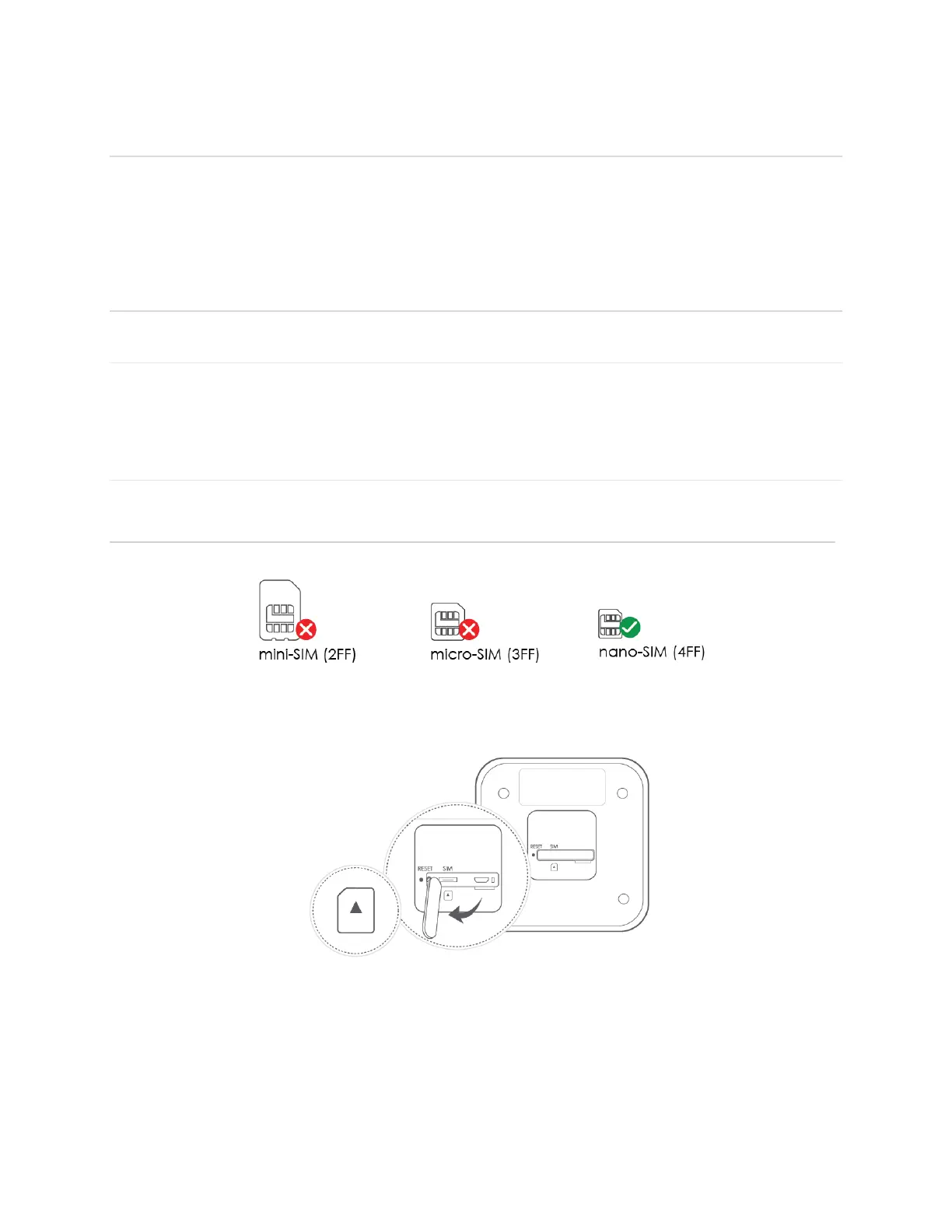
1. Prepare appropriate SIM card size.
2. Open the rubber cover on the bottom of the device, insert the SIM card with a proper
direction shown on the device until it clicks.
* To remove the SIM card, press it down once gently. The SIM card will pop out.
IMPORTANT! Do not bend or scratch your SIM card. Avoid exposing your SIM card to static
electricity, water, or dirt. Whenever you insert or remove the SIM card, ensure your CG890 is
powered off and is not connected to any power source. Never use tools, knives, keys, or any
type of object to force the door open or to remove the SIM card.



 To Next Page