21
Device
- Preferences
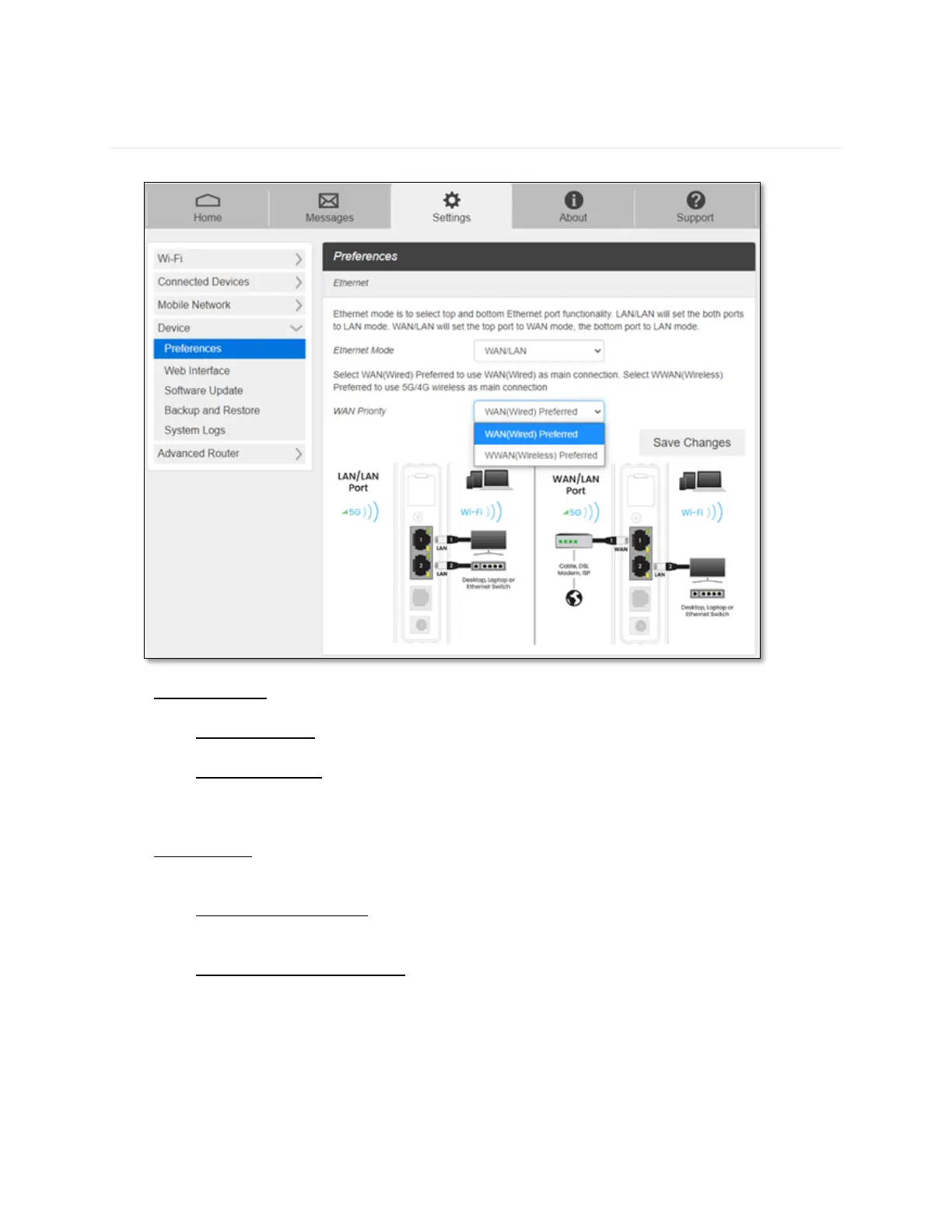
- Ethernet Mode: CG890 has two Ethernet ports. The top and bottom Ethernet Ports can be
set as LAN/LAN mode (default) or WAN/LAN mode.
- LAN/LAN mode: Default setting. CG890 will provide internet connection (LAN) to
both Ethernet Ports.
- WAN/LAN mode: CG890 will provide WAN connection to the top Ethernet Port.
Users can connect Ethernet cable from other internet service provider (for example,
landline ISP modem) to the top Ethernet Port.
- WAN Priority: This option appears only when Ethernet Mode is set to WAN/LAN mode to
decide which connection to be used primarily. If the primary connection fails, it will be
switched to the secondary connection.
- WAN(Wired) Preferred: CG890 will provide internet connection primarily from the
WAN port connection (Other modems connected to CG890) to its Wi-Fi and LAN
networks.
- WWAN(Wireless) Preferred: CG890 will provide internet connection primarily from
your wireless service providers to its Wi-Fi and LAN networks.



 To Next Page