vision
Snack Plus/Easy Combo
//
Vending
MNP86V03GBV00 Date: 2010/06/14 Rev. 0 PAGE 34 OF 62
The display shows the value of the total audits.
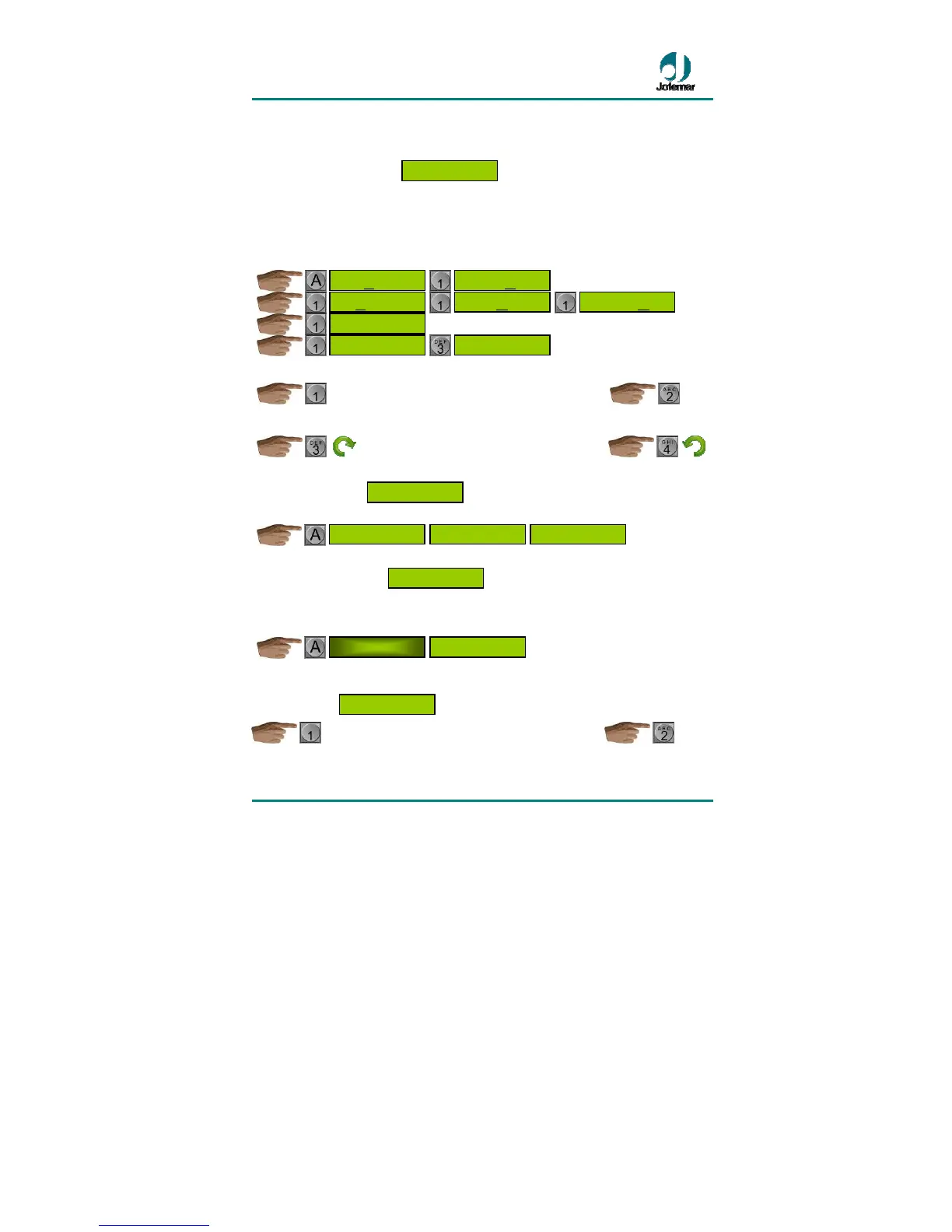
[05] SETTING THE CLOCK
At this address you can program from minutes to years and even chose the format used
to display time on the display. The setting you can change at any given time will be
blinking.
The data that can be programmed appear on four windows.
The setting is changed.
………………………………………………………….
The value of the chosen setting is changed by increasing or decreasing it.
……………………………………………….............
[06] FAULT REVIEW
The display will show the machine’s general faults.
[07] FAULT RESETTING
The machine’s general faults and the temperature expired product marks are reset. (To
reset faults in the J-2000 compact consult the compact manual). The display will blink
to indicate this.
[08] MANUAL OPERATION OF MOTORS AND CHECKS OF MACHINE
COMPONENTS
………………………………………………………….
The available options are as follows:
CHECKING MOTORS
OF THE MACHINE
CLEARING ALL
FAULTS
CLEARING ALL
FAULTS
CLEARING ALL
FAULTS
FAULT
CHECKING
KEYBOARD
OK
COIN MECANISM
OK
FAULT
CHECKING
AM-PM CLOCK 24 H CLOCK
THURSDAY
DAY-MONTH-YEAR
14-07-08
DAY-MONTH-YEAR
14-07
-08
DAY-MONTH-YEAR
14
-07-08
HOURS:MINUTES
10:42
HOURS:MINUTES
10
:42
SETTING OF
THE CLOCK


 To Next Page