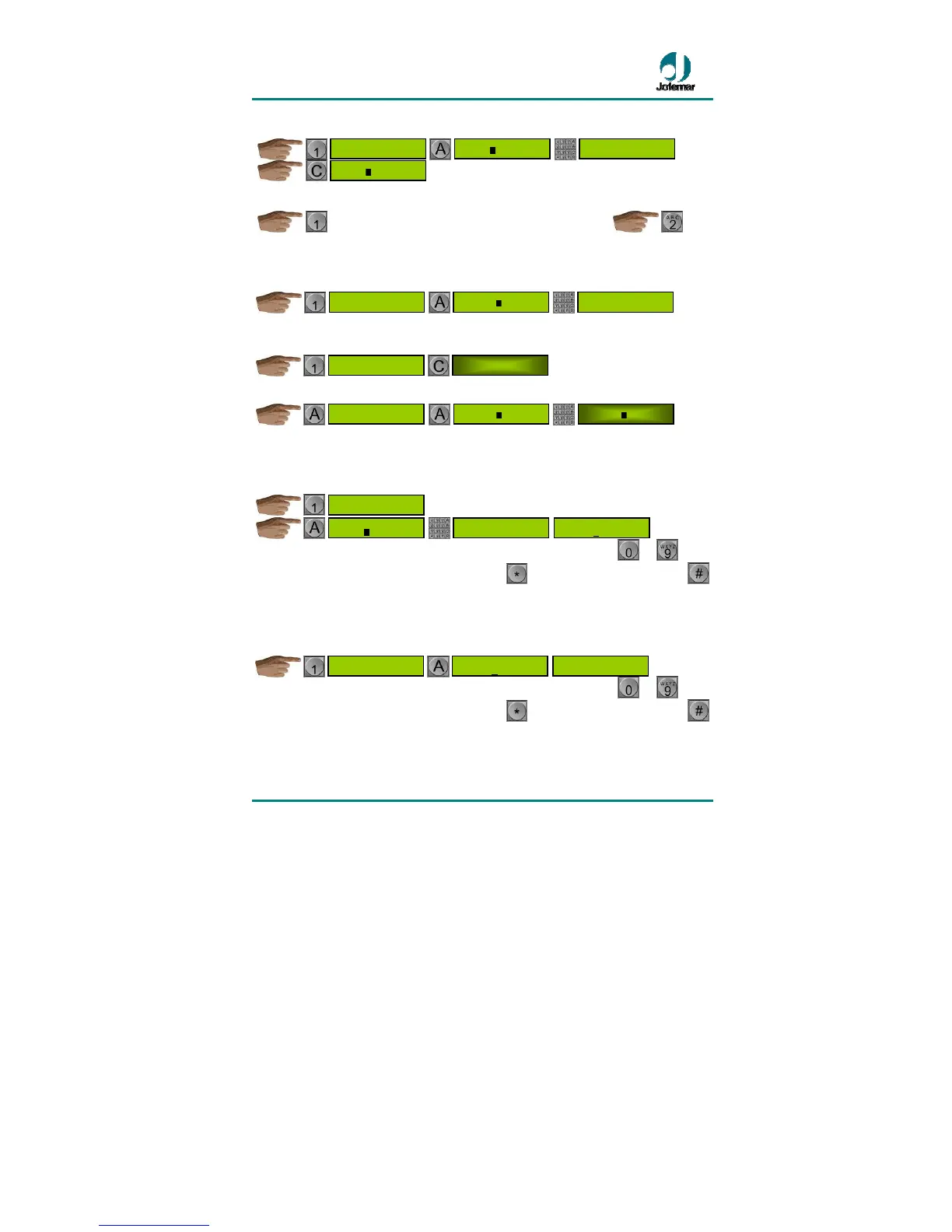
• Displaying the expiry dates programmed for each product:
Access the channel number selection menu. Once you have entered a selection
number, the display will show the expiry date programmed for that number.
• Deleting the expiry dates for each product:
Delete all programmed product expiry dates.
Access the menu where you choose the selection number where you can choose the
products whose expiry date will be deleted.
• Programming the expiry date for each channel:
Enter the date programming menu (day – month). Once you have entered the date
correctly, you will access the menu to choose the channel number where you can
select all the channels to be programmed with the date you have previously entered.
You can choose the channel by entering the 3 digits using the keys to or by
moving from one channel to the next using key
to move forward or using key
to move backward.
• Displaying the expiry dates programmed for each channel:
Enter the menu where you choose the channel number. Once you have entered a
selection number, the display will show the expiry date programmed for that channel.
You can choose the channel by entering the 3 digits using the keys
to or by
moving from one channel to the next using key
to move forward or using key
to move backward.
• Deleting the expiry dates for each channel:
Delete all programmed channel expiry dates.
DAY-MONTH
xx-xx
*- #- A-CHOOSE
X
XX
EXPIRATION DATE
PER CHANNEL
*- #- A-CHOOSE
X
XX
DAY-MONTH


 To Next Page