CK721-A Network Controller Hardware Installation
24-10025-237 Rev. –
8
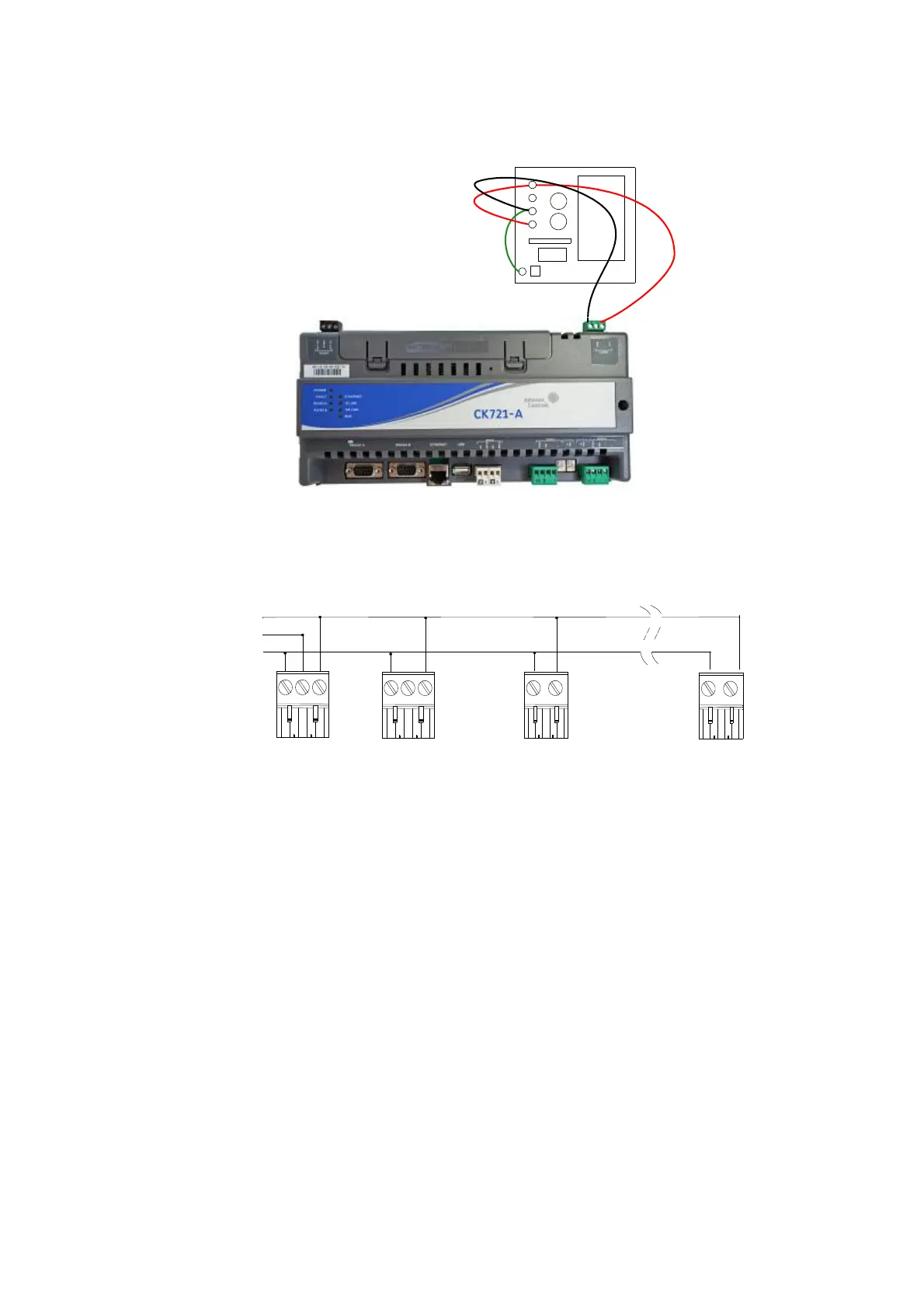
Figure 6: Power Wiring in Small Enclosure
For power wiring in the large enclosure, use the pre-wired power cable assembly provided with
the CK721-A. Connect the wires to the existing cable assembly from the power supply as shown
in Figure 7.
Figure 7: Power Wiring in Large Enclosure
BASIC COMMISSIONING
The CK721-A intelligent controller provides a text-based user interface that you must use to configure
a CK721-A for operation.
Important Notes
• As a security precaution, Johnson Controls strongly suggests changing the default controller
password during the installation process.
• The CK721-A panel must be set up first using Terminal Emulation, before setting up the
panel from the server. Once the IP addresses are assigned at the panel, they cannot be
changed from the server.
• For identification purposes, the controller’s IP address and netmask must match those
specified at the server.
• Do not attempt modifications to the controller database during controller database download
operations.
Connector of
CK721-A
Connectors of
the last device
Connectors of the 2nd
device: RDR2S-A,
I8O4, RDR8S, I32O16
+24VDC
Chassis Ground
COM
From power
supply



 To Next Page
 Loading...








