5292230-USG-B-0718
4 RRS Economizer Controller Quick Start Guide
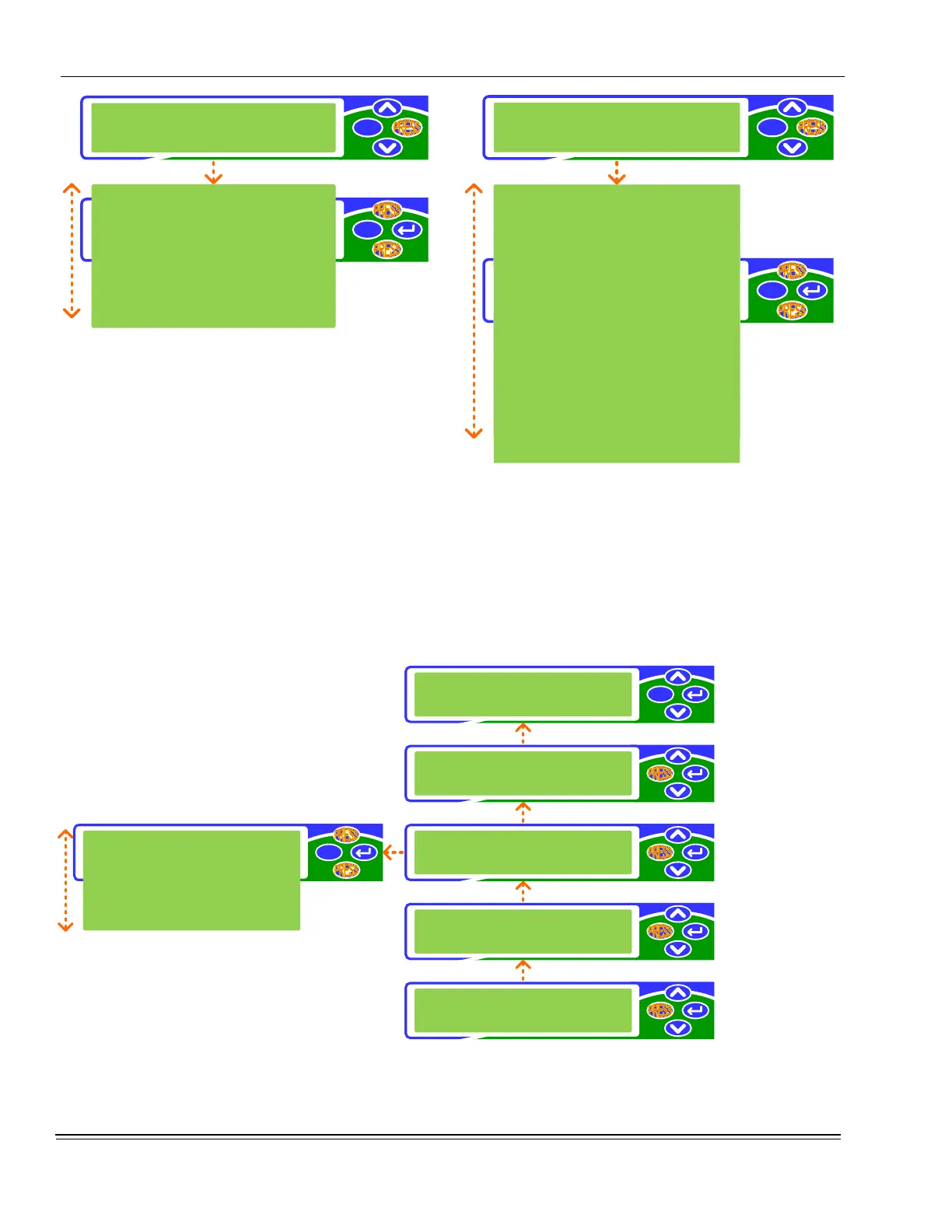
FIGURE 5 - Example Of Level 3 Options Under The
Setpoints Selection
Again, each press of the (enter) button navigates to the
next navigation level.
In the example illustrated above: With the > cursor at the nav-
igation Level 2 Set-points selection, a press of the (enter)
button navigates to the Details section, navigation Level 3 of
the parameter menu.
Once again, presses of the (scroll up) and (scroll down)
buttons move the > cursor and scroll through the selections in
the section of the display parameter menu at the current nav-
igation level.
FIGURE 6 -
Example of specific parameters under
the Damper Min Pos selection
2-line scrolling, where the individual parameter name is listed
on the top line of the display and the parameter setting/value
is listed on the bottom line of the display, is the greatest num-
bered navigation Level that can be reached in each menu
section.
FIGURE 7 -
Example Summary
esc
esc
Unit
>Setpoints
Supply Temp Stpt
Supply Temp
>Damper Min Pos
Damper Command
High OA Shutoff
Outdoor Temp
esc
esc
Supply Temp
>Damper Min Pos
Supply Temp Stpt
55.0 F
Supply Temp
71.8 F
Damper Min Pos
25%
Damper Command
25.0%
High OA Shutoff
75.0 F
Outdoor Temp
71.8 F
esc
esc
esc
esc
esc
esc
Unit
>Setpoints
Zone
Control
Service
#1
Alarm description
Update
>Details
Unit
>Setpoints
Supply Temp
>Damper Min Pos
Damper Min Pos
25%
Level 1
Main Menu
Level 2
Level 3
Level 4
(Parameter
Adjustment)







 To Next Page