WT-4000 Series Pneumatic-to-Direct Digital Control (DDC) Room Thermostats Installation Instructions
16
The start time of each schedule part is automatically
the end time of the previous schedule part. For
example, when the occupied schedule is 6 A.M. to
6 P.M., the Occupied Mode starts at 6 A.M. and the
Unoccupied Mode starts at 6 P.M. Figure 18 and
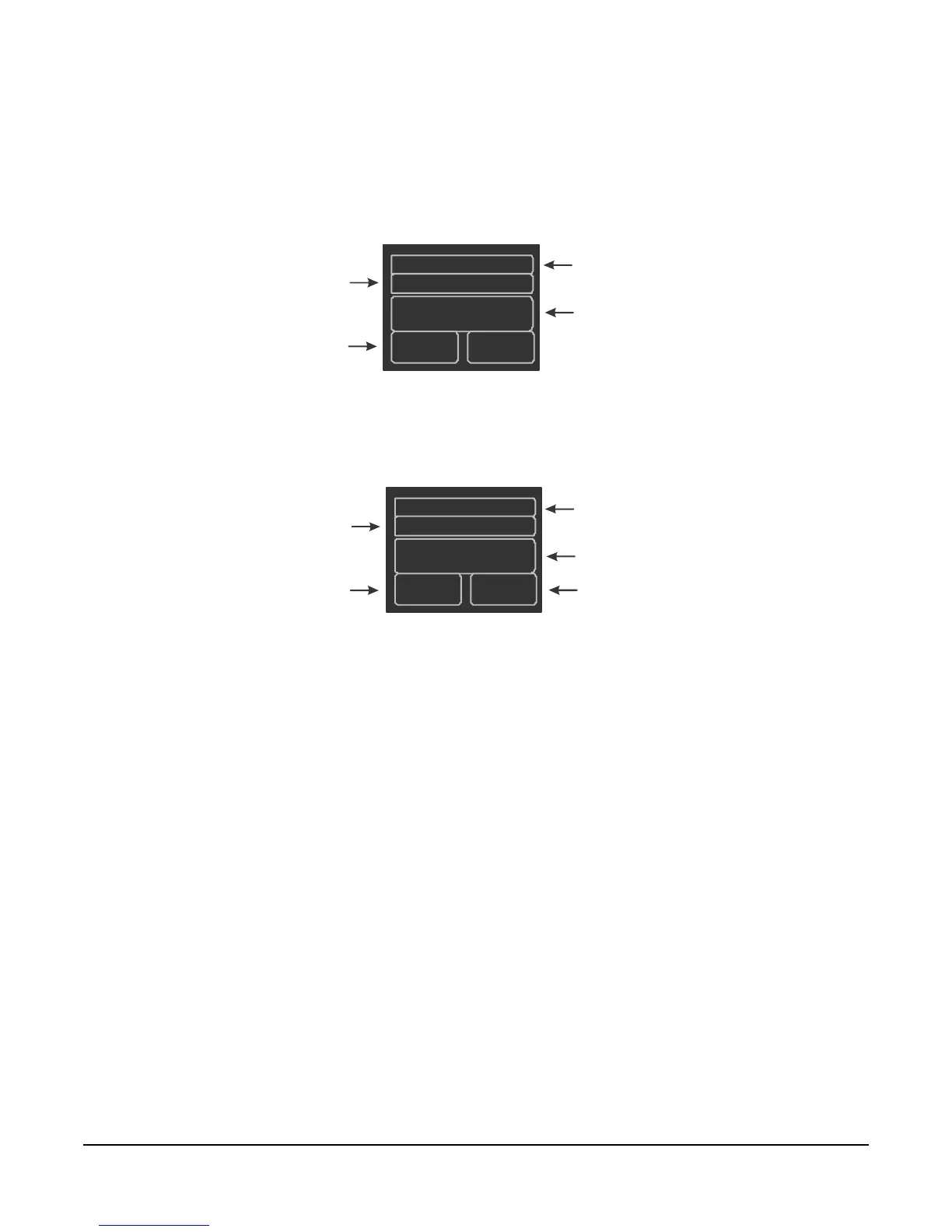
Figure 19 illustrate the Occupied and Unoccupied
Mode schedule setup.
Weekday1
Occupied
07:00
70
Setpoint Temperature
(Defines the Occupied Mode
setpoint temperature of the part.)
Weekday 1, Weekday 2,
Weekend 1, or Weekend 2
(Defines which part is being edited.)
Occupied or Unoccupied
(Defines the occupancy
mode of the part.)
Time in 24-Hour Format
(Defines the start time of the part.)
FIG:occpd_mde
Figure 18: WT-4000 Series Pneumatic-to-DDC Room Thermostat
Schedule Setup Screen for Occupied Mode
Upper Temperature Limit
(Defines the Unoccupied Mode
upper temperature limit of the part.)
Weekday 1, Weekday 2,
Weekend 1, or Weekend 2
(Defines which part is being edited.)
Occupied or Unoccupied
(Defines the occupancy
mode of the part.)
Lower Temperature Limit
(Defines the Unoccupied Mode
lower temperature limit of the part.)
FIG:unoccpd_mde
Weekday2
Unoccupied
18:00
85 55
Time in 24-Hour Format
(Defines the start time of the part.)
Figure 19: WT-4000 Series Pneumatic-to-DDC Room Thermostat
Schedule Setup Screen for Unoccupied Mode







 To Next Page