Step 7 - Press ST AR T
Using the numerical k eypad press STAR T to begin your exercise program.
As you step, watch your selected exercise mode on the control panel.
Illuminated indicator ligths will monitor your progress.
Note: You can adjust your maximum work levels up or down anytime dur-
ing the ex ercise period.
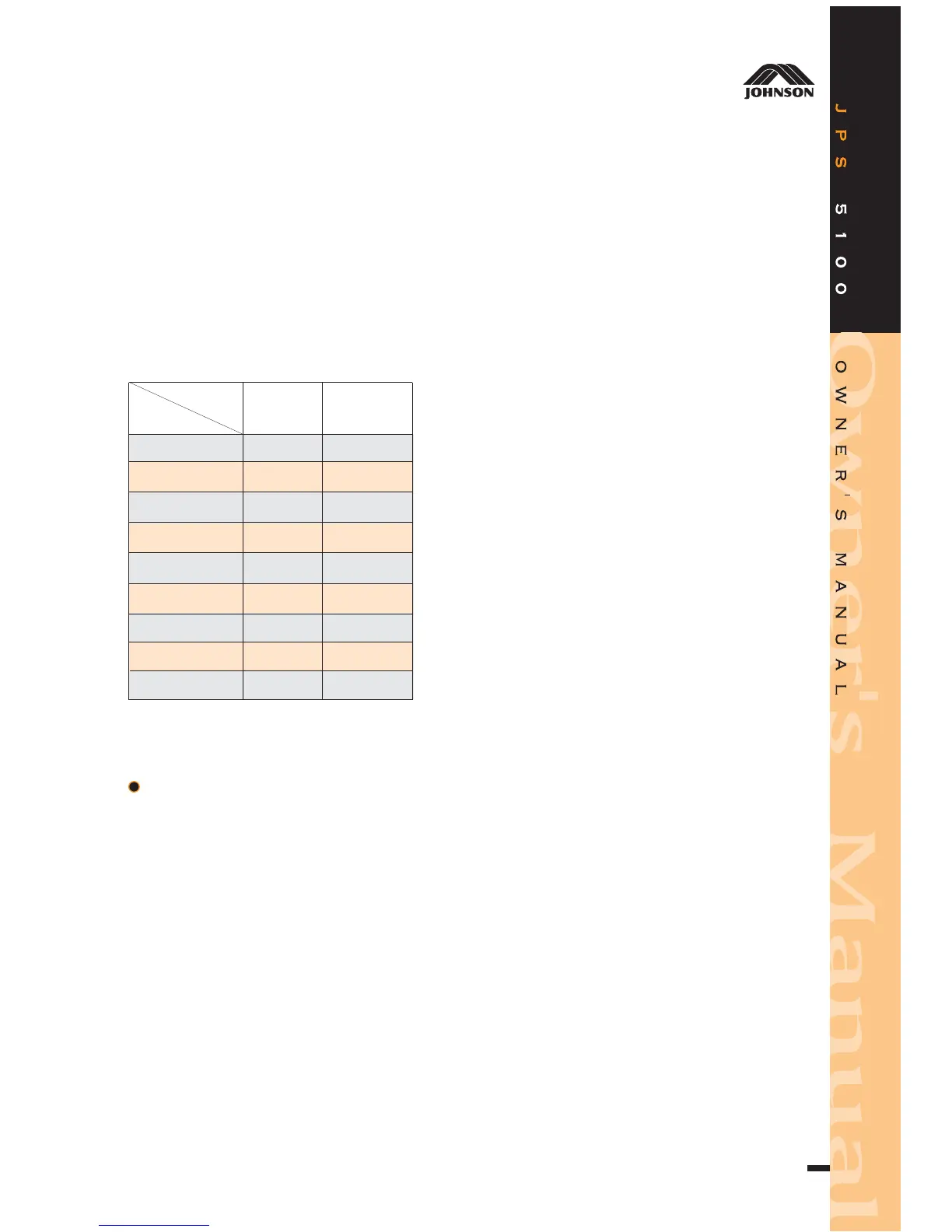
WORK LEVEL/SPM CHART
L1
L2
L3
L4
L5
L6
L7
L8
L9
MIN MAX
32SPM
38SPM
44SPM
50SPM
56SPM
62SPM
68SPM
74SPM
80SPM
74SPM
80SPM
86SPM
92SPM
98SPM
104SPM
110SPM
116SPM
122SPM
STEP RATE
LEVEL
MANUAL MODE
Step 1 - Start Pedaling
Put on the plug and turn on the switch, then press RESET and step on your
stepper to start stepping. If you wish to monitor heart rate, simply wear
Polar
TM
belt or ear clip.
Step 2 - Press MANUAL MODE
Using the numerical k eypad, press the MANUAL MODE key.
Note:Only one exercise mode may be in opertion at a time.
Step 3 - Press ENTER
Step 4 - Selecting L ength of Time for Exercise
Using the numerical k eypad, enter the length of time in minutes that you
wish to ex ercise. P ress ENTER.
Step 5 - Input Your Weight
7



 To Next Page