— 14 —
CONFIRMING THE CHANNEL SETTING
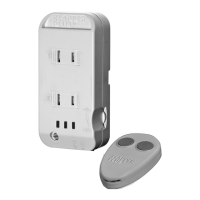
You can conrm that the Clapper Base unit and the Remote
are set to the correct channel.
This is easy because it happens automatically each time
you press one of the remote’s buttons. The Clapper Plus
base will display (after 4 seconds) the channels by ashing
the Red lights on the Clapper.
To allow you to see which channel the Clapper Base and
the remote are set at, the Clapper Red indicator lights ash
once for each channel. For channel 1, the lights ash once,
for Channel two the lights ash twice, etc.
The Middle light shows the channel the Clapper Base is set at
The Right light shows the channel the Remote is set at.
Example 1; Press, hold and release a remote button
(wait 4 seconds) and if both the Middle and Right red
lights ash three times, they are both set to channel 3.
Example 2: If the Middle ashes 1 time and the
Right Light ashes 2 times this means the
Clapper Base is set for Channel 1 and the Remote
is set for channel 2. (In this conguration the Remote
will not control the Clapper Base.
Unplugging the Clapper will reset the channel to 1.If you
have more units to set, repeat steps 1 through 4.


 To Next Page