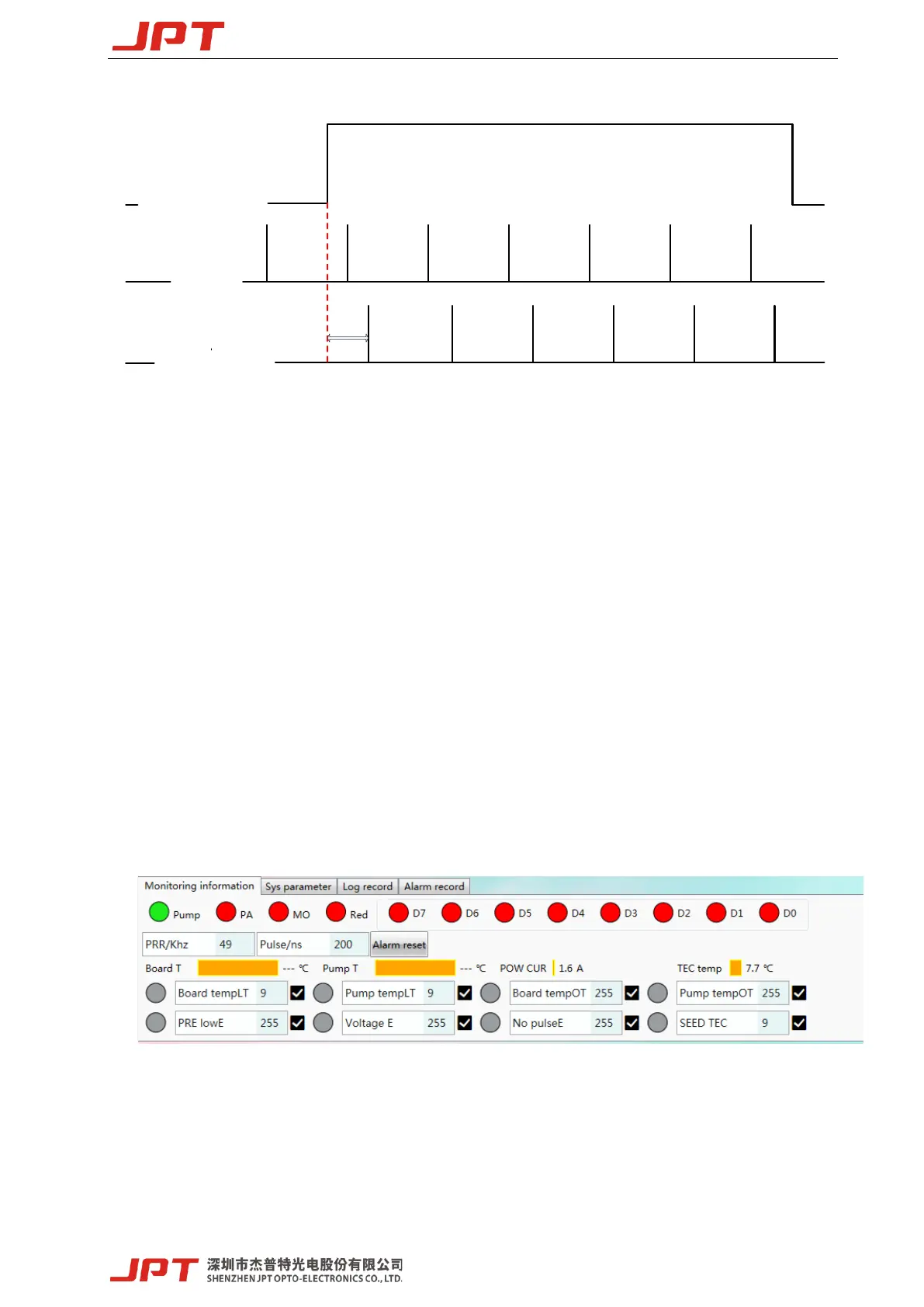
[Internal Frequency]
*T=Duration of pulse period, maximum duration ≤ cut off frequency period
Pin9Lock:Power latch function is enabled if selected, rising edge is effective. Default setting is
not selected.
Pin23Stop:Emergency stop function is enabled if selected, low level is effective. Default setting
is not selected
Fan Speed Control:The laser fan speed will be control according to the value of the built-in
temperature sensor. If not selected, the fans will run at full speed. Default setting is selected.
Note:The parameter setting of E type software takes effect immediately, no need to restart laser.
3.2 Laser monitoring function
The laser running status and alarm record can be read by E type software.
Figure 24 laser running status and alarm record
1) Status monitoring
Pump indicator light: Monitor whether the pump of the laser is currently in normal working state,
which is green under normal conditions, and red light if abnormal alarm occurs.




 To Next Page