– 11 –
ENGLISH
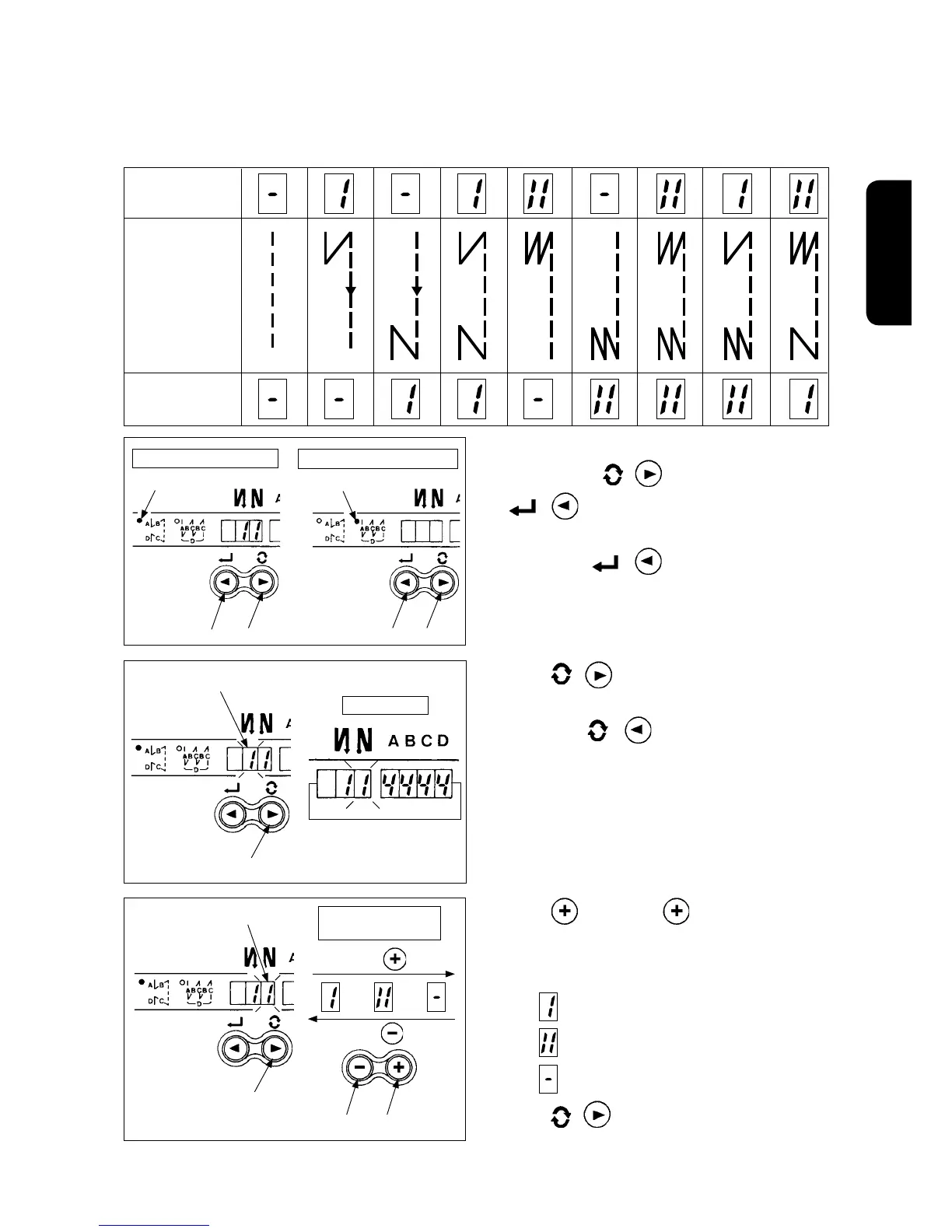
3) Press switch
4
or
switch
3
and select
the reverse stitching pattern.
Reverse stitching patterns and displays are as
follows.
: Reverse stitching
: Double reverse stitching
: Without reverse stitching
4) Press
/ switch
2
to make reverse stitch
-
ing at end display
7
ash on and off, and set the
pattern in the same way as step 3).
[ Setting procedure of the reverse stitching ]
1) Hold pressing
/ switch
2
, and press
/ switch
1
to select the reverse stitch-
ing pattern.
(Every time
/ switch
1
is pressed, re
-
verse stitching pattern/overlapped stitching pat
-
tern change over alternately.)
Operating procedure of the sewing pattern
(1) Reverse stitching pattern
Reverse stitching patterns below can be set by using the operation panel.
Contents of reverse
stitching selection
updating with swith
4
updating with swith
3
Overlapped stitching pattern
Reverse stitching pattern
Reverse stitching
at start display
Sewing pattern
Reverse stitching
at end display
D
C
A
B
D
C
A
B
A
B B
A
A
B
A
B
D
C
D
C
A
B
D
C
D
C
D
C
D
C
D
C
A
B
A
B
4
3
⇔
2
1
2
1
LED lights Up. LED lights Up.
6
Flash
2
2
7
Flash
2) Press / switch
2
to make reverse stitch
-
ing at start display
6
ash on and off.
Every time
/ switch
2
is pressed, the
ashing position shifts in the right direction.
(Caution) The sewing machine does not start in the
ashingstate.
Reverse stitching patterns that can be set
Shift direction



 To Next Page