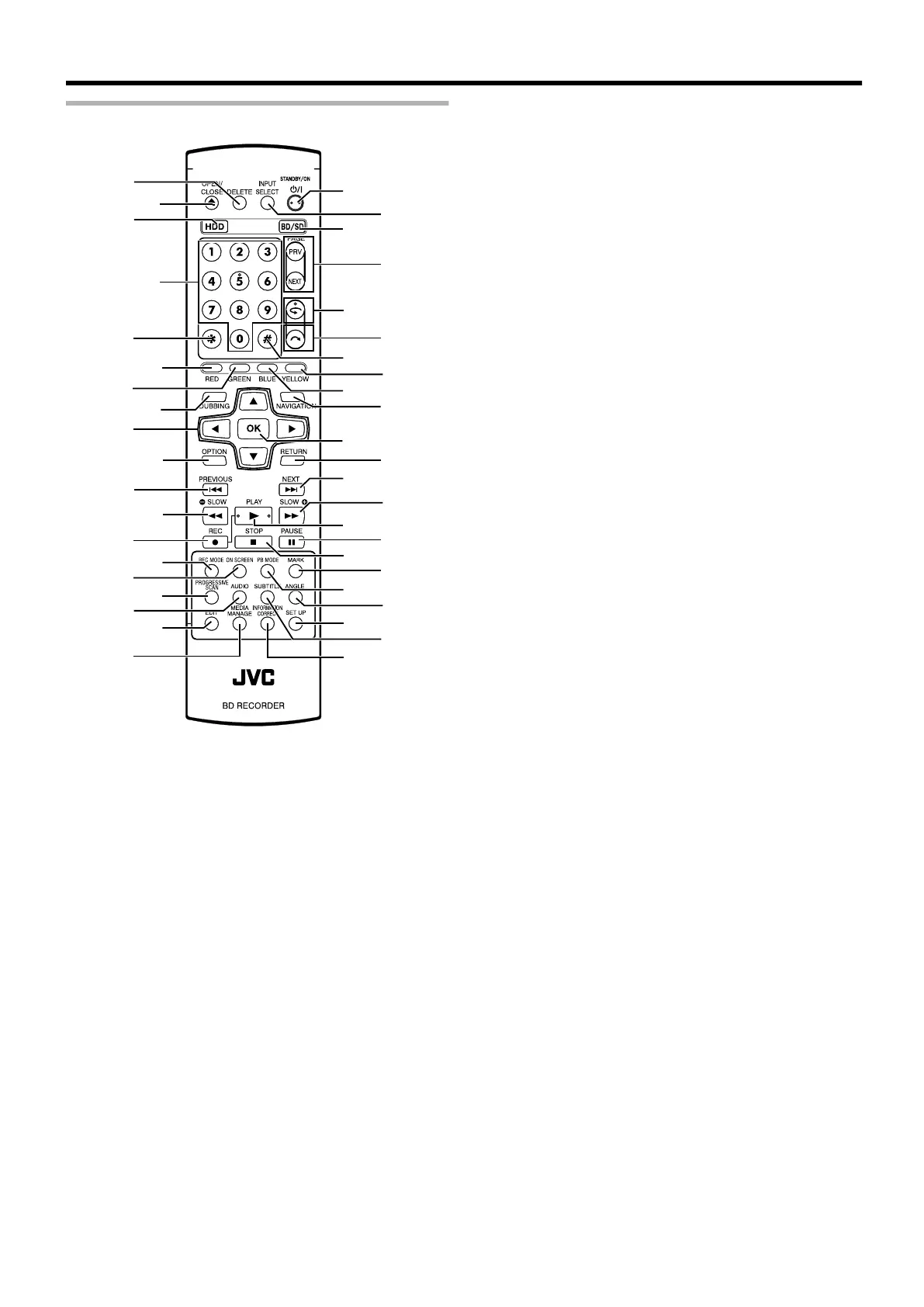
Remote control
.
c
e
f
T
W
U
X
C
A
D
g
d
h
i
j
n
k
m
p
o
Y
B
V
b
a
G
Z
I
J
K
L
H
P
S
M
E
F
N
O
Q
R
l
A [DELETE]
Deletes a title or characters.
B [ M ]
Opens/closes the disc tray.
C [HDD]
For operating the HDD.
D [1]-[9]
For entering characters.
E [Z]
For entering characters.
F [RED]
Enabled when the color button (red) is displayed.
G [GREEN]
Enabled when the color button (green) is displayed.
H [DUBBING]
Displays the dubbing menu screen.
I [ J / K / H / I ]
The cursor can be moved to select an item.
J [OPTION]
Displays the option screen.
K [ S ]
Move to the chapter just before the current chapter.
L [ O ]
Fast reverses the video and starts slow playback.
M [ R ]
Press the [ R ] and [ I ] buttons together to start recording.
N [REC MODE]
For checking the recording mode settings and amount of time
remaining.
O [ON SCREEN]
Displays information on the screen.
P [PROGRESSIVE SCAN]
Switches the resolution of the image output.
Q [AUDIO]
Switches the playback audio.
R [EDIT]
Displays the editing menu screen.
S [MEDIA MANAGE]
Displays the media management menu screen.
T [ A ]
For turning On/Off the power.
U [INPUT SELECT]
Switches the external input signals (HDV/DV, L1).
V [BD/SD]
For operating BD/DVD or SD.
W [PAGE PRV][PAGE NEXT]
Returns to the previous page. Or advances to the next page.
X [ w ]
Move the playback position slightly backwards.
Y [ v ]
Advance the playback position slightly.
Z [#]
For entering characters.
a [YELLOW]
Enabled when the color button (yellow) is displayed.
b [BLUE]
Enabled when the color button (blue) is displayed.
c [NAVIGATION]
Displays the playback navigation screen.
d [OK]
Confirms a selection or entry.
e [RETURN]
Returns to the previous screen without applying the selection
or entry.
f [ T ]
Move to the next chapter.
Getting Started
15



 To Next Page
 Loading...


