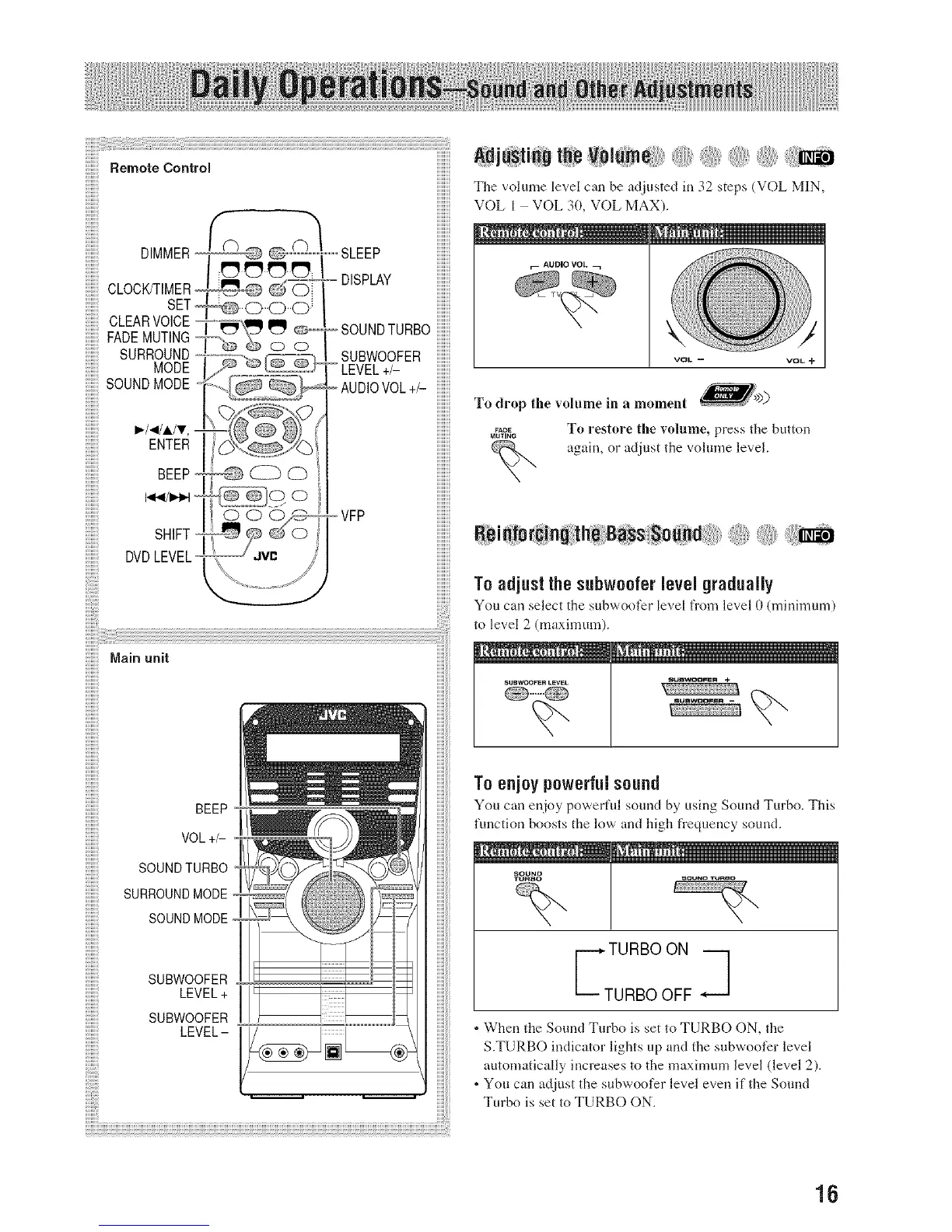
_¢ SLEEP. "",'_'DISPLAYDIMMER
CLOCK/TIMER
SET
CLEAR VOICE --,o
FADE MUTING I _\g_l _ o----SOUNDTURBO
SURROUND [-'_-',_ _/=_'_ SUBWOOFER
SOUND ° 2%%;L+,-
_-/._/i/v, '
ENTER
7 ',...........YG
BEEP _S _ 0
O 00_ -VFP
SHIFT 0
DVDLEVEL.,v0 ,i
Main unit
BEEP
VOL +/-
SOUND TURBO
SURROUNDMODE
SOUND MODE
SUBWOOFER
LEVEL + I
SUBWOOFER
LEVEL -
Tile vohune level can be adjusted in 32 steps (VOL MIN,
VOL I VOL 3D, VOL MAX).
AUDIO VOL_ _
To drop the volume ill a mome __>))
,_,_Y& To restore the volume, press the button
again, or adjust the volume level.
To adjusl lhe subwooler level gradually
You can select the subwoof_r level from level D (minimum)
to level 2 (ma×imum).
SUSWOOFERLEVEL
,<r...... +j
To enjoy powerful sound
You can enjoy powerflfl sound by using Sound Turbo. This
function boosts the low' and high frequency sound.
_URBO
TURBO ON i
URBO OFF -',i
, When the Sound Turbo is set to TURBO ON, the
S.TURBO indicator lights up and the subwoofer level
automatically increases to the maximum level (level 2).
, You can adjust the subwoofer level even if the Sound
Turbo is set to TURBO ON.
16


 To Next Page