36
ENGLISH
4
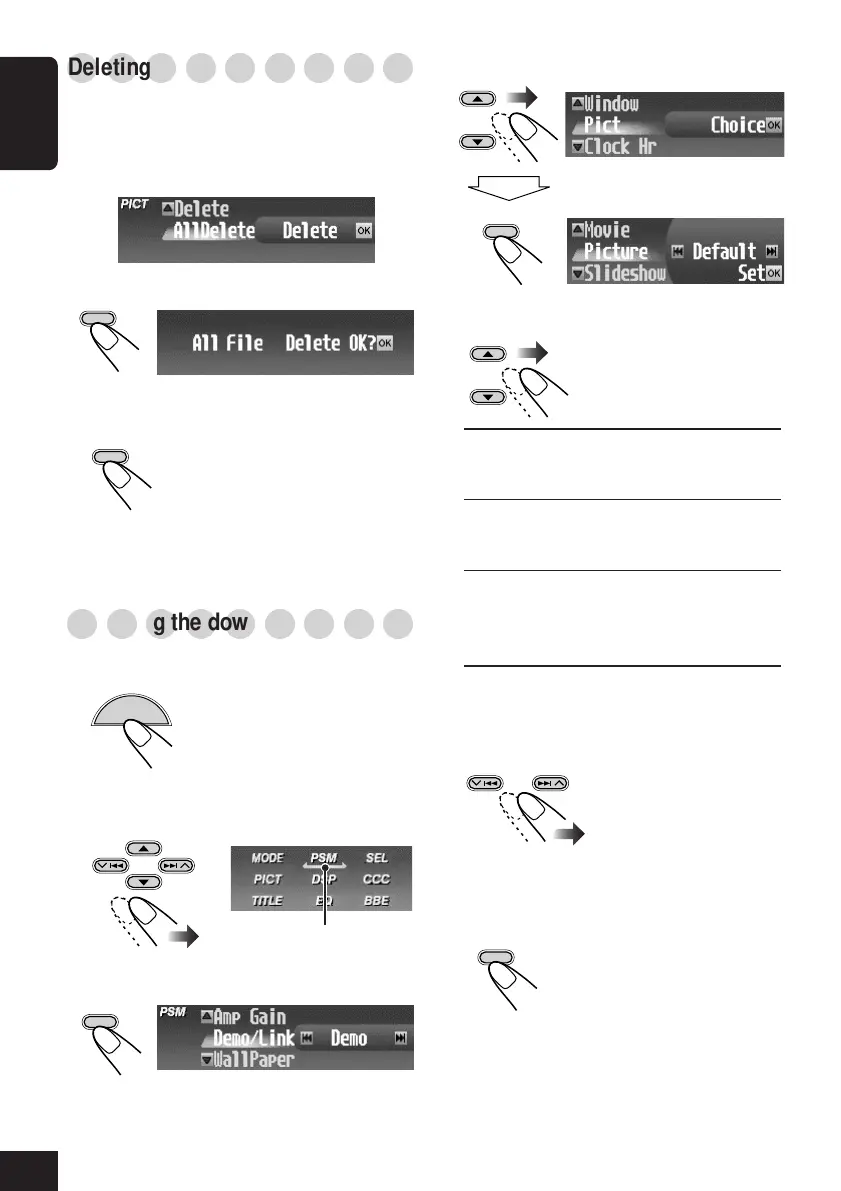
Select “Pict.”
5
Select the graphic screen type—
“Picture,” “Movie,” or “Slideshow.”
Picture: One of the stored pictures is
activated for your graphic
screen. \ Go to step
6
.
Movie:
Your stored animation is
activated for your graphic
screen. \ Go to step
6
.
Slideshow: All stored pictures are activated
and shown in sequence for your
graphic screen (UserSlide). \
Go to step
7
.
6
If you have selected “Picture” or
“Movie” in the previous step, select the
file you want.
• Select “Default” to activate the
preinstalled file.
7
Finish the setting.
○○○○○○○○○
Deleting all files
You can delete all stored files (pictures and
animation) at a time.
1
Repeat steps
3
to
6
on page 32 (in step
6
select “AllDelete”).
2
Confirm your selection.
The confirmation screen appears.
3
Delete all stored files.
When all files are deleted, the
PICT Menu appears again.
To exit from the Menu operation, press
MENU again.
○○○○○○○○○
Activating the downloaded files
1
While playing any source...
The Main Menu appears on
the display.
2
Move the cursor to “PSM” on the Main
PSM Menu.
3
Enter the PSM Menu.
OK
BAND
OK
BAND
OK
BAND
OK
BAND
MENU
OK
BAND
Cursor
32-36_KD-SHX701_f.p65 4/1/04, 1:08 PM36



 To Next Page
 Loading...