48
ENGLISH
○○○○○○○○○
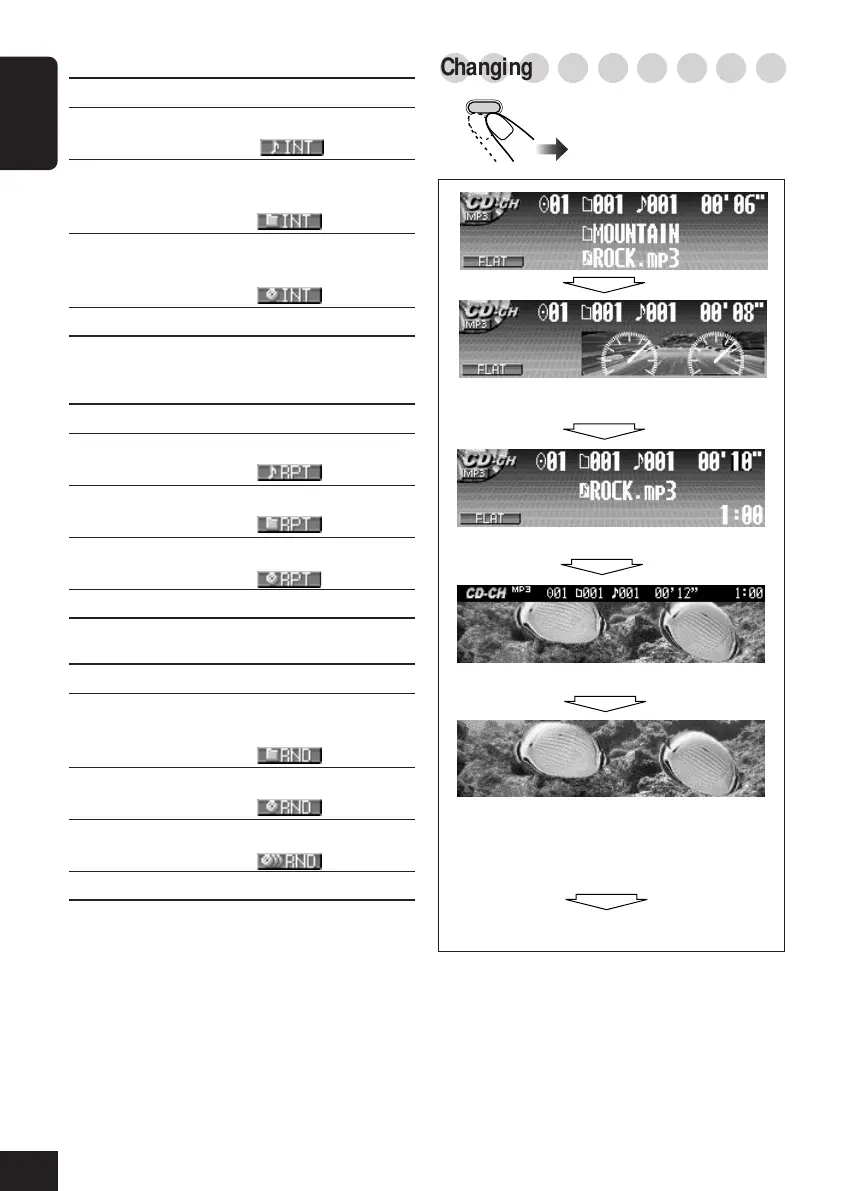
Changing the display pattern
Clock time is displayed.
Goes back to the initial display pattern.
BACK
DISP
*You can use your edited file for graphic screen
(see pages 32 to 36).
Full graphic screen*
(Full graphic screen will be temporarily
changed to the semi-graphic screen when
you operate the unit.)
Semi-graphic screen*
• Intro Scan modes
Mode Plays the beginnings of
Track : All tracks of the current disc.
• While playing, lights up.
Folder*: First tracks of all folders of the
current disc.
•While playing,
lights up.
Disc : First tracks of all discs in the
magazine.
•While playing, lights up.
Off : Cancels Intro Play.
• Repeat Play modes
Mode Plays repeatedly
Track : Current track.
•While playing,
lights up.
Folder*: All tracks of the current folder.
•While playing, lights up.
Disc : All tracks of the current disc.
•While playing, lights up.
Off : Cancels Repeat Play.
• Random Play modes
Mode Plays randomly
Folder*: All tracks of the current folder, then
moves to the next folder and so on.
•While playing, lights up.
Disc : All tracks on the current disc.
•While playing,
lights up.
All : All tracks of all discs in the magazine.
•While playing, lights up.
Off : Cancels Random Play.
* “Folder” can be selected for MP3 discs only.
A window (see page 39) is displayed.
44-48_KD-SHX701_f.p65 4/1/04, 1:06 PM48



 To Next Page
 Loading...