Adjusting the Position
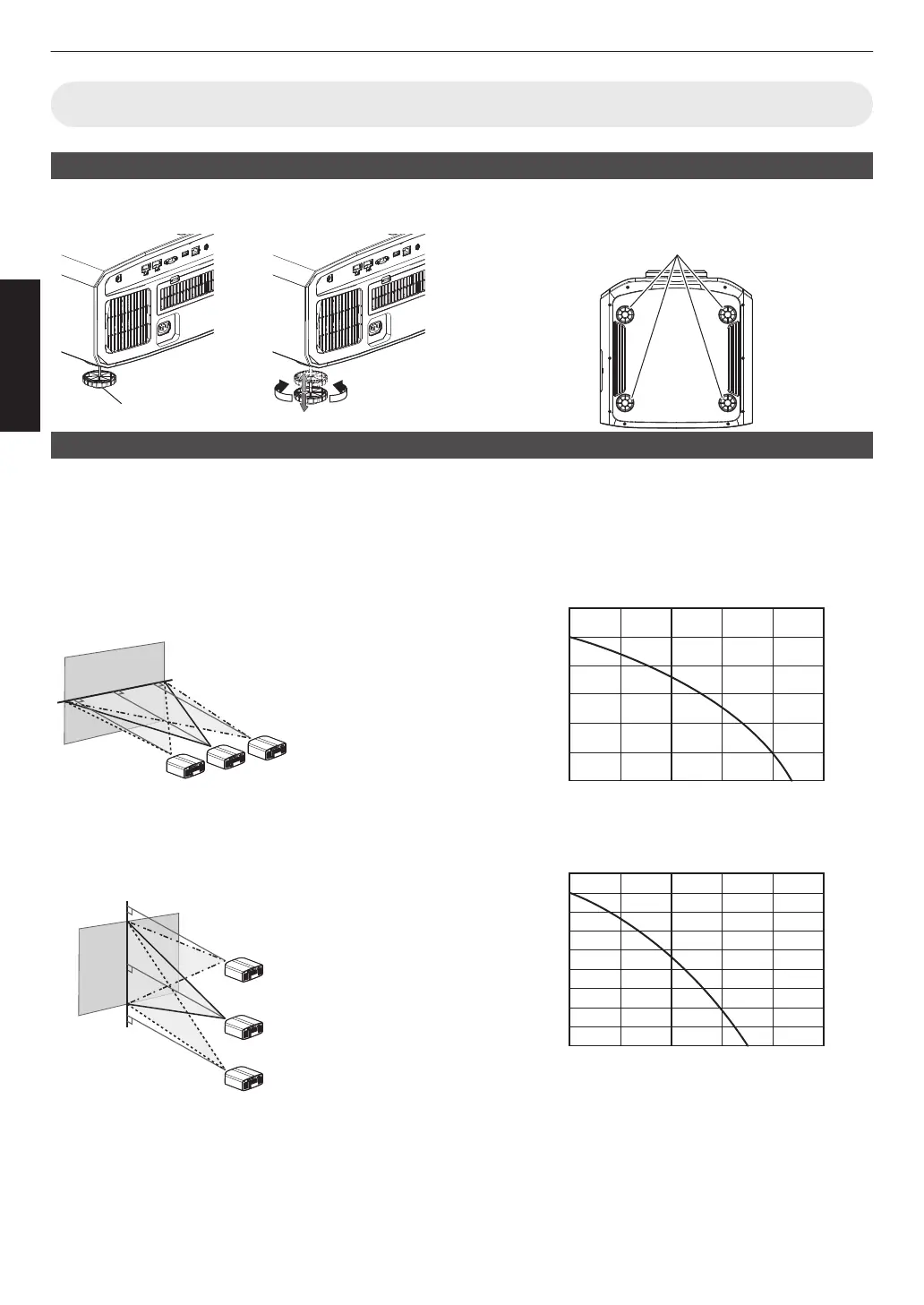
Adjusting the elevation angle of the projector
The height and inclination of the unit (0 to 5 mm) can be adjusted by turning the feet.
Lift the unit and adjust the four feet.
Adjusting the position of the image
By using the lens shift feature of this unit, you can shift the image upward/downward or to the left/right. Set it to your
preferred position.
Æ “Adjusting the Lens According to the Projection Position” (P.
24)
Horizontal Position
Vertical Position: 0% (Center)
Up to about 43% k and 34% u q of the projected
image *
Vertical Position
Horizontal Position: 0 % (Center)
Up
to about 100% k and 80% u q of the projected
image *
* 16:9 image
Lens Shift Range (16:9)
k
120
100
80
60
40
20
0 10 3020 40 50
Amount of horizontal shift (%)
Amount of vertical shift (%)
u q
90
80
60
70
50
40
30
10
20
0 10 3020 40 50
Amount of horizontal shift (%)
Amount of vertical shift (%)
0
The maximum vertical shift varies with the amount of
horizontal
shift. Similarly, the maximum horizontal shift
also changes with the amount of vertical shift.
0
The
values on the graph are intended as a guide. Use
them for reference during installation.
18
Set up



 To Next Page