Filename [MX1S_05Name.fm]
Masterpage:Left+
24 EN
INITIAL SETTINGS
Page 24 Saturday, 30 October 2004 16:18
The following procedure is required if you receive your TV
channels through a cable box (descrambler) and/or if you receive
satellite channels through DBS (Direct Broadcast Satellite)
receiver. The Controller allows the unit to automatically switch the
cable box and/or DBS receiver’s channels during timer recording.
NOTES:
● The Controller is effective for “VCR Plus+ C
3
® Timer Programming”
(墌 pg. 55), or “Manual Timer Programming” (墌 pg. 57).
● When connecting your cable box, refer to its instruction manual.
Installing Controller
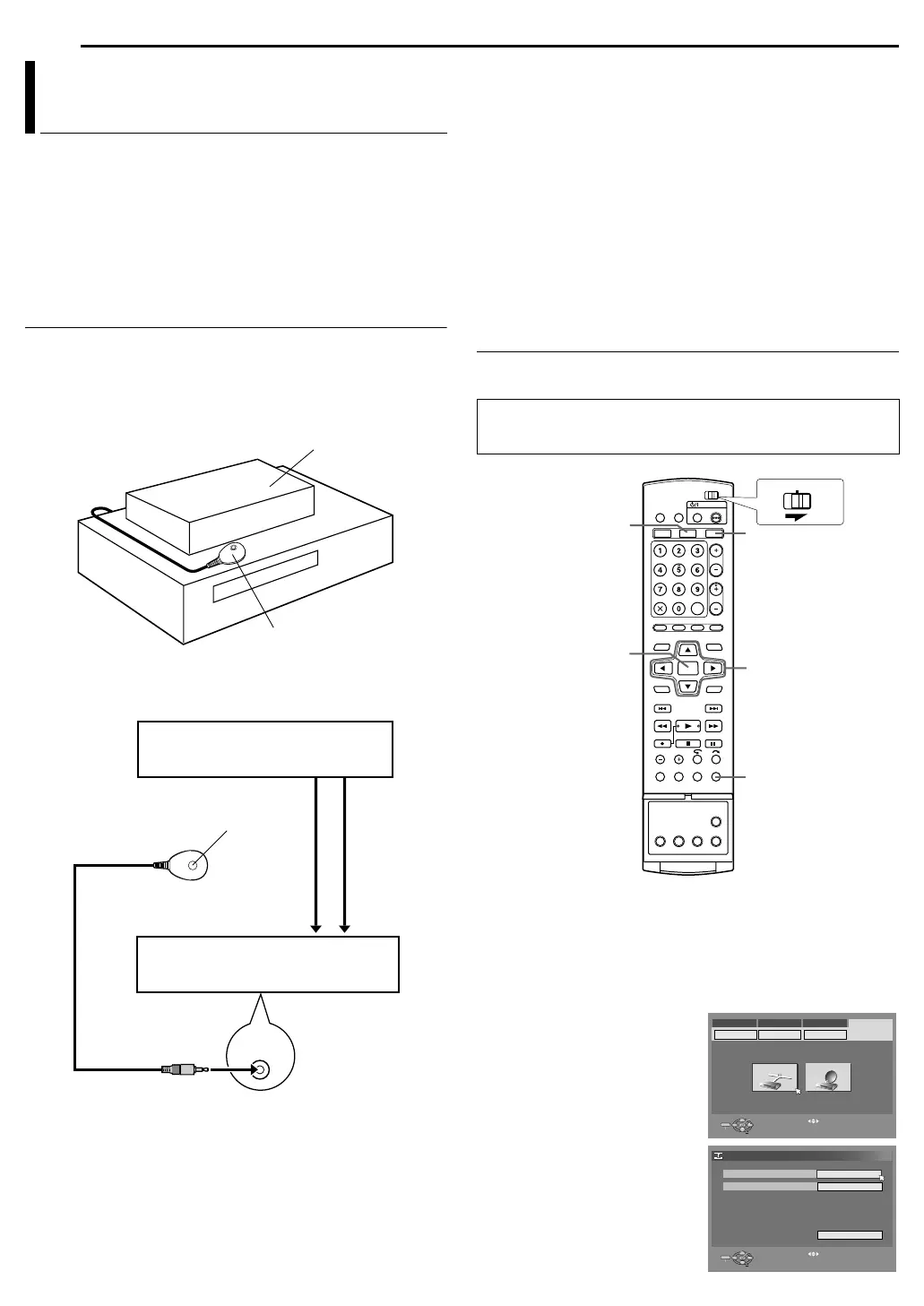
1 If both a cable box and a DBS receiver are used, position the
Controller so its signal reaches the receiving windows of both the
cable box and DBS receiver.
2 Fix securely using the adhesive strip attached on the back of the
Controller.
3 Connect the controller to the unit.
a
If your cable box or DBS receiver does not have audio/video
output connectors
Connect the RF output connector on the cable box or DBS receiver to the
[VHF/UHF IN] (HDD/DVD) connector on the rear of your unit.
If your cable box or DBS receiver has audio/video output
connectors
Connect the audio/video output connectors on the cable box or
DBS receiver to the [AUDIO/VIDEO INPUT] connectors on the rear
of the unit.
● If both a cable box and a DBS receiver are used, it is recommended
that you connect the DBS receiver to your unit’s [AUDIO/VIDEO
INPUT] connectors and the cable box to your unit’s [VHF/UHF IN]
(HDD/DVD) connector.
4 Connect the Controller to the [CABLE BOX] connector on the
rear panel.
Setting Brand And Channel
After installation, set the cable box and/or DBS receiver’s brand and
channels correctly; otherwise, the Controller cannot work correctly.
1 Turn on the cable box and/or DBS receiver.
2 Press HDD or DVD so that the HDD or DVD lamp lights up on
the unit.
3 Press SET UP to access the Main Menu screen.
4 Press we to select “INITIAL SET UP”, then press t.
5 Press we to select “STB SET”, then press t.
6 Press rt to select “CABLE
SET UP” or “DBS SET UP”, then
press ENTER.
7 Press rt to select “CABLE
BOX OUTPUT CHANNEL” or “DBS
RECEIVER OUTPUT CHANNEL”,
then press ENTER.
Cable Box and/or DBS Receiver Control
Setting (HDD & DVD Deck only)
Cable box or DBS
receiver
Controller
(suggested locations)
Your unit
CABLE
BOX
Transmitter
To [VHF/UHF IN]
(HDD/DVD)
Controller
To RF output To Audio/video
output
or
Your unit
To [AUDIO/
VIDEO INPUT]
Cable box or DBS receiver
● Turn on the unit.
● Turn on the TV and select the video channel (or AV mode).
● Slide the TV/CABLE/DBS/DVD switch to DVD.
rtwe
ENTER
SET UP
DVD
HDD
CABLE/DBS
DVDTV
PRESS [SET UP] TO EXIT
ENTER
SELECT
EXIT
SET UP
SELECT WITH [ ] THEN PRESS [ENTER]
STB SET
CABLE SET UP DBS SET UP
TUNER SET CLOCK SET
DVD VIDEO SET UP INITIAL SET UPFUNCTION SET UPHDD/DVD SET UP
PRESS [SET UP] TO EXIT
ENTER
SELECT
EXIT
SET UP
SELECT WITH [ ] THEN PRESS [ENTER]
INITIAL SET UP > CABLE SET UP
BRAND
CABLE BOX OUTPUT CHANNEL
1
OFF
RETURN
MX1S_00.book Page 24 Saturday, October 30, 2004 4:18 PM


 To Next Page