Filename [MX1S_07HDD Operation.fm]
Masterpage:Left+
46 EN
BASIC OPERATIONS ON HDD DECK
Page 46 Saturday, 30 October 2004 16:18
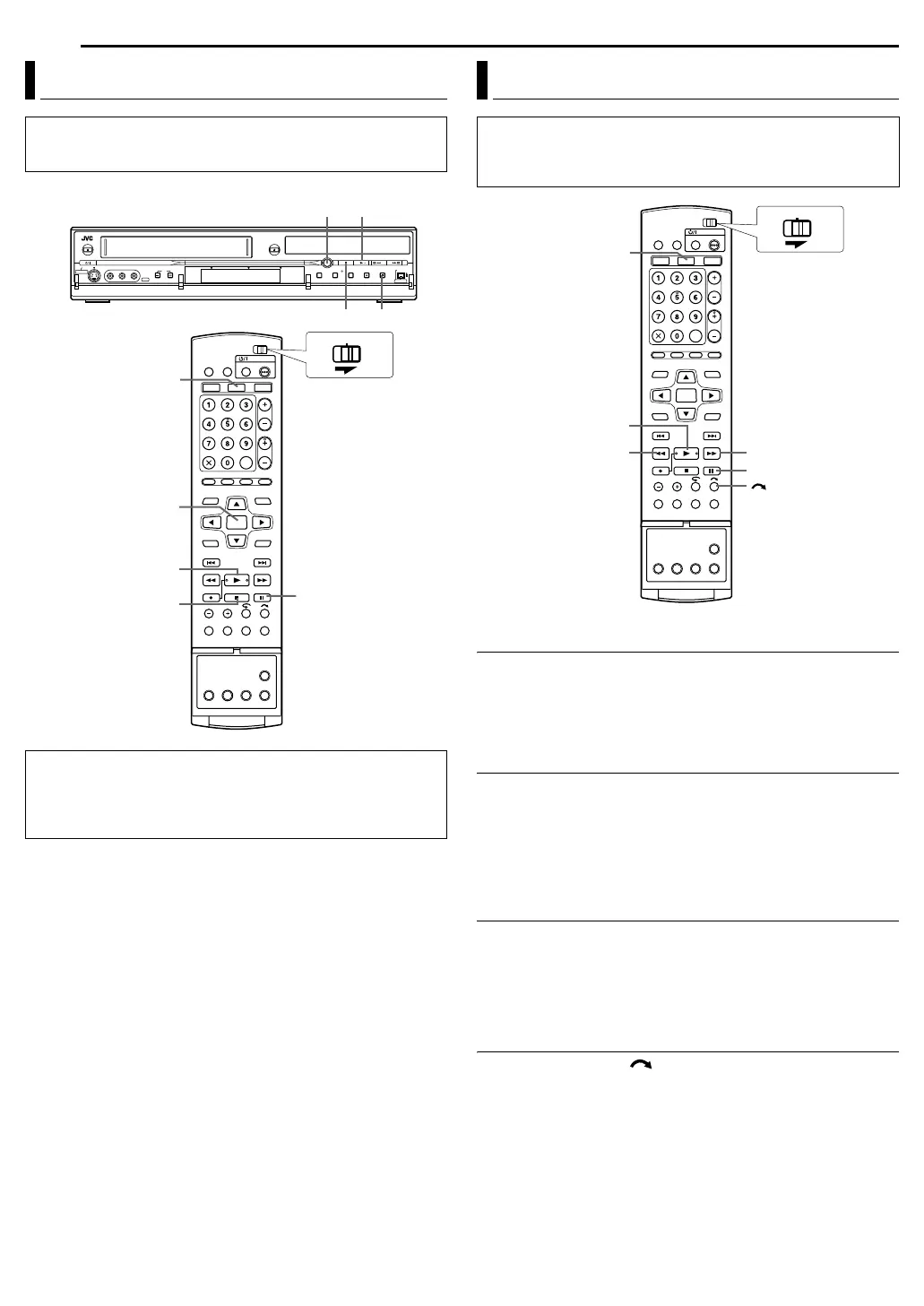
1 Press VHS/HDD/DVD SELECT on the unit repeatedly or HDD
on the remote so that the HDD lamp lights up on the unit.
2 Press 4 to start playback.
● The Library Database Navigation also enables you to search and
select the desired programs. (
墌 pg. 64)
3 Press 9 to pause playback.
● To resume normal playback, press 4.
4 Press 8 to stop playback.
NOTE:
When the Library Database Navigation screen appears, choose a
thumbnail image of the desired title on the TV screen, then press
ENTER. (墌 pg. 64)
High-Speed Search
During playback, press 5 for forward high-speed search, or
3 for reverse high-speed search.
● Each press of the button increases the search speed for each
direction.
● To resume normal playback, press 4.
Still Picture/Frame-By-Frame Playback
1 Press 9 to pause during playback.
2 Press SLOW – (3) or SLOW + (5) to activate frame-by-
frame playback.
● Each press of SLOW – (3) or SLOW + (5) advances/reverses
the still picture frame by frame.
● To resume normal playback, press 4.
Slow Motion
1 Press 9 to pause during playback.
2 Press SLOW – (3) or SLOW + (5) for 2 or more seconds.
● Each press of SLOW – (3) or SLOW + (5) increases the slow
motion speed for each direction (from 1/16 to 1/2 times the normal
speed).
Skip Search
During playback, press .
● Each press initiates an approximately 30-second period of fast-
motion playback. Normal playback resumes automatically.
Basic Playback
● Turn on the unit.
● Turn on the TV and select the video channel (or AV mode).
● Slide the TV/CABLE/DBS/DVD switch to DVD.
TTENTION:
● It may take a few seconds to start playback. This is not a
malfunction.
● Forward/reverse high-speed search and other operations cannot
be performed while playback is stopped.
8
4
9
VHS/HDD/DVD
SELECT
ENTER
8
4
9
HDD
CABLE/DBS
DVDTV
Playback Features
● Turn on the unit.
● Turn on the TV and select the video channel (or AV mode).
● Slide the TV/CABLE/DBS/DVD switch to DVD.
● Press HDD so that the HDD lamp lights up on the unit.
9
4
5/SLOW + 3/SLOW
-
HDD
CABLE/DBS
DVDTV
MX1S_00.book Page 46 Saturday, October 30, 2004 4:18 PM


 To Next Page