16
5
When import is successful, the name of the imported SDP le will be added to the
[Main Menu] → [Overlay Settings] → [Layout] item. Select an SDP le name suitable
for overlay. If a valid SDP le is not imported to the camera recorder, or if the SDP
le imported does not match the recording format of the camera recorder, the [Type]
item will be displayed as “None” and grayed out. Import a correct SDP le with [Import
User Layout].
6
Select the team name to display in [Main Menu] → [Overlay Settings] → [Left Team] (*)
or [Right Team] (*).
* This menu item name can be changed in the SDP Generator settings.
Deleting an Imported SDP File
You can delete an imported SDP le.
1
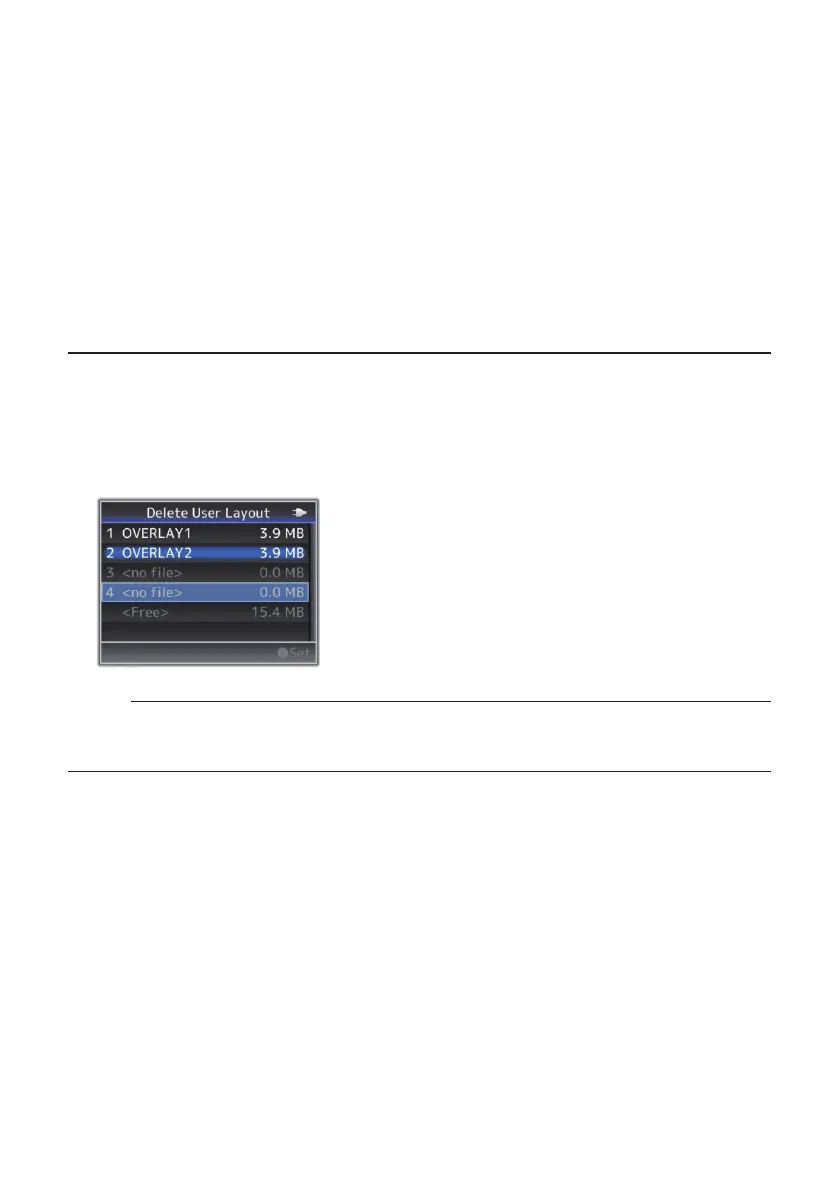
Select [Main Menu] → [Overlay Settings] → [Delete User Layout].
2
Select an SDP le to delete. The blue line at the background of the SDP le name
indicates that the le is applied for the current overlay.
Memo:
●
The imported SDP le cannot be deleted in [Main Menu] → [System] → [Reset All].
Please use this function to delete.


 To Next Page
 Loading...