EasyManua.ls Logo

JVC GY-HM250UG - User Manual

JVC GY-HM250UG
212 pages
Print Icon
To Next Page IconTo Next Page
Loading...
.
4K MEMORY CARD CAMERA RECORDER
GY-HM250U/GY-HM250E
GY-HM180U/GY-HM180E
GY-HM170U/GY-HM170E
INSTRUCTIONS
.
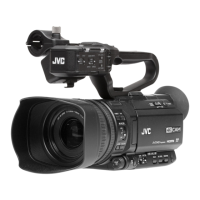
The illustration here shows how the handle unit is attached using the unit supplied.
The specifications and appearance of this product are subject to changes for further improvement
without prior notice.
Please check the latest version of the INSTRUCTIONS from the following Mobile User Guide. You can
also download the PDF from the Mobile User Guide.
Mobile User Guide
When you are outside, you can refer to the instructions from your Android phone or iPhone.
http://manual3.jvckenwood.com/pro/mobile/global/
You can view the Mobile User Guide using the browser on your Android phone or iPhone.
GY-HM250U(G)/GY-HM250E(G)
GY-HM180U(G)/GY-HM180E(G)
GY-HM170U(G)/GY-HM170E(G)
Thank you for purchasing this product.
Before operating this unit, please read the
instructions carefully to ensure the best
possible performance.
In this manual, each model number is
described without the last letter (U/E) which
means the shipping destination.
(U: for USA and Canada, E: for Europe)
Only “U” models (GY-HM250U/GY-HM180U/
GY-HM170U) have been evaluated by UL.
Please read the following before getting started:
For Customer Use:
Model No.
Serial No.
Enter below the Serial No. which is located
on the body.
Retain this information for future reference.
GY-HM250U/GY-HM180U/GY-HM170U
IM 1.05 B5A-3921-00

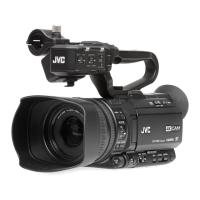
Table of Contents

Questions and Answers

  • A
    Amanda BrownSep 23, 2025
    Why is the recording time shorter than expected on my JVC GY-HM250UG?
    • J
      Jennifer SavageSep 23, 2025
      If the actual recording time on your JVC Camcorder is shorter than the estimated time, be aware that the recordable time may be shorter depending on the shooting conditions or the subject.
  • B
    Brandi ParkerAug 25, 2025
    How to fix a JVC Camcorder when the power does not turn on?
    • K
      Katherine HurstAug 25, 2025
      If your JVC Camcorder's power does not turn on, consider these potential solutions: * Ensure the AC adapter is properly connected. * Verify the battery is charged. * If the power was recently turned off, wait at least 5 seconds before attempting to turn it on again.
  • H
    henrymarkAug 25, 2025
    Why can't I connect my JVC GY-HM250UG to wireless LAN?
    • M
      Matthew JohnsonAug 26, 2025
      If you cannot connect your JVC Camcorder to a wireless LAN, consider the following: * Check the connection mode and settings, specifically the [SSID] and [Passphrase] if not using WPS. * If the Passphrase is incorrect, re-enter it, even if a “Completed the Setup Wizard” message appears.
  • V
    Veronica SmithAug 27, 2025
    What to do if the camera image is not output on the LCD monitor and viewfinder screen of my JVC GY-HM250UG?
    • C
      Corey HarrisonAug 27, 2025
      If the camera image is not displaying on the LCD monitor and viewfinder screen of your JVC Camcorder, make sure the camera recorder is set to the Camera mode by using the [MODE] selection button.
  • J
    Joshua GuerraSep 23, 2025
    What causes the View Remote screen issues on my JVC GY-HM250UG?
    • M
      Michael SparksSep 23, 2025
      If The View Remote screen turns black, flickers, freezes, or you cannot perform remote operation on your JVC Camcorder, the network path may be congested. Wait a while before refreshing (reloading) the web browser.
  • K
    Kenneth HobbsSep 13, 2025
    Why is the wireless LAN disconnected on my JVC GY-HM250UG?
    • P
      parkerkathrynSep 13, 2025
      If the wireless LAN on your JVC Camcorder is disconnected, the following suggestions may help: * The wireless LAN may be disconnected depending on the environment. Try changing the usage environment. * Try connecting via wired LAN.
  • C
    Christopher AdamsSep 12, 2025
    Why is there an incorrect display on the viewfinder of my JVC GY-HM250UG?
    • K
      Kimberly MartinezSep 12, 2025
      If you're experiencing an incorrect display on the viewfinder of your JVC Camcorder, check if [LCD/VF] B [VF SW] is set to “Enable” and if the viewfinder is in use without being pulled out. To use the viewfinder in this setting, pull out the viewfinder.
  • S
    Sharon ZimmermanSep 12, 2025
    How to fix JVC Camcorder SD card that cannot be initialized?
    • A
      Austin PowellSep 12, 2025
      If the SD card of your JVC Camcorder cannot be initialized (formatted), ensure that the write-protect switch on the SD card is turned off.
  • S
    Shawn AtkinsSep 4, 2025
    Why does the wireless LAN disconnect on my JVC GY-HM250UG Camcorder?
    • T
      tammy44Sep 4, 2025
      If your JVC Camcorder's wireless LAN keeps disconnecting, consider these points: * The disconnection could be due to the environment; try changing your usage environment. * As an alternative, connect via a wired LAN.
  • J
    jennifer96Sep 2, 2025
    What to do if my JVC Camcorder is unable to start recording?
    • B
      Brendan RichardsonSep 2, 2025
      If you're having trouble starting a recording on your JVC Camcorder, here's what to check: * Make sure the record trigger button/lock switch on the handle is turned on. * Ensure the write-protect switch on the SD card is off. * Verify the camera recorder is set to Camera mode using the [MODE] selection button. * Confirm the inserted SD card is compatible with the recording format.

JVC GY-HM250UG Specifications

General IconGeneral
Camera TypeProfessional camcorder
Effective Pixels12.4 MP
Filter Size72 mm
Video FormatMPEG-4 AVC/H.264
Display TypeLCD
TouchscreenNo
MicrophoneBuilt-in stereo microphone
Accessory ShoeYes
WirelessWi-Fi
Sensor Type1/2.3" CMOS
ND FilterBuilt-in ND filter
Recording MediaSD/SDHC/SDXC memory cards
Video Resolution1920 x 1080
Recording FormatAVCHD, MP4
Audio RecordingYes
Audio Format2-channel LPCM
Audio InputXLR input
Screen Size3.5"
Viewfinder TypeElectronic viewfinder
ConnectorsHDMI, USB, XLR
Operating Temperature32 to 104°F / 0 to 40°C

Related product manuals