Memo :
0
When [A/V Set] B [Audio Set] B [Limiter] is set
to “Off” while in
the automatic adjustment mode,
the limiter operates at -6 dBFS.
0
When [A/V Set] B
[Audio Set] B [Audio On FULL
AUTO] is set to “SW Set”, you can switch the
audio recording mode with the [AUDIO SELECT
CH-1/CH-2 AUTO/MANU] switch on the camera
recorder even if the [FULL AUTO] button is set
to “ON”.
(A P121 [ Audio On FULL AUTO ] )
Setting the Audio recording Level in the
Main Menu
* Enabled only when the handle unit is not
attached.
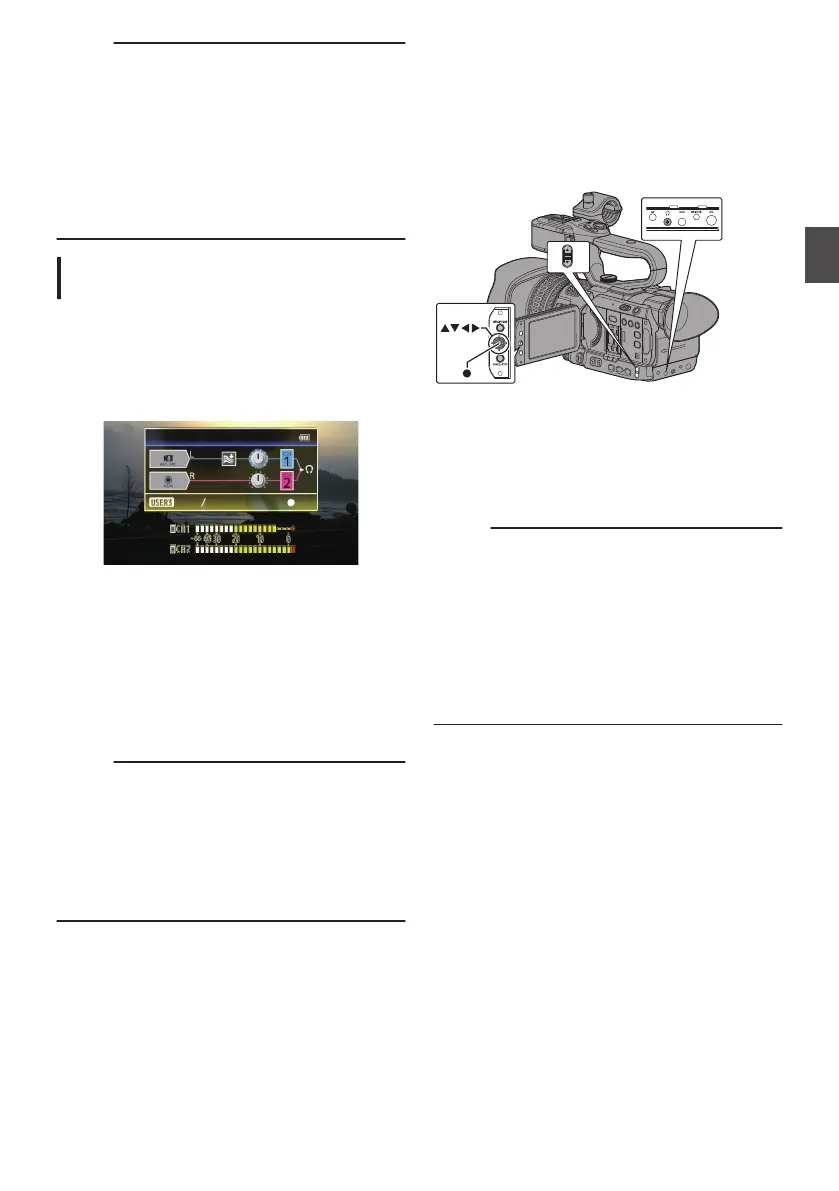
1
Select [A/V Set] B [Audio Set] B [Audio
Level].
0
The [Audio Level] screen appears.
.
* The contents displayed on the screen vary
depending on the various settings.
2
Select “Auto” or “Manual” using the
[LOLUX/3]
button.
0
If “Auto” is selected,
the audio recording level
will be automatically adjusted.
0
If “Manual” is selected, the volume appears
on the screen. Use the cross-shaped button
(H
I) to adjust the volume.
Memo :
0
When the [FULL
AUTO] button is set to “On” and
[Audio On FULL AUTO] in the menu is set to
“Auto”, the audio recording level cannot be
selected.
0
If both CH1 and CH2 are set to the built-in
microphone or to AUX, settings for CH2 will not
be displayed, and the settings for CH1 will apply
to CH2.
Monitoring Audio Sound
During Recording Using a
Headphone
You can check the recorded audio using
headphone.
.
1
Connect the headphone.
2
Select [A/V Set] B [
Audio Set] B [Monitor].
3
Adjust the monitor volume using the J / K
volume buttons on the side of the camera
recorder.
Memo :
0
There is no audio output from the monitor
speaker in Camera mode.
0
Warning tone is output when there is an
abnormality in the
camera recorder or when the
battery is low.
(A P202 [Warning Tone] )
0
You can set the volume of the warning tone in
[A/V Set]
B [Audio Set] B [Alarm Level].
(High/Low/Off)
(A P121 [ Alarm Level ] )
Audio Recording
71
Shooting


 To Next Page
 Loading...