EasyManua.ls Logo

JVC GY-HM890CHU - User Manual

JVC GY-HM890CHU
220 pages
Print Icon
To Next Page IconTo Next Page
Loading...
.
HD MEMORY CARD CAMERA RECORDER
GY-HM890U/GY-HM890E
GY-HM890CHU/GY-HM890CHE
GY-HM850U/GY-HM850E
GY-HM850CHU/GY-HM850CHE
INSTRUCTIONS
.
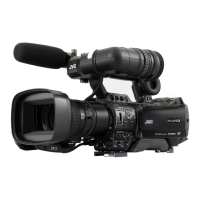
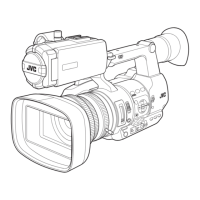
In this illustration, the supplied viewfinder, microphone, and lens are attached to the
GY-HM890U/GY-HM890E.
The lens is not supplied for GY-HM890CHU/GY-HM890CHE and GY-HM850CHU/GY-HM850CHE.
The specifications and appearance of this product are subject to changes for further improvement
without prior notice.
Please check the latest version of the INSTRUCTIONS from the following Mobile User Guide, or
download the PDF from the URL below.
Mobile User Guide
When you are outside, you can refer to the instructions from your Android phone or iPhone.
http://manual3.jvckenwood.com/pro/mobile/global/
You can view the Mobile User Guide using the browser on your Android phone or iPhone.
Ver. 1.00
LST1584-001A
Thank you for purchasing this JVC product.
Before operating this unit, please read the
instructions carefully to ensure the best
possible performance.
In this manual, each model number is
described without the last letter (U/E) which
means the shipping destination.
(U: for USA and Canada, E: for Europe)
Only “U” models (GY-HM890U/GY-HM890CHU/
GY-HM850U/GY-HM850CHU) have been
evaluated by UL.
Please read the following before getting started:
For Customer Use:
Model No.
Serial No.
Enter below the Serial No. which is located
on the body.
Retain this information for future reference.
GY-HM890U / GY-HM890CHU
GY-HM850U / GY-HM850CHU


Table of Contents

Questions and Answers

  • K
    kathy38Sep 23, 2025
    Why does the View Remote screen turns black on my JVC GY-HM890CHU Camcorder?
    • B
      brandon49Sep 23, 2025
      The network path is congested. Wait a while before refreshing (reloading) the web browser. The problem may be resolved by clearing the web browser cache.
  • M
    Mary MartinAug 23, 2025
    What to do if images on JVC GY-HM890CHU LCD monitor and viewfinder screen appear dark or blurred?
    • M
      Michael AllisonAug 25, 2025
      If the images on the LCD monitor and viewfinder screen appear dark or blurred, try these steps: Readjust the brightness of the LCD monitor and viewfinder. Check if the [ND FILTER] switch is set to “1/64”. Ensure the iris is not closed. Verify the shutter speed setting is not too high. Increase the amount of peaking using the [PEAKING +/-] button to adjust the contour for the LCD monitor and the viewfinder screen.
  • A
    Alicia WhitakerAug 25, 2025
    What to do if JVC GY-HM890CHU Camcorder is unable to start recording?
    • P
      pacekellyAug 26, 2025
      If you are unable to start recording, check the following: Ensure the record trigger button/lock switch on the handle is turned on. Make sure the write-protect switch of the SD card is turned off. Verify the camera recorder is set to the Camera mode by pressing the [CAM/MEDIA] selection button.
  • Y
    ywebsterAug 27, 2025
    How to fix incorrect display on the viewfinder of JVC GY-HM890CHU Camcorder?
    • M
      Matthew TuckerAug 27, 2025
      If there is an incorrect display on the viewfinder, check if the LCD monitor is used with [LCD/VF] B [LCD + VF] set to “Off”.
  • W
    wendycampbellAug 27, 2025
    Why is there no sound during JVC GY-HM890CHU playback?
    • J
      Jacqueline WilliamsAug 28, 2025
      There might be no sound during playback if the currently played clip was recorded in the Variable Frame Rec mode.
  • D
    Dan JacksonSep 17, 2025
    Why are the two JVC GY-HM890CHU Camcorder recorders not synchronized even though the time codes have been synchronized?
    • C
      Christopher CooperSep 17, 2025
      If the two camera recorders are not synchronized even though the time codes have been synchronized, check if the [TC GENE.] switch is set to “FREE”. Also set [System] B [Record Set] B [Record Format] B [WFrame & Bit Rate] such that the two camera recorders have the same frame rate.
  • H
    Heather MitchellSep 14, 2025
    Why is the actual recording time shorter than the estimated time on my JVC GY-HM890CHU Camcorder?
    • B
      Brian MartinSep 14, 2025
      The recordable time may be shorter depending on the shooting conditions or the subject.
  • R
    Ronald JohnsonSep 15, 2025
    Why are the date and time not displayed on my JVC GY-HM890CHU Camcorder?
    • C
      cooperrogerSep 16, 2025
      The date and time are only displayed on the Display 1 and Display 2 screens in the Camera mode (during shooting). Also, check if [System] B [Record Set] B [Time Stamp] is set to “On”. To display the date and time, set it to “Off”.
  • R
    Richard ThompsonSep 6, 2025
    Why is [CH-3/CH-4] audio not recorded on JVC GY-HM890CHU?
    • K
      Kevin ChangSep 6, 2025
      If [CH-3/CH-4] audio is not being recorded, ensure that the number of recording channels is set to “4ch”. Also, verify that [System] B [Record Set] B [Record Format] B [WFormat]/ [YFormat] is not set to “AVCHD”. Select a setting other than “AVCHD”.
  • L
    Luke HigginsSep 3, 2025
    How to fix JVC GY-HM890CHU Camcorder SD card that cannot be initialized (formatted)?
    • R
      robertsonrobertSep 3, 2025
      If the SD card cannot be initialized (formatted), make sure that the write-protect switch of the SD card is turned off.

JVC GY-HM890CHU Specifications

General IconGeneral
Camera TypeProfessional Camcorder
LensOptional
Sensor Type3 CMOS Sensors
Video Resolution1920 x 1080
Frame Rates29.97p
Recording FormatAVCHD, MPEG-2
Image StabilizationYes
ND FilterYes (1/4, 1/16)
Recording MediaSDHC/SDXC
Audio Recording2-channel
Audio InputsXLR
InputsHDMI, USB
OutputsHDMI, USB
Viewfinder0.45-inch Color LCD
LCD Screen3.5 inch
Inputs/OutputsHDMI, USB, LAN, XLR, 3.5mm, Composite, Component
Battery TypeLithium-ion
Dimensions175 x 206 x 414mm

Related product manuals