15
Quick Setup
Notes:
• Green, blue and red are the most common colors for DVD cables. Some models may vary
colors. Please consult the user’s manual for your DVD player for more information.
• Be careful not to confuse the red DVD cable with the red audio cable. It is best to complete
one set of connections (DVD or audio output) before starting the other to avoid accidentally
switching the cables.
• You may also connect the DVD player to Input 1.
OVER
CENTER CHANNEL INPUT
INPUT-1
INPUT-2
INPUT-3
HDMI 1
INPUT-1
INPUT-2
VIDEO
VIDEO
VIDEO
R - AUDIO - L
R - AUDIO - L
R - AUDIO - L
R - AUDIO - L
Y Pb Pr
Y Pb Pr
S-VIDEO
S-VIDEO
OVER
VIDEO R L
R L
S-VIDEO
MONITOR
/REC OUT
AUDIO
OUTPUT
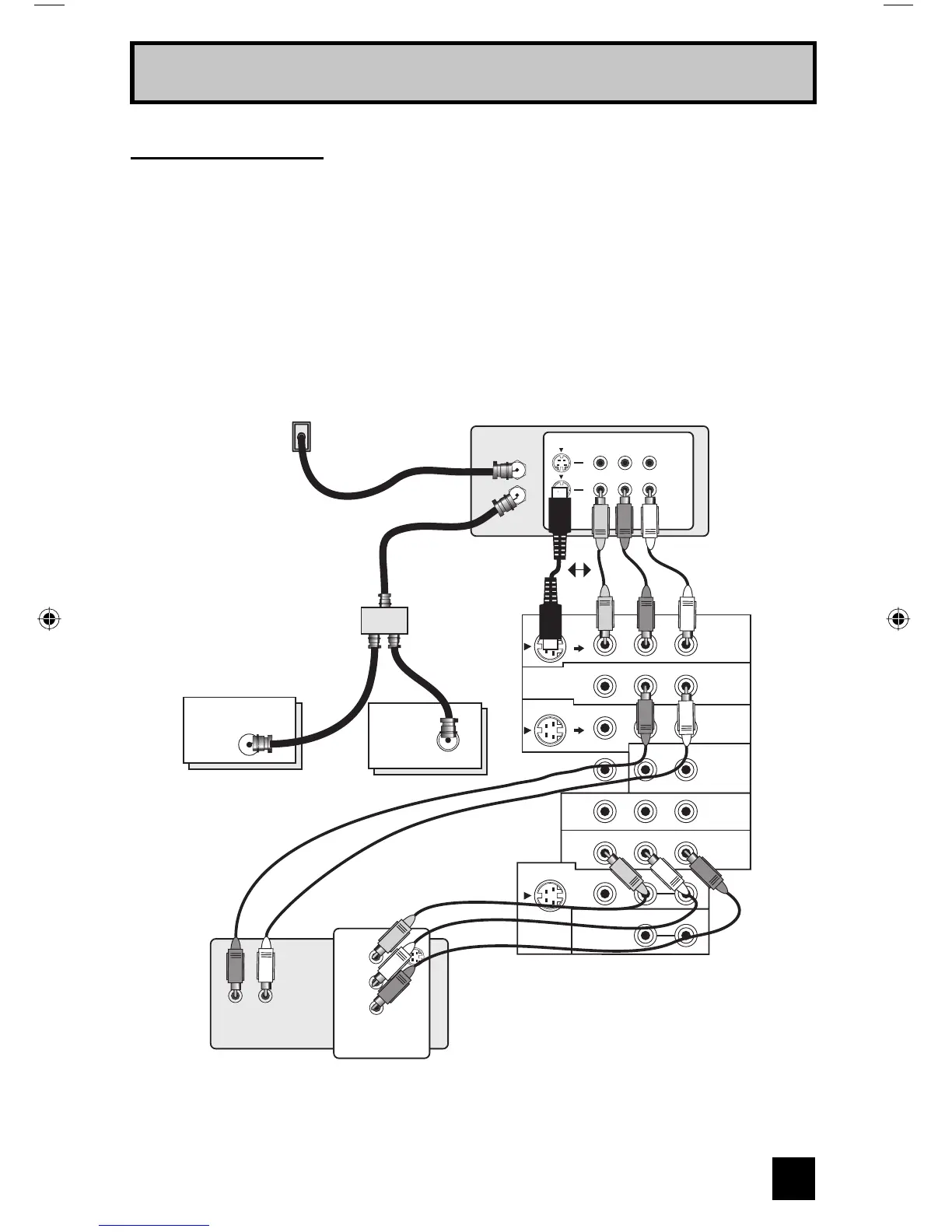
Cable or Antenna
Output
Two-Way Splitter
(Attachment)
Coaxial Cable
(Attachment)
Green
Blue
Red
DVD Player (OPTIONAL)
VCR
TV Rear Panel
ATSC
/DIGITAL CABLE IN
I
IN
OUT
V R L
IN
OUT
OR
Y
P
B
P
R
OUT
AUDIO OUT
R L
IN
OUT OUT
75Ω
(VHF/UHF)
Diagram #1
VCR Connection
Note:
• If this connection setup does not work for you, try the connection setup on page 16.
LCT2067 Eng.indd 15LCT2067 Eng.indd 15 6/21/06 9:32:09 AM6/21/06 9:32:09 AM


 To Next Page