21
Quick Setup
By connecting a Digital TV Receiver, high definition pictures can be displayed on your TV in
their digital form.
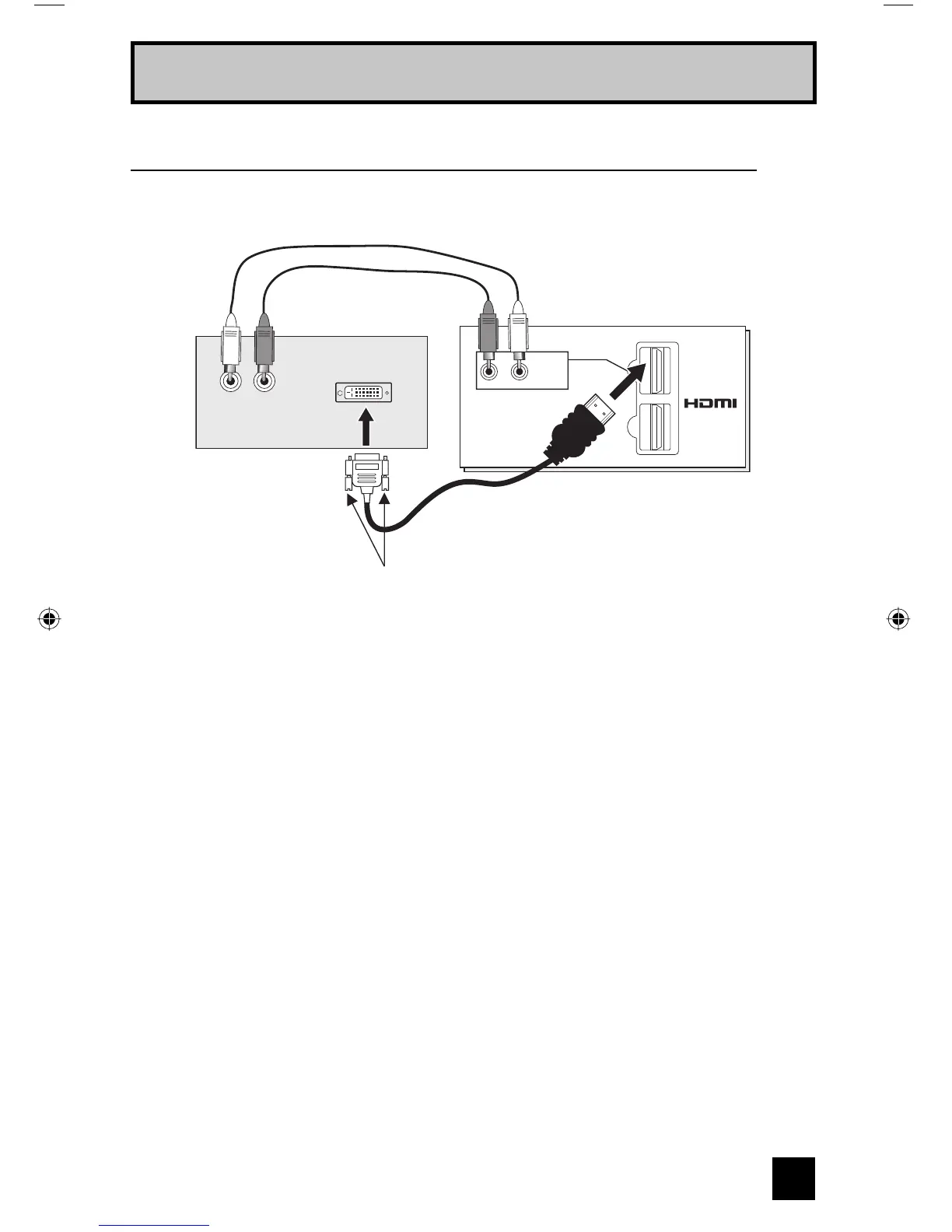
DIGITAL-IN
1
2
R - AUDIO - L
HDMI 1
TV Rear Panel
DTV Decoder
HDMI to DVI Cable
After the connections have been made,
tighten the screw to secure the cables.
LR
AUDIO OUT
DIGITAL OUT
Connecting to a Digital TV Receiver
1) Connect the HDMI to DVI Cable from the DIGITAL OUT on the back of your DTV decoder, to
the HDMI1 DIGITAL-IN on the back of your television.
2) Connect a red cable from the "R AUDIO OUT" on the back of your DTV Device, to the
HDMI 1 "R AUDIO" input terminal.
3) Connect a white cable from the "L AUDIO OUT" on the back of your DTV Device, to the
HDMI 1 "L AUDIO" input terminal.
• The digital-in terminal is not compatible with the picture signal of a personal computer.
• Use a HDMI to DVI cable (commercially available) in order to digitally connect the television
with a DTV decoder.
Notes:
• If 480p signals (640x480 or 720x480) are displayed on the screen, the horizontal balance
may be slightly shifted. Access the “DIGITAL-IN” in the initial setup menu to adjust it. (Refer
to page 55.)
• When you do the above connection, set DIGITAL-IN1 AUDIO in the Initial Setup menu to
ANALOG. See "DIGITAL-IN1 AUDIO", page 55.
• The Analog Audio input can only be used with the HDMI 1 input.
• When setting the “DIGITAL AUDIO – ANALOG / DIGITAL” menu setting on the TV, please note
that this setting only effects the HDMI 1 jack and that if you use a DVI to HDMI adapter this
connection must be made to the HDMI 1 along with analog audio cables.
LCT2067 Eng.indd 21LCT2067 Eng.indd 21 6/21/06 9:32:11 AM6/21/06 9:32:11 AM


 To Next Page