16
ENGLISH
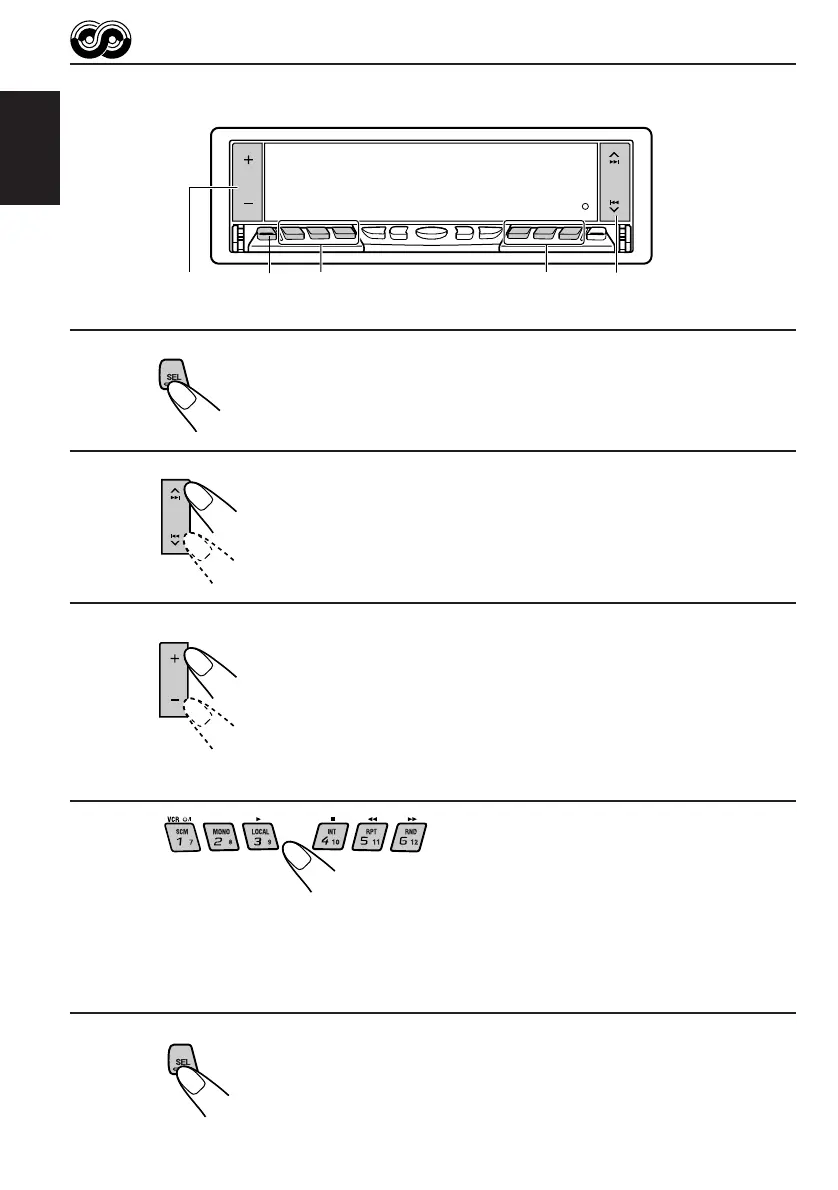
To store your favorite programme types
1
Press and hold SEL (select) for more than 2
seconds to call up the Preferred Setting Mode
(PSM: see page 51).
2
Select “PTY SEARCH” if not shown on the
display.
3
Select one of twenty-nine PTY codes.
(See page 18.)
Selected code name appears on the display.
• If the code already stored in memory is selected, it will flash
on the display.
4
Press and hold the number button for more than 2 seconds to
store the PTY code selected into the preset number you want.
PTY preset number appears, and selected code name and “MEMORY” alternates on
the display.
5
Finish the setting.
4 4
3
2
1,5
EN12-19.KD-LX50R[E]/f 00.3.22, 10:34 AM16



 To Next Page
 Loading...