34
ENGLISH
STOP
PLAY
Registering procedure
EXAMPLE:
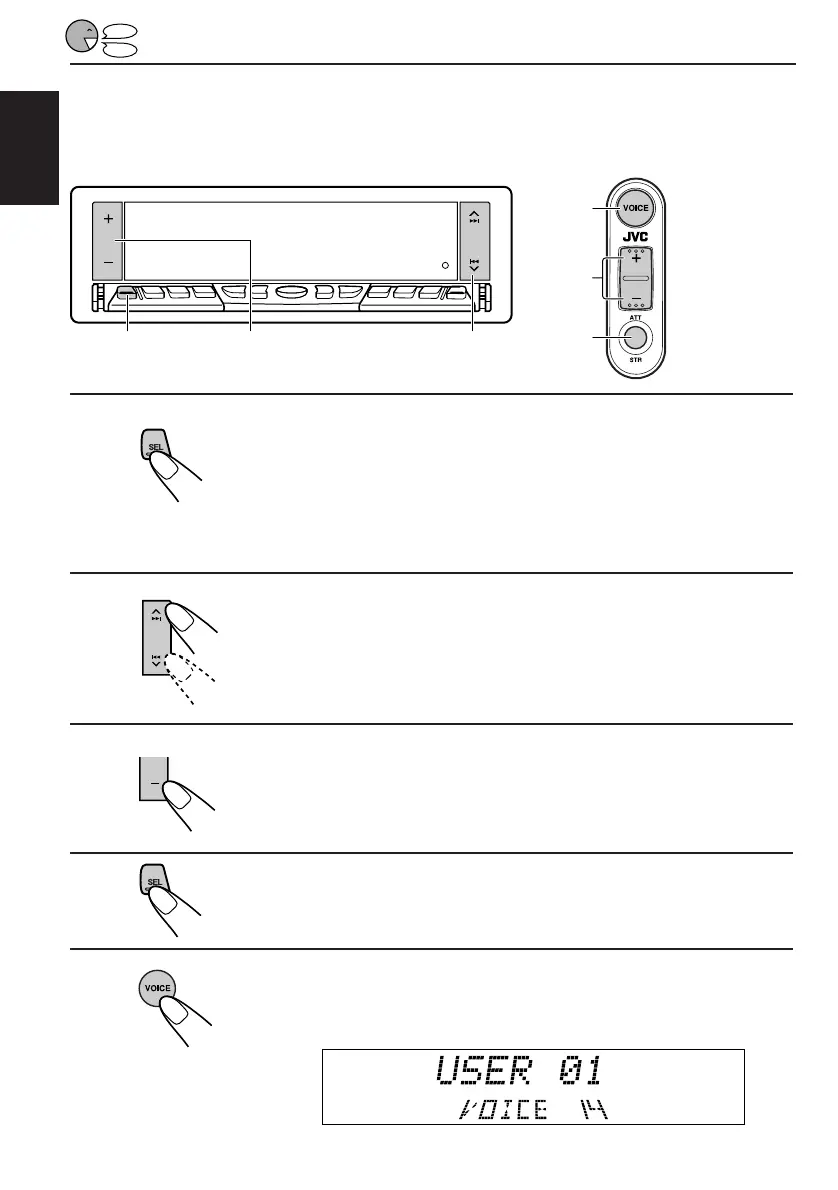
Storing your own voice “Turn off” into Operation Command number 01
1,4 3 2
Voice remote
5,11
7
6
1
Press and hold SEL (Select) for more than 2 seconds
so that one of the PSM items appears on the display.
(See page 52.)
2
Select “VOICE DEMO.”
3
Set it to “DEMO OFF.”
• For more details, see page 47.
4
Finish the setting.
5
Press and hold VOICE until Access Command
(VOICE 14) appears on the display.
EN30-47.KD-LX50R[E]/f 00.3.22, 10:36 AM34



 To Next Page
 Loading...