8
ENGLISH
Data Size: B6L (182 mm x 128 mm)
Book Size: B6L (182 mm x 128 mm)
IF BAND AUTO
:Increases the tuner selectivity to reduce interference noises from
adjacent FM stations. (Stereo effect may be lost.);
WIDE
:Subjects to
interference noises from adjacent FM stations, but sound quality will not
be degraded and the stereo effect will remain.
MONO SET ON
:Improves the FM reception, but the stereo effect will be lost.;
OFF
:Cancels.
NEWS SET
*
2
ON
:The unit will temporarily switch to News Programme if available.;
OFF
:Cancels.
REGIONAL
*
2
ON
: Switches to another station only in the specific region using the “AF”
control.;
OFF
:Cancels.
AF SET
*
2
ON
: Automatically searches for another station broadcasting the same
program in the same Radio Data System network with better reception
when the current reception is poor.;
OFF
: Cancels.
TI ON
: Allows the unit to temporarily switch to Traffic Information if
available (“TI” lights up) while listening to all sources except in AM/SW1/
SW2. ;
OFF
:Cancels.
PTY SEARCH
*
2
Select a PTY code (see below).
If there is a station broadcasting a program of the same PTY code as you
have selected, that station is tuned in.
*
2
Only for FM source.
PTY code
NEWS
,
AFFAIRS
,
INFO
,
SPORT
,
EDUCATE
,
DRAMA
,
CULTURE
,
SCIENCE
,
VARIED
,
POP M
(music),
ROCK M
(music),
EASY M
(music),
LIGHT M
(music),
CLASSICS
,
OTHER M
(music),
WEATHER
,
FINANCE
,
CHILDREN
,
SOCIAL
,
RELIGION
,
PHONE IN
,
TRAVEL
,
LEISURE
,
JAZZ
,
COUNTRY
,
NATION M
(music),
OLDIES
,
FOLK M
(music),
DOCUMENT
RADIO
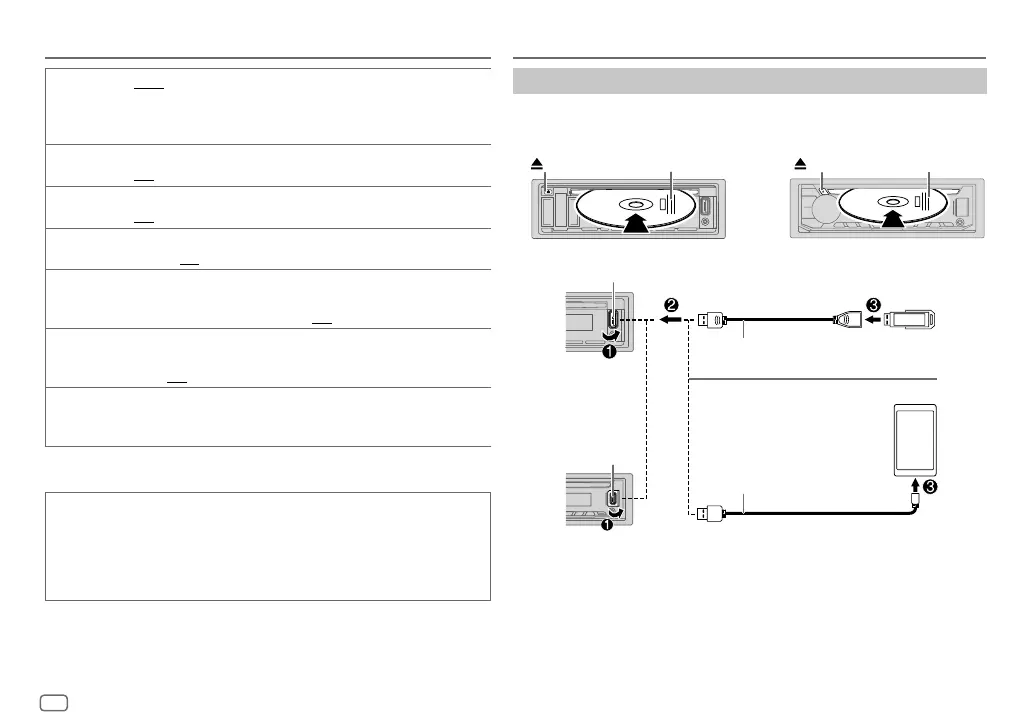
Start playback
The source changes automatically and playback starts.
CD
*
1
Do not leave the cable inside the car when not using.
*
2
When connecting an Android device, “Press [VIEW] to install JVC MUSIC PLAY APP” is shown.
Follow the instructions to install the application. You can also install the latest version of JVC
MUSIC PLAY application on your Android device before connecting. For more information, visit
<http://www.jvc.net/cs/car/>.
CD/USB/ANDROID
Eject disc
Label side
KD-R498/KD-R496/KD-R491: KD-R492:
Eject disc
Label side
KD-R491
KD-R492
KD-R498/
KD-R496/
USB 2.0 cable
*
1
(commercially available)
USB cable
*
1
(commercially available)
ANDROID
*
2
USB
USB input terminal
USB input terminal
JS_JVC_KD_R498_M_EN_2.indd 8JS_JVC_KD_R498_M_EN_2.indd 8 7/25/2017 4:41:33 PM7/25/2017 4:41:33 PM


 To Next Page