9ENGLISH
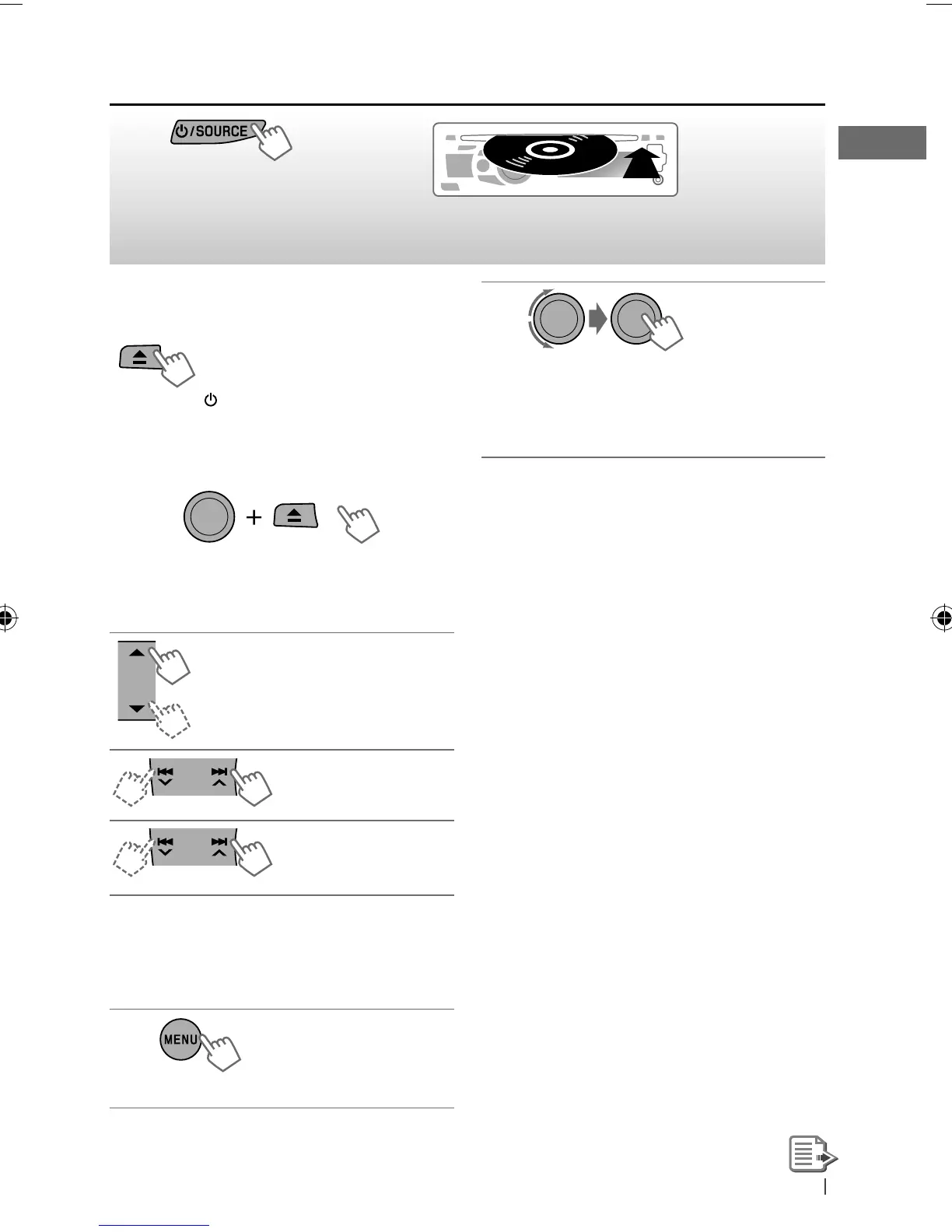
Stopping playback and ejecting
the disc
“NO DISC” appears.
Remove the disc, then press
/
SOURCE
to listen to another
playback source.
Prohibiting disc ejection
To cancel the prohibition, repeat the same
procedure.
Selects folder of the MP3/WMA
Selects track
Fast-forwards or
reverses the track
Selecting a folder/track on the
list
While listening to a disc....
1
]
Enter the list menu.
Listening to a disc
~
]
Turn on the power.
Ÿ
All tracks will be played repeatedly until you change
the source or eject the disc.
[Hold]
[Hold]
2
]
Select your desired item.
MP3/WMA: Select your desired folder,
then the desired track by repeating
this step.
• If the MP3/WMA disc contains many tracks,
you can fast search (±10, ±100, ±1000)
through the disc by turning the control dial
quickly.
• To return to the previous menu, press
BACK
.
For MP3/WMA disc, you can also use the search
menu (A to Z, 0 to 9, and OTHERS) to scroll
through the list menu.
• “OTHERS” appears if the 1st character is not A
to Z or 0 to 9, such as #, —, !, and etc.
While in list menu....
1
Press
5
/
∞
to show the search menu.
• The first character of the current folder/file
name appears.
2
Press
5
/
∞
to select your desired character.
Then press the control dial to confirm.
• The track list with the selected character
appears.
3
Turn the control dial to select your desired
track. Then press the control dial to confirm.
• Only the existing characters will be shown on
the search menu.
• Press and hold
5
/
∞
to continuously change
the character of the search menu.
EN02-11_KD-R716_001A_f.indd 9EN02-11_KD-R716_001A_f.indd 9 12/17/09 3:04:31 PM12/17/09 3:04:31 PM



 To Next Page