ENGLISH
13OPERATIONS
2 Highlight the program number.
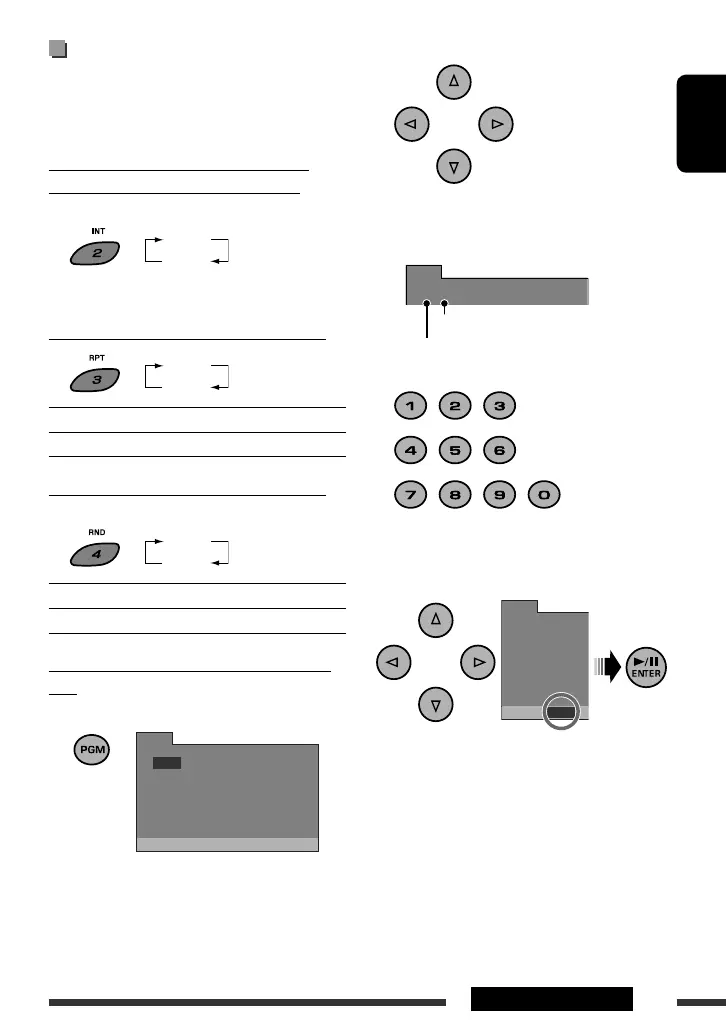
3 Enter track number.
• For MP3/WMA: Enter a folder number (F), press
#, then enter a track number (T).
• For VCD/audio CD: Enter a track number.
4 Repeat steps 2 and 3 to program other
tracks.
5 Start program play.
• To clear the program, select “CLEAR” on the
program screen, then press ENTER. The program
is cleared, and the unit return to normal playback.
Pressing 7 also clears the program. (The playback
stops.)
Selecting the playback modes
You can use only one of the following playback modes
at a time.
• This function is not available for VCD with PBC.
Playing the beginning 15 seconds of all
tracks of the current disc — Intro Play
On the Unit ONLY:
To return to normal playback, press the button again.
Playing a track repeatedly — Repeat Play
RPT ON: Repeats the current track.
RPT OFF: Cancels. ( Repeats all tracks on a disc.)
Playing tracks at random — Random Play
On the Unit ONLY:
RND ON: Randomly plays all tracks.
RND OFF: Cancels.
Programing the playing order — Program
Play
On the Remote ONLY:
1
PROG
1
[
--
]
[
--
]
[
--
]
[
--
]
[
--
]
[
--
]
[
--
]
[
--
]
[
--
]
[
--
]
[
--
]
[
--
]
[
--
]
[
--
]
[
--
]
[
--
]
2
3
4
5
6
7
8
9
10
11
12
13
14
15
16
PLAY CLEAR
PROG
1
[ 08
]
[ 02
]
[ 11
]
[ 05
]
[
--
]
[
--
]
[
--
]
[
--
]
2
3
4
5
6
7
8
PLAY
RPT ON
RPT OFF
RND ON
RND OFF
Folder number
Track number
PROG
FT
1 02:05
FT
--
:
--
5
FT
--
:
--
9
FT
--
:
--
13
INT ON
INT OFF
EN_KD-SV3706[US].indb 13EN_KD-SV3706[US].indb 13 08.12.11 3:10:09 PM08.12.11 3:10:09 PM


 To Next Page
 Loading...